

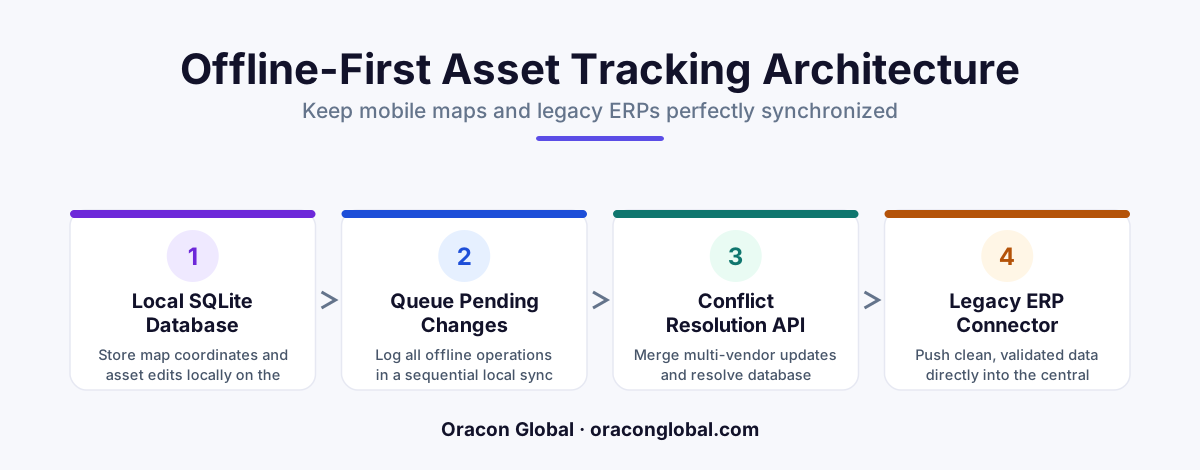
To keep mobile maps and legacy ERP inventory aligned offline, you must build a local-first architecture using an embedded database like SQLite to queue spatial and inventory updates. A specialized state reconciliation layer then processes these queues once connectivity returns, translating mobile coordinates into legacy ERP transaction schemas without data loss.
Field operations are only as fast as their weakest connection. For companies managing high-value physical assets across multi-vendor networks, keeping field workers aligned with central inventory is a constant challenge. This is especially true when operations move into remote areas with poor cellular service.
When a field technician updates an asset location on a mobile map app while offline, that change must eventually sync back to a rigid, legacy ERP system. If the mobile app and the ERP lose alignment, your business risks duplicate orders, lost machinery, and costly operational delays. Building a custom offline asset tracking app requires a deliberate architecture that bridges the gap between modern, spatial mobile frontends and inflexible legacy backends.
The Core Challenge: Spatial Data vs. Legacy Schemas
Modern mobile maps rely on rapid, real-time spatial coordinates (latitude and longitude) and fluid user interfaces. Legacy ERP databases, on the other hand, understand structured transaction ledgers, static warehouse bins, and rigid SKU tables. They were simply not built to process constant geo-location updates, let alone handle them asynchronously when field teams go offline.
To make matters more complex, multi-vendor operations introduce different data formats. One subcontractor might use a specific GPS device, while another relies on manual smartphone pins. When this data is captured offline, it cannot be written directly to the ERP. Doing so risks database locks, corrupted inventory states, or silent write failures.
Step 1: Implementing a Local-First SQLite Storage Layer
To ensure field workers never lose progress, the mobile application must adopt an offline-first architecture. Instead of attempting to reach the central server with every map interaction, the app writes all actions to a local database embedded directly on the device.
We typically implement this using a lightweight, local SQLite database within a React Native or native mobile framework. When a user updates an asset status or moves a pin on their map interface, the app performs three actions locally:
- Serializes the Spatial Data: The exact map coordinates are converted into a standardized GeoJSON payload.
- Appends to a Local Outbox Queue: The transaction is logged with a high-resolution cryptographic timestamp and a sequential sequence ID.
- Updates the Local UI Instantly: The map reflects the change immediately, giving the user a seamless experience without waiting for a network handshake.
Step 2: Designing the Smart Sync Gateway
Once the mobile device detects a stable internet connection, it must not dump its entire backlog onto the legacy ERP at once. A direct blast of offline writes can easily crash older enterprise databases or trigger rate limits.
Instead, we position a lightweight mobile ERP sync gateway between the mobile clients and the legacy backend. This gateway acts as a shock absorber. It ingests the local SQLite queues from various devices, verifies the payload integrity, and prepares the data for ERP ingestion.
The gateway's primary job is translation. It takes modern JSON spatial payloads from your custom mapping software and formats them into the specific SQL transactions or XML SOAP calls your legacy ERP expects.
Step 3: Resolving Spatial and Inventory Conflicts
What happens when two contractors update the exact same asset while both are offline? If both devices reconnect at the same time, the system faces a data conflict. Resolving this requires a deterministic state reconciliation layer.
We build these reconciliation layers with clear, business-first rules:
- Logical Timestamps: Every offline update is signed with a reliable device-side timestamp, allowing the sync gateway to establish a chronological chain of custody.
- Vendor Hierarchy Rules: The system can prioritize updates based on user clearance levels or vendor tiers. For example, an internal supervisor's update automatically supersedes a third-party contractor's offline change.
- The Exception Queue: When a conflict cannot be resolved programmatically (such as two highly contradictory status updates within the same minute), the gateway routes the transaction to an administrative dashboard rather than guessing and risking data corruption.
Step 4: Bridging to the Legacy ERP Without Direct Writes
Directly writing to legacy ERP tables is a recipe for system instability. The safest approach to legacy database integration is utilizing an event-driven queue. Once the sync gateway has resolved map coordinate conflicts, it pushes clean, validated updates to an enterprise queue.
A background worker then reads from this queue and feeds the legacy ERP at a pace it can handle. This protects your core financial and inventory ledger from traffic spikes while ensuring that the physical locations displayed on your dispatch maps perfectly match the accounting records in the back office.
Own Your Logistics Technology Stack
Off-the-shelf tracking tools rarely fit the unique workflows of complex, multi-vendor enterprise operations. They force you into restrictive subscriptions and limit your ability to integrate with deep legacy backends.
Building custom software ensures your business owns 100% of the code and intellectual property, giving you the freedom to scale operations globally without licensing penalties. At Oracon Global, our senior in-house team specializes in designing resilient mobile architectures, custom GIS mapping integrations, and safe enterprise sync layers that keep your field teams moving, online or off.
Are you ready to build a reliable, custom tracking system tailored to your unique operational workflows? Contact Oracon Global today to discuss how we can help you align your mobile field operations with your legacy backend systems.
Frequently asked questions
Why do standard mobile sync libraries fail with legacy ERP databases?
Most standard sync tools expect modern, RESTful APIs or flexible NoSQL backends. Legacy ERPs usually rely on rigid, transaction-based SQL relational schemas that do not natively handle out-of-order writes or spatial coordinate updates from mobile devices.
How do you handle mapping coordinates when a mobile device is offline?
The mobile app stores spatial data locally as GeoJSON coordinates within an embedded SQLite database. Once the device re-establishes a network connection, these coordinates are packaged into a structured payload and sent to a central sync gateway that translates them for the ERP.
What is the best way to handle data conflicts between field workers?
We use a deterministic "last-write-wins" strategy backed by logical timestamps, or route complex conflicts to a dedicated admin review queue. This prevents automated scripts from silently overwriting critical physical asset updates inside the central ERP.
Do we need to rewrite our legacy ERP to support offline mobile tracking?
No. Instead of altering the core ERP, we build a lightweight, secure middleware bridge. This bridge acts as an API gateway that absorbs mobile writes, queues them, and slowly translates them into commands the legacy ERP can safely ingest.
Read next
Beyond Chatbots: How to Build AI Agents That Actually Do Work for Your Business
Most businesses use AI to answer questions. Here is how to build custom AI agents that actually take action, connect to your internal tools, and handle complex workflows.
Beyond the Wrapper: How to Build Custom AI Agents for Business That Actually Work
Many businesses invest in basic AI wrappers only to find they lack the security and context needed for real work. Here is how to build custom AI agents that integrate deeply with your workflows and databases.
Enterprise AI Maintenance Costs: Budgeting for Year Two and Beyond
Building an AI system is only half the battle. Discover the practical, ongoing operational costs of enterprise AI, including token management, model drift, and continuous security audits.
Oracon Global builds production-grade AI agents, automation and apps — and you own the code and IP. Tell us what you want to automate.
Book a call →See our work