

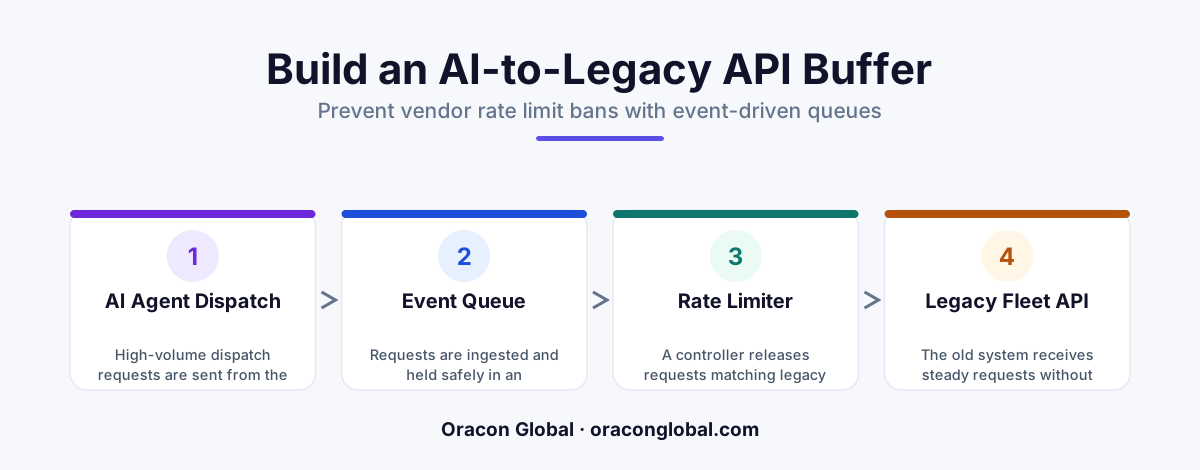
When AI dispatch agents query legacy fleet tracking systems too quickly, they trigger rate limit bans that halt logistics operations. Building an event-driven API buffer acts as an intelligent shock absorber, queuing and smoothing out outgoing API requests to protect fragile backend systems while keeping dispatch data flowing.
Autonomous AI dispatch agents are transforming logistics. They can monitor traffic, calculate optimal routes, coordinate driver schedules, and update cargo statuses in real time. However, when these highly active agents attempt to communicate with legacy fleet tracking systems, they often run into a invisible brick wall: API rate limits.
Older fleet management systems, ERPs, and GPS tracking portals were built for a human pace of work. They expect a dispatcher to click a button, wait for a page to load, and make another request a few seconds later. When an AI dispatch agent executes dozens of parallel lookups and database writes per second, the legacy system perceives this traffic spike as a denial-of-service attack. The result is instant: rate limit bans, locked API keys, dropped connections, and halted operations.
To keep your automated logistics pipeline running without interruption, you need an intelligent shock absorber. Here is how to build an event-driven API buffer designed specifically to protect legacy fleet tracking infrastructure from high-volume AI actions.
The Core Problem: AI Velocity vs. Legacy Limits
Most legacy logistics platforms enforce strict rate limits, such as a maximum of 5 API requests per second or a daily quota of 10,000 calls. While this is plenty of bandwidth for a team of human dispatchers, an active AI agent can burn through those limits in minutes.
When an AI agent is planning routes for fifty trucks, it doesn't just make one API call. It queries live truck locations, checks driver hours-of-service logs, inspects historical delivery windows, and writes back updated schedules simultaneously. Without a protective layer, the AI agent will repeatedly trigger 429 Too Many Requests errors. In worst-case scenarios, the legacy vendor may automatically flag and ban your API credentials, leaving your fleet blind and your dispatch operations stranded.
What is an Event-Driven API Buffer?
Instead of allowing the AI dispatch agent to call the legacy fleet tracking API directly, you introduce an intermediary layer. This event-driven API buffer acts as a smart queue.
When the AI agent needs to read or write data, it sends that request to the buffer as an "event." The buffer immediately acknowledges receipt of the event so the AI agent can continue its work without waiting. The buffer then holds these requests in a queue, releasing them to the legacy system at a controlled, predictable pace that strictly adheres to the vendor's rate limits.
Key Benefits of this Architecture:
- Zero Dropped Requests: Every dispatch action is saved in a reliable message queue, ensuring no critical routing updates are lost during traffic spikes.
- System Resiliency: If the legacy system goes down entirely, the buffer holds the AI agent's transactions and retries them automatically once the legacy API recovers.
- Optimized API Spend: By consolidating redundant read-and-write requests within the queue, the buffer reduces the total number of calls made to expensive third-party APIs.
Step-by-Step Guide to Building the Buffer Layer
Building a robust API buffer requires decoupling your AI decision-making process from your API execution. Here is the architectural blueprint our team uses to solve this problem for high-volume enterprise logistics setups.
1. Establish an Ingestion Queue
When your AI dispatch agent decides to update a truck's route, it publishes a message to a lightweight, highly available queueing system like RabbitMQ or AWS SQS. This message contains the payload, the destination legacy endpoint, and a priority level. Because the queue is highly scalable, it can handle thousands of incoming messages from the AI agent without breaking a sweat.
2. Implement a Token Bucket Rate Limiter
To control the outflow of messages from the queue to the legacy fleet system, implement a token bucket algorithm within your buffer middleware. This algorithm maintains a "bucket" of virtual tokens. Every time a message is sent to the legacy API, a token is consumed. Tokens refill at a steady rate that matches the legacy system's exact API limits (e.g., 3 tokens per second). If the bucket is empty, the queue pauses sending until more tokens accumulate.
3. Define a Priority Routing Hierarchy
Not all dispatch events are created equal. An emergency route change due to an accident must happen instantly, while a routine fuel log update can wait a few minutes. Your buffer must parse incoming events and assign priority tiers:
- High Priority: Real-time driver safety alerts, accident rerouting, and active delivery cancellations. These bypass the standard queue and use reserved API tokens.
- Medium Priority: General arrival and departure confirmations, ETA updates, and customer delivery notifications.
- Low Priority: Routine diagnostic logs, odometer readings, and historical performance tracking data. These are batched and processed during low-traffic windows.
4. Build a Smart Deduplication Engine
AI agents often make redundant queries when evaluating scenarios. For instance, an agent might request the GPS coordinates of the same truck five times in ten seconds. The buffer should intercept these duplicate read requests, return the cached result of the first query to the AI, and discard the unnecessary subsequent API calls before they ever reach the legacy system.
Handling Retries and Backoff Gracefully
Even with a rate limiter in place, legacy systems can experience transient network glitches or unexpected load spikes. Your buffer must be prepared to handle these failures without crashing.
We recommend implementing an exponential backoff strategy with jitter. If the legacy system returns a server error or a temporary rate limit warning, the buffer should wait 2 seconds before retrying the request. If it fails again, it waits 4 seconds, then 8 seconds, and so on. Adding "jitter" introduces small, randomized variations to these wait times, preventing a massive surge of retried requests from hitting the legacy system all at once when it comes back online.
If a request fails repeatedly after a set number of attempts, the buffer moves it to a Dead Letter Queue (DLQ). This isolates the problematic payload, flags it for review on your operational dashboard, and allows the rest of the queue to keep moving without bottlenecking your fleet.
Keeping Your Logistics Running Smoothly
Integrating modern, highly active AI digital employees with fragile legacy business systems is one of the most common challenges growing logistics companies face. Attempting to force legacy systems to handle modern AI traffic patterns without protection is a recipe for system downtime, missed deliveries, and frustrated ops teams.
By implementing a custom event-driven API buffer, you get the best of both worlds: the autonomous speed of custom AI dispatch tools and the reliable stability of your existing software investments.
Are legacy API constraints holding back your automation goals? At Oracon Global, our senior in-house development team builds custom AI agents, robust middleware integrations, and resilient workflow automation systems designed to scale safely. Contact Oracon Global today to discuss how we can help you integrate modern AI tools with your existing legacy infrastructure.
Frequently asked questions
Why do AI dispatch agents trigger rate limits on legacy fleet systems?
AI agents process information and generate actions in parallel at a speed humans cannot match, executing dozens of API calls per second which easily overwhelms older legacy software designed for occasional human clicks.
What is an event-driven API buffer?
It is an intermediary software layer that intercepts API requests from your AI agent, places them in a managed queue, and releases them to the legacy system at a controlled rate that complies with the target system's limits.
Will buffering slow down my real-time dispatch operations?
No, a well-built buffer prioritizes critical real-time safety and route changes while safely delaying non-urgent telemetry updates by a few seconds, resulting in a system that is actually more reliable than unbuffered operations.
Do we need to rewrite our legacy fleet tracking software to implement this?
Not at all. The buffer lives entirely between your AI agent and the legacy API, acting as a smart translator and traffic controller without requiring any code changes to your existing fleet management infrastructure.
Read next
Beyond Chatbots: How to Build AI Agents That Actually Do Work for Your Business
Most businesses use AI to answer questions. Here is how to build custom AI agents that actually take action, connect to your internal tools, and handle complex workflows.
Beyond the Wrapper: How to Build Custom AI Agents for Business That Actually Work
Many businesses invest in basic AI wrappers only to find they lack the security and context needed for real work. Here is how to build custom AI agents that integrate deeply with your workflows and databases.
Enterprise AI Maintenance Costs: Budgeting for Year Two and Beyond
Building an AI system is only half the battle. Discover the practical, ongoing operational costs of enterprise AI, including token management, model drift, and continuous security audits.
Oracon Global builds production-grade AI agents, automation and apps — and you own the code and IP. Tell us what you want to automate.
Book a call →See our work