

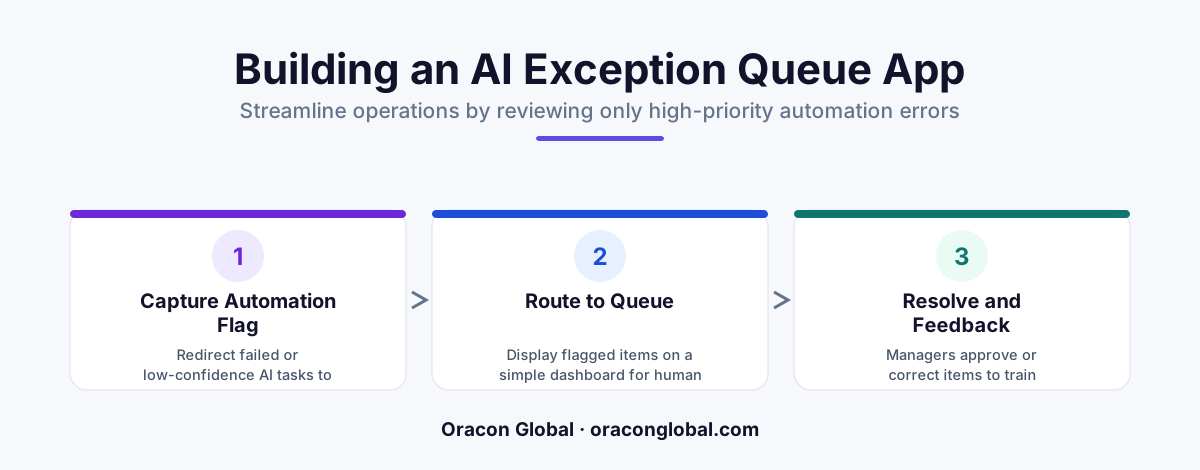
An AI exception queue is a custom web application that acts as a smart digital inbox for your operations team. Instead of forcing managers to manually check every automated invoice or order, the AI processes routine items in the background and routes only unusual or broken tasks to human experts for quick approval.
Imagine running a busy delivery fleet where thousands of digital invoices flow through your desk every morning. Most of those documents are completely normal: the prices match your contract, the addresses exist, and the math adds up. Yet, your operations team spends four hours every day opening every single file just to confirm that nothing is wrong.
This endless checking is called babysitting your software. When businesses start using basic artificial intelligence to handle repetitive tasks, they often fall into a trap where employees feel compelled to check every piece of automated work. The solution is to build a custom web application that functions as an AI exception queue.
In simple terms, an AI exception queue is a specialized digital inbox. Instead of asking human managers to look at every transaction, the AI works quietly in the background on normal items. When it hits an unusual problem—like a missing tax ID or a price that looks dangerously wrong—it places that single task into the web app for a human manager to review and approve.
What Is an AI Exception Queue and How Does It Work?
To understand how this setup works, think of a physical quality control line in a toy factory. Thousands of green plastic rubber ducks move along a conveyor belt every hour. A basic robot inspects them automatically. The robot does not ring an alarm for every perfect green duck. It only pushes a duck into a side bin if it is missing an eye or painted red.
An AI exception queue works the exact same way for modern operations management software. Here are the core terms you need to know:
- Artificial Intelligence (AI): Software that can read documents, understand human language, and make decisions based on patterns.
- Automated Workflow: A pre-set series of digital steps that happen automatically, like saving an email attachment into a database.
- Exception: Any task or document that strays from normal business rules or causes an error during processing.
- Queue: A organized list or digital line of items waiting for review or action.
Instead of forcing your managers to check every single transaction, the web app displays a clean, short list of broken or uncertain items that need immediate attention.
A Real-World Example: Fixing Order Processing Discrepancies
Let us look at a practical scenario from a regional plumbing supply distributor. The company receives hundreds of PDF purchase orders daily from contractors through email. They use an automated workflow error handling strategy to process these orders instantly.
On a typical Tuesday, 95% of incoming orders match the exact part numbers, standard prices, and delivery addresses stored in the company system. The AI software reads those invoices, enters the data, and sends the delivery trucks on their way without human intervention.
However, one order comes in where a customer handwritten a note asking for a 50% discount on five commercial water heaters. The AI reads the note, calculates that giving a 50% discount breaks company rules, and flags the file. It immediately places that order into the web app queue with a clear alert tag: Unusual Discount Requested.
The operations manager logs into the custom web app on her phone during her morning coffee, sees that single flagged order, clicks a button to approve a temporary 10% discount instead, and sends the updated order directly to the warehouse. What used to take two hours of searching through spreadsheets now takes ten seconds.
Key Features Every Custom Exception Queue Web App Needs
If you choose to build a web application designed specifically for handling operational errors, keeping the user interface simple is critical. Non-technical teams perform best when software focuses strictly on action rather than complex settings.
1. Plain-Language Error Cards
When the software halts a task, the web application should show a clear box explaining why the task stopped. Avoid technical jargon like API Timeout 500 or Null Pointer Exception. Instead, display simple statements such as Customer address is missing a postal code or Invoice total exceeds the authorized spending limit.
2. Direct Data Editing Fields
Your operations team should never have to open three different software tabs to fix a simple mistake. If an invoice is missing a serial number, the exception queue application should display a single text box directly on the screen where the manager can type the missing number and hit submit.
3. One-Click Approval and Escalation Buttons
Speed is essential for busy operations teams. Give managers large, clear buttons to either Approve the task, Reject the task, or Escalate it to a senior director if it requires extra permission.
How an Exception Queue Transforms Daily Operations
Transitioning from manual oversight to an exception-based management model completely changes how your team spends their workday. By delegating routine checks to secure background processes, your business achieves several immediate benefits:
- Massive Time Savings: Managers spend 90% less time looking at software, allowing them to focus on high-value client relationships and strategy.
- Faster Response Times: Flagged issues do not sit forgotten in an email inbox; they gather in a central hub where anyone on duty can clear them quickly.
- Better Accuracy: Humans get tired when checking hundreds of repetitive files, leading to missed errors. AI never grows tired of checking standard details, while humans excel at solving unique problems.
Building Software That Fits Your Specific Workflow
Off-the-shelf software packages often force your team to adjust how they work to fit pre-made templates. Building a custom web application ensures that your exception queue reflects your exact corporate policies, database structures, and approval hierarchies.
When your operational workflow is wrapped in a clear, easy-to-use web app, your team stops acting as data entry clerks and begins acting as efficient managers. The software handles the noise, while your team handles the decisions.
Ready to streamline your operational workflows and stop your managers from babysitting routine software tasks? Contact the senior engineering team at Oracon Global today to discuss how we can design and build a custom web app tailored to your exact business needs.
===Frequently asked questions
What is an AI exception queue?
An AI exception queue is a central dashboard web application where an AI sends tasks that it cannot confidently finish on its own, allowing human managers to step in and fix only the unusual items.
Why do operations managers need an exception queue?
Without an exception queue, managers waste hours checking routine, error-free tasks just to make sure the automated software worked correctly. An exception queue brings only the broken or uncertain items to their attention.
How does a custom web app help manage operations exceptions?
A custom web app gives your team a clean, dedicated interface to view flagged items, see why the AI paused the task, fix missing details with one click, and send the work safely on its way.
Do my managers need coding skills to use an AI exception queue?
No, a well-designed custom web app is built for non-technical users. It displays plain-language reason codes, simple buttons, and clear text boxes so anyone on the team can resolve exceptions instantly.
Read next
Beyond Chatbots: How to Build AI Agents That Actually Do Work for Your Business
Most businesses use AI to answer questions. Here is how to build custom AI agents that actually take action, connect to your internal tools, and handle complex workflows.
Beyond the Wrapper: How to Build Custom AI Agents for Business That Actually Work
Many businesses invest in basic AI wrappers only to find they lack the security and context needed for real work. Here is how to build custom AI agents that integrate deeply with your workflows and databases.
Enterprise AI Maintenance Costs: Budgeting for Year Two and Beyond
Building an AI system is only half the battle. Discover the practical, ongoing operational costs of enterprise AI, including token management, model drift, and continuous security audits.
Oracon Global builds production-grade AI agents, automation and apps — and you own the code and IP. Tell us what you want to automate.
Book a call →See our work