

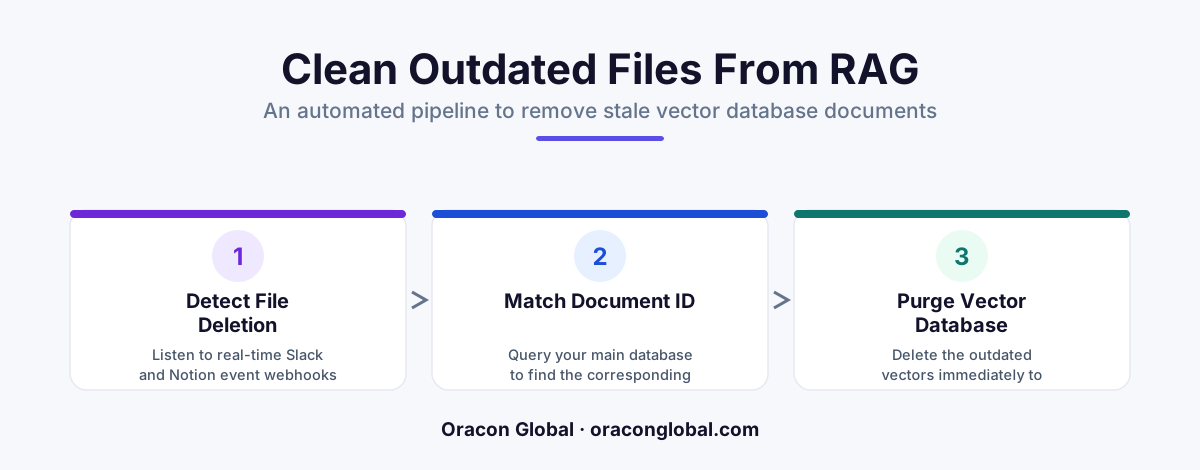
When team members edit or delete files in Slack and Notion, your AI often retains the old versions in its vector database. By building a real-time event-driven janitor service using webhooks and metadata syncing, you can automatically purge or update stale chunks instantly. This ensures your AI agents and search tools always work with current, reliable information.
Many businesses build custom Retrieval-Augmented Generation (RAG) systems to help their teams find internal knowledge. You connect your company wiki, plug in your active messaging channels, and let the AI search across your operational data. In the beginning, the system works beautifully. It answers customer support questions correctly and retrieves files instantly.
Then, human workflow reality sets in. A sales representative updates an outdated pricing proposal on Notion. A project manager deletes an incorrect delivery estimate in Slack. But when your team queries the AI agent, it still serves the old pricing and the deleted estimate.
This happens because most RAG architectures are built as one-way streets. They are excellent at ingestion, but they have no native way to handle deletions or modifications in external apps. To prevent your AI from retrieving expired information, you need a system for vector database cleanup that keeps your vector database and active workspaces in perfect sync.
Why Stale Data Destroys RAG Pipeline Reliability
When you ingest a document from Slack or Notion into a RAG pipeline, the text is broken into small chunks, converted into mathematical vectors (embeddings), and stored in a specialized vector database. The database uses these vectors to perform semantic searches when a user asks a question.
However, the connection between the original document and the vector database is easily broken. Common daily workplace activities create a massive amount of digital debris:
- Document edits: If a Notion document is updated, the old paragraphs remain in your vector store alongside the new ones, leading to conflicting retrieval results.
- Hard deletions: A Slack message containing outdated system credentials or private customer information is deleted by a moderator, but the raw text remains indexed in your AI memory.
- Workspace reorganizations: Folders are renamed or moved, breaking the source file links and leaving orphan data in your retrieval engine.
Without systematic RAG pipeline maintenance, your vector database slowly degrades. Your AI starts hallucinating outdated policies, quoting expired prices, and exposing deleted conversations.
The Architecture of a Real-Time Vector Database Janitor
A vector database janitor is a lightweight, event-driven microservice that runs silently alongside your main application. Instead of waiting for a manual database rebuild, the janitor monitors your external workspaces in real time and handles stale data in RAG systems immediately.
To build an effective janitor, your architecture needs three primary components:
1. The Event Webhook Listener
Both Slack and Notion offer developer APIs that emit webhooks when events occur. Your janitor service exposes a secure endpoint to listen to these incoming payloads. For example, when a Notion page is updated, Notion sends an unfurl or page_updated event payload containing the unique Page ID. When a Slack message is deleted, Slack sends a message_deleted event with the timestamp and channel ID.
2. The Metadata Mapping Layer
A common mistake is storing vectors without enough source context. To delete a vector, you must be able to find it. Your ingestion pipeline must tag every single vector chunk with strict metadata keys, such as:
{ "source": "slack", "channel_id": "C12345", "message_ts": "1672531199.000100", "document_id": "notion_page_9876" }
This metadata acts as your index search key. When the webhook listener receives a delete event for a specific document ID, the janitor uses this metadata mapping to locate all vector chunks tied to that exact source.
3. The Purge and Recalculate Engine
Once the janitor identifies the target vectors, it executes a delete-by-metadata query in your vector database. If the event was an update rather than a deletion, the engine triggers a micro-ingestion workflow: it parses only the updated portion of the document, generates new embeddings, and writes them back to the database in seconds. This ensures a real-time RAG update without restarting your database or interrupting active users.
Step-by-Step Guide to Implementing the Janitor Service
For operations teams and technical leaders looking to deploy this solution, the development process follows a clean, structured lifecycle.
- Configure Source Subscriptions: Enable event subscriptions in your Slack and Notion developer portals. Ensure you subscribe to delete, archive, and edit events, not just creation events.
- Deploy a Resilient Message Queue: Webhook delivery can be unpredictable. Run a simple Redis queue or background worker to ingest the events. This prevents your system from dropping cleanup requests during high-traffic periods.
- Execute Targeted Purges: Use your vector database's native metadata filtering capabilities to execute deletes. In Pinecone, Milvus, or Qdrant, a query filtering by
source_id == event_idwill instantly wipe all chunks related to the modified document. - Implement a Weekly Reconciliation Sweep: Webhooks occasionally fail due to network drops. To guarantee absolute compliance, build a weekly cron job that runs a light comparison hash between your active Notion directories and your vector metadata catalog, pruning any missed orphans.
The Business Impact of Automated Cleanups
Building a database janitor is about more than just keeping your system neat. It directly impacts your business operations, compliance standards, and overall trust in AI tools.
First, it protects corporate compliance. If a customer exercises their right to be forgotten (GDPR/CCPA) and your support team deletes their file from Notion, the janitor ensures that sensitive customer data is wiped from your AI search space within seconds, avoiding costly regulatory liabilities.
Second, it improves AI accuracy. By keeping your vector store clean, you reduce the noise in your retrieval context window. Your LLM receives only the most current, verified operational data, resulting in highly accurate answers and zero confusion caused by outdated documents.
Finally, it lowers your cloud computing costs. Storing millions of dead, duplicate, or outdated vector embeddings wastes valuable memory space. Regular cleanup runs optimize your database performance and keep your hosting bills predictable.
Keep Your Custom AI Architecture Fast and Accurate
RAG pipelines are incredibly powerful, but they are only as good as the data they access. Letting stale documents accumulate in your vector database is a fast track to lost user trust and erratic AI performance. Implementing a real-time vector janitor ensures your automated systems stay sharp, secure, and aligned with your team's real-time work.
At Oracon Global, our senior in-house development team builds custom AI agents, production-ready RAG architectures, and highly optimized database integrations for enterprises worldwide. We make sure your data flows smoothly, remains perfectly synchronized, and belongs entirely to you with 100% IP ownership.
Want to optimize your company's AI knowledge base or build custom automated workflows? Contact Oracon Global today to discuss how we can help you design and scale your software projects.
Frequently asked questions
Why does stale data accumulate in my vector database?
Most RAG pipelines are built as one-way ingest systems. When a team member deletes a message in Slack or archives a page in Notion, the external service does not automatically tell your vector database to remove the corresponding text embeddings, leaving outdated data behind.
How does a vector database janitor work?
It acts as an event-driven listener. When an event occurs in a connected app (like a page deletion in Notion), the janitor intercepts the webhook, matches the source document ID with your vector metadata, and runs a delete operation to purge the stale vectors immediately.
Can we just run a daily script instead of a real-time janitor?
While daily batch scripts work, they leave a window of several hours where your AI might retrieve incorrect, outdated, or deleted security-sensitive information. A real-time approach minimizes this compliance and accuracy risk.
Do we need to rewrite our entire RAG pipeline to implement this?
No. A vector janitor can be deployed as an independent microservice alongside your existing pipeline, listening to the same event streams and target database without requiring a complete rebuild of your search architecture.
Read next
Beyond Chatbots: How to Build AI Agents That Actually Do Work for Your Business
Most businesses use AI to answer questions. Here is how to build custom AI agents that actually take action, connect to your internal tools, and handle complex workflows.
Beyond the Wrapper: How to Build Custom AI Agents for Business That Actually Work
Many businesses invest in basic AI wrappers only to find they lack the security and context needed for real work. Here is how to build custom AI agents that integrate deeply with your workflows and databases.
Enterprise AI Maintenance Costs: Budgeting for Year Two and Beyond
Building an AI system is only half the battle. Discover the practical, ongoing operational costs of enterprise AI, including token management, model drift, and continuous security audits.
Oracon Global builds production-grade AI agents, automation and apps — and you own the code and IP. Tell us what you want to automate.
Book a call →See our work