

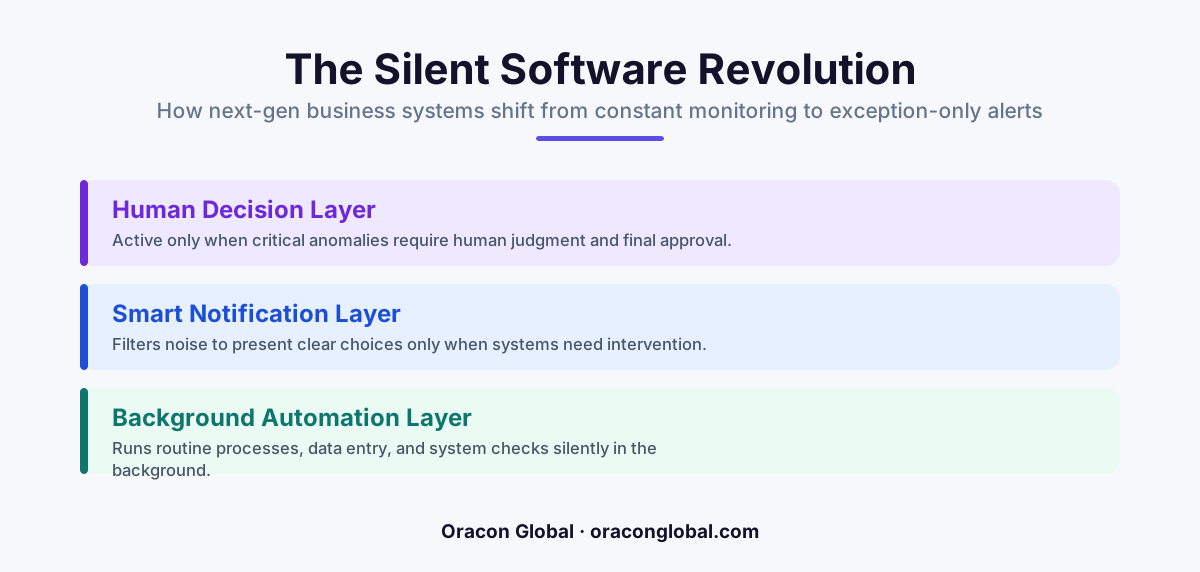
Next-generation custom business software is moving away from dense, data-heavy dashboards and toward "zero-UI" architectures. Instead of forcing employees to manually input data and monitor screens, modern AI-native systems run silently in the background and only present a screen when an exception requires a human decision.
For the last three decades, enterprise software design has followed a simple rule: more features mean more screens. If your business processes thousands of orders, manages complex supply chains, or coordinates global logistics, your team likely spends their days staring at dense dashboards, clicking through multi-tabbed forms, and manually moving data from one system to another.
This layout is built on an old assumption that humans must actively guide every single transaction through a digital pipeline. But as custom business software matures, we are seeing a fundamental shift in how applications are designed. The next generation of software is moving toward a "zero-UI" model, where the primary interface is invisible, and screens are designed solely for human operators to look at when something goes wrong.
The Cognitive Cost of Constant Monitoring
In a traditional operations setup, team members act as human bridges between disconnected systems. They monitor live feeds, cross-reference invoices, and watch for system alerts. This constant context switching and screen monitoring leads to silent operational drag and human error.
When an operator spends eight hours a day looking at a dashboard where 99% of the data is correct, their attention naturally slips. The one critical error—such as an incorrect customs tariff code, an overlapping dispatch schedule, or a mismatched billing line item—gets lost in the noise. Designing software that demands continuous human attention is no longer a sign of control; it is a design bottleneck.
The Rise of Silent Automation and Exception Handling
Next-generation custom business software reverses this dynamic by relying on silent automation. Instead of waiting for a human to initiate a task, run a report, or verify a document, background systems run continuously to ingest, parse, and reconcile data. These systems utilize specialized AI digital employees that understand the rules of your business logic and operate directly on your databases.
Under this architectural model, the software runs quietly in the background, executing thousands of routine transactions flawlessly. It only generates a user interface when it encounters a true anomaly. These systems are explicitly designed around exception handling software principles:
- Autonomous Execution: The vast majority of standard, clean data transactions pass through the system without ever touching a human screen.
- Targeted Notifications: Instead of a complex dashboard, operators receive single-purpose notifications containing only the context needed to resolve a specific issue.
- Minimal Interfaces: When a screen does appear, it is clean, distraction-free, and focused entirely on the choice at hand.
How the "No-Screen" Workflow Operates in Practice
To understand how this looks in a live operational environment, consider a high-volume logistics business. Traditionally, a team of coordinators would sit in front of three monitors, tracking live truck routes, manual bills of lading, and shifting warehouse schedules.
In a modern zero-UI setup, the software handles the routine logistics autonomously. It reads incoming freight documents, validates them against your existing database, schedules the dispatch, and sends confirmations. The human operators do not watch this happen. Instead, they keep their screens closed or work on high-value client relationships.
The software only alerts an operator when a physical disruption occurs—like a sudden road closure, an unexpected customs delay, or a pricing discrepancy that exceeds a predefined threshold. The system then generates a temporary, single-page dashboard showing the exact problem, three automated solutions, and a button to approve the best path forward. Once the operator clicks "Approve," the screen disappears, and the system goes silent again.
Structuring the Exception Queue
When building these systems, we focus on designing clear, hierarchical queues that categorize exceptions based on business risk and complexity. Rather than overwhelming your staff with a wall of red error text, the software groups tasks into logical buckets:
- Deterministic Validation Failures: Simple mismatches, such as a missing zip code, which the system flags for quick manual entry.
- Strategic Decisions: Scenarios where the automated path meets a conflict, such as choosing between two shipping carriers with identical rates but different delivery windows.
- High-Value Thresholds: Transactions that exceed a specific dollar amount, requiring a mandatory human signature as a hardcoded safety gate.
The Architectural Shift Behind Zero-UI
Building software that runs silently requires a highly robust backend architecture. Because there is no human constantly double-checking the input fields on a screen, the underlying system must be incredibly resilient. This means shifting away from basic web forms toward event-driven architectures, reliable state machines, and real-time database validation.
At Oracon Global, our senior in-house team builds these systems to ensure that when background AI agents execute tasks, they do so with absolute precision. By utilizing local SQLite state tracking, semantic event queues, and deterministic business rules, we build applications where the silent background layer is just as reliable as a traditional click-and-save web app. You own 100% of the code and intellectual property, ensuring your core business logic remains completely secure and proprietary.
Why Your Team Will Prefer Silent Software
A common concern when introducing highly automated systems is that teams will feel disconnected from their work or worry about system accuracy. In practice, the opposite happens. Operators transition from repetitive, low-value data entry clerks into strategic decision-makers.
Instead of wrestling with clunky software interfaces to complete basic tasks, your employees spend their energy resolving complex, interesting edge cases. This reduces burnout, improves retention, and allows your business to scale its transaction volume exponentially without needing to scale your headcount at the exact same rate.
The goal of modern custom business software is not to remove the human from the loop entirely, but to ensure that when a human does look at a screen, their attention is valued, focused, and highly effective.
Build Your Next-Generation System with Oracon Global
Transitioning your business operations to a modern, exception-driven workflow requires more than just adding automation to your old dashboards. It requires custom software designed from the ground up to run silently, securely, and reliably.
At Oracon Global, we design and build custom web and mobile apps, AI digital employees, and AI-native ERP systems that streamline your operations and eliminate digital clutter. If you are ready to move away from crowded screens and design software that only speaks when spoken to, contact Oracon Global today to discuss how we can build your next custom platform.
Frequently asked questions
What is zero-UI business software?
It is a software design philosophy where applications run quietly in the background without requiring continuous manual interaction or monitoring, surfacing a visual interface only when a human decision or exception occurs.
How do human operators interact with these silent systems?
Operators act as decision-makers and exception handlers, reviewing flagged errors, edge cases, or high-value actions through clean, single-purpose approval screens rather than complex dashboards.
Will this style of software replace my team's daily workflows?
It shifts their focus from repetitive data entry and constant screen monitoring to strategic exception handling, allowing your team to manage much larger volumes of work without cognitive fatigue.
How does an business transition to a zero-UI model?
By mapping existing manual workflows, automating the routine path with background AI agents, and building custom, minimal interfaces specifically designed to display system exceptions.
Read next
Beyond Chatbots: How to Build AI Agents That Actually Do Work for Your Business
Most businesses use AI to answer questions. Here is how to build custom AI agents that actually take action, connect to your internal tools, and handle complex workflows.
Beyond the Wrapper: How to Build Custom AI Agents for Business That Actually Work
Many businesses invest in basic AI wrappers only to find they lack the security and context needed for real work. Here is how to build custom AI agents that integrate deeply with your workflows and databases.
Enterprise AI Maintenance Costs: Budgeting for Year Two and Beyond
Building an AI system is only half the battle. Discover the practical, ongoing operational costs of enterprise AI, including token management, model drift, and continuous security audits.
Oracon Global builds production-grade AI agents, automation and apps — and you own the code and IP. Tell us what you want to automate.
Book a call →See our work