

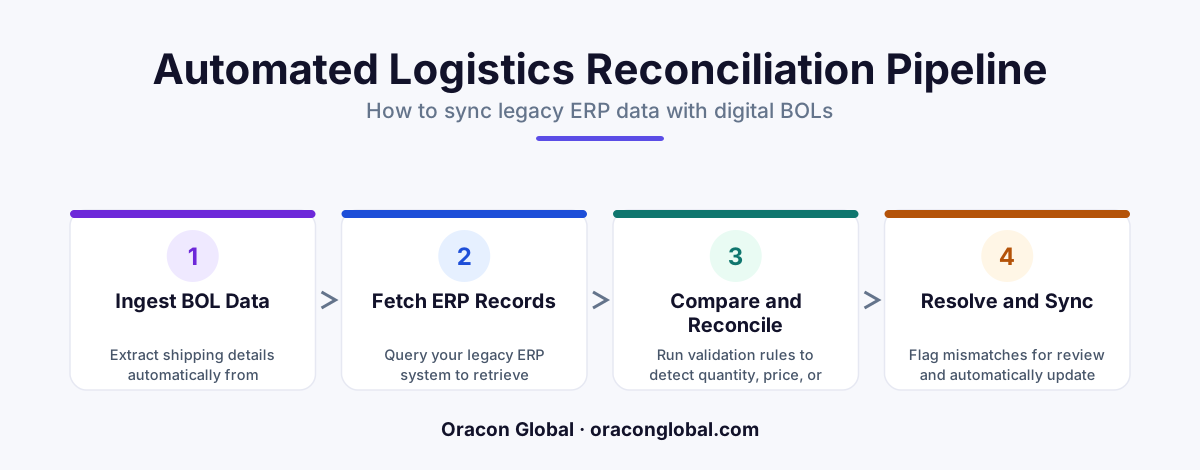
A custom multi-vendor logistics sync layer acts as an intelligent translation bridge between diverse carrier formats and legacy ERPs. By extracting Bill of Lading data, validating it against purchase orders, and automatically resolving exceptions, businesses can eliminate manual freight audits and costly billing disputes.
For mid-sized and enterprise distributors, manufacturers, and retailers, freight reconciliation is a quiet profit killer. Every day, shipments arrive accompanied by a mountain of paperwork: Bills of Lading (BoLs), proof of delivery slips, and carrier invoices. In a perfect world, the quantities, weights, and tariff codes on these documents would match your internal purchase orders and inventory ledgers perfectly. In reality, they rarely do.
Most organizations rely on teams of logistics coordinators to manually spot-check these documents against their ERP screens. When a mismatch occurs—such as a carrier billing for 12 pallets when only 10 were received, or applying an incorrect accessorial charge—the process grinds to a halt. Building a custom logistics sync layer allows businesses to automate this verification, programmatically catching Bill of Lading discrepancies and updating legacy ERP systems without manual data entry.
The Core Challenge: Why Legacy ERPs Struggle with Multi-Vendor Freight Data
Most legacy ERPs were designed as systems of record, not systems of integration. They excel at holding static data, but they struggle to ingest and interpret highly variable, unstructured data from dozens of different freight carriers. Each logistics provider uses its own layout, terminology, and digital format—ranging from clean API payloads and EDI transmissions to messy, scanned PDFs.
Attempting to force your legacy ERP to directly read and reconcile these diverse incoming data streams usually leads to several common failure modes:
- Rigid Integration Failures: Hardcoded ERP ingestion pipelines break the moment a carrier changes a single column header on their digital invoice.
- The Visibility Gap: Discrepancies are often discovered weeks after the shipment has cleared, making it incredibly difficult to dispute incorrect charges with vendors.
- Administrative Bottlenecks: Skilled logistics personnel spend hours performing basic "stare-and-compare" data entry tasks instead of optimizing supply chain lanes.
Architecting a Custom Logistics Sync Layer
To solve this without undertaking a multi-million dollar ERP replacement project, forward-thinking operators build an independent, middleware-style logistics sync layer. This system acts as an intelligent translator and buffer. It sits between external carrier networks and your sensitive core ERP database, protecting your legacy infrastructure from unstable external inputs.
1. The Data Ingestion and Normalization Engine
The first task of the sync layer is translation. Whether a carrier submits data via an EDI 214 transaction, a modern JSON webhook, or an email containing a scanned PDF of a Bill of Lading, the ingestion engine extracts the key data points. These include carrier codes, PO numbers, item quantities, total weights, and freight class. The sync layer converts this raw, messy data into a standardized schema within a secure, intermediary database.
2. The Automated Verification and Reconciliation Pipeline
Once the document data is normalized, the sync layer queries your internal databases to fetch the corresponding purchase order and receiving logs. It then runs a multi-point verification check across three critical vectors:
- Quantity Verification: Does the shipped quantity on the Bill of Lading match the physical quantity recorded at the receiving dock?
- Tariff and Class Audits: Does the freight class listed on the carrier's document align with the pre-negotiated contract rates stored in your ERP?
- Accessorial Fee Validation: Are there unexpected charges for liftgate services, residential delivery, or detention time that were not pre-authorized?
3. The Smart Tolerance and Exception Routing Matrix
Not every discrepancy requires a human audit. If a shipment's weight varies by 0.5% due to humidity or scale calibration differences, the system can be programmed to automatically accept the variance and update the record. However, if a major discrepancy is detected, the sync layer flags the transaction and holds it in a staging area, keeping the legacy ERP clean from bad data.
Building a "Human-in-the-Loop" Dashboard for Exceptions
When an automated logistics sync layer identifies a critical mismatch, it shouldn't just crash or halt the entire shipping pipeline. Instead, it routes the flagged transaction to a simple, custom-built web dashboard designed for your logistics operations team.
This interface displays the original Bill of Lading side-by-side with the ERP purchase order, highlighting the exact lines where the values do not match. The operator can resolve the issue with a single click—either by accepting the carrier's charge and automatically updating the ERP ledger, or by generating a structured dispute PDF populated with the exact evidence needed to challenge the carrier's invoice.
Safely Writing Reconciled Data Back to Legacy ERP Systems
One of the biggest risks of building custom supply chain software is corrupting or crashing the core ERP. Direct database injection into an older ERP system is incredibly risky, as these platforms often rely on complex, interdependent database tables.
To write data back safely, the custom sync layer should utilize a two-step integration strategy:
- The Staging Buffer: The sync layer writes verified, reconciled records to an intermediate staging table rather than the primary production tables.
- The Native Import Agent: A scheduled background process or a native ERP import tool fetches the clean data from the staging table, running it through the ERP’s built-in business validation rules before final posting.
This architecture keeps your primary database safe, ensuring that your core operations remain stable while still achieving hands-free automated freight reconciliation.
The Bottom Line: Reclaim Your Operational Margins
Manual freight reconciliation is an expensive distraction for growing businesses. By deploying a custom logistics sync layer, you can eliminate manual verification bottlenecks, prevent overpayments, and ensure that your legacy ERP systems always reflect the absolute truth of your physical supply chain.
At Oracon Global, our senior in-house engineering team specializes in building robust, custom integration layers, AI-driven automation systems, and high-performance middleware that seamlessly connect legacy enterprise architectures with modern data pipelines. We build custom software that you own 100%, with full IP transfer from day one.
Ready to automate your freight reconciliation process and eliminate manual ERP data entry? Contact the senior engineering team at Oracon Global today to discuss your integration needs.
Frequently asked questions
What is a logistics sync layer?
It is a custom software middleware layer that sits between your external freight carriers and your internal legacy ERP system, translating and reconciling incoming shipping data automatically.
How does the system handle different Bill of Lading formats?
The sync layer uses layout-agnostic processing and parsing engines to standardize data from various PDFs, scans, and EDI transmissions into a single unified format before matching.
Can this write data back to older legacy ERP systems?
Yes, the sync layer converts processed data into the exact format required by legacy ERPs, pushing updates via database connectors, secure FTP, or staging tables to avoid system crashes.
How does the system handle major pricing or quantity discrepancies?
Minor variances are resolved using pre-set tolerance thresholds, while major discrepancies are automatically routed to a dedicated human-in-the-loop dashboard for quick approval.
Read next
Beyond Chatbots: How to Build AI Agents That Actually Do Work for Your Business
Most businesses use AI to answer questions. Here is how to build custom AI agents that actually take action, connect to your internal tools, and handle complex workflows.
Beyond the Wrapper: How to Build Custom AI Agents for Business That Actually Work
Many businesses invest in basic AI wrappers only to find they lack the security and context needed for real work. Here is how to build custom AI agents that integrate deeply with your workflows and databases.
Enterprise AI Maintenance Costs: Budgeting for Year Two and Beyond
Building an AI system is only half the battle. Discover the practical, ongoing operational costs of enterprise AI, including token management, model drift, and continuous security audits.
Oracon Global builds production-grade AI agents, automation and apps — and you own the code and IP. Tell us what you want to automate.
Book a call →See our work