

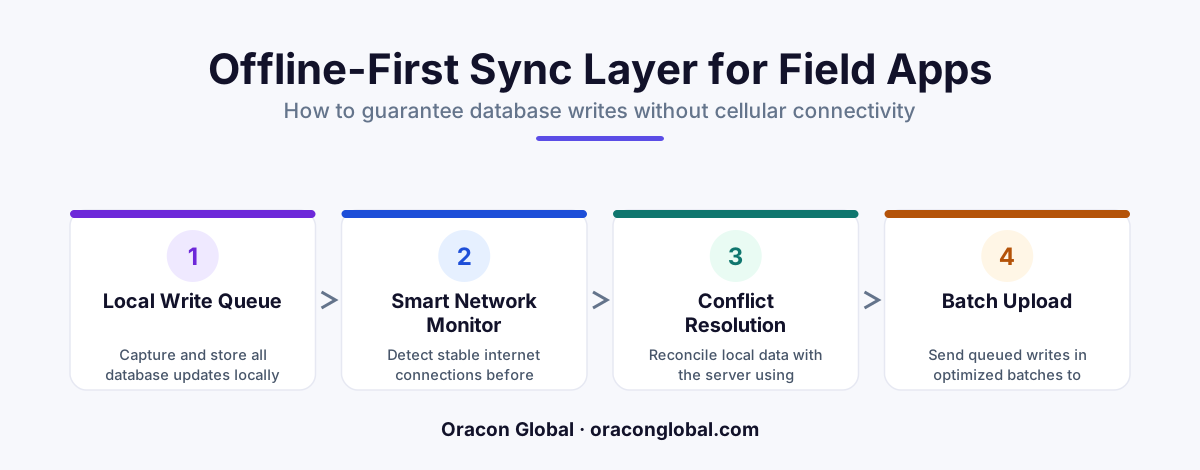
Building a reliable AI-native mobile app for remote field inspections requires a dedicated offline-first sync layer that manages database writes locally before syncing with the cloud. By utilizing a local SQLite queue, vector embedding caching, and a robust state-reconciliation engine, teams can eliminate dropped database writes and keep field inspectors productive in zero-connectivity environments.
Conducting remote field inspections is a challenging task. Inspectors often operate in remote areas, industrial basements, or rural zones where cellular networks are unreliable or non-existent. When you equip these workers with AI-native mobile apps designed to run voice-to-text transcriptions, real-time image analysis, and automated compliance checks, standard cloud-reliant architectures quickly break down.
Without a dedicated offline-first sync layer, an application trying to save data directly to a remote server will drop critical writes. A dropped write means lost inspection logs, unrecorded safety hazards, and frustrated technicians who have to repeat their work. To build resilient software for the field, you must design a local-first data architecture that treats connectivity as an occasional luxury rather than a constant requirement.
Here is a practical guide on how to architect a custom offline-first sync layer to guarantee flawless database write reconciliation during remote field inspections.
The Challenge: Why AI-Native Mobile Apps Fail in Low-Connectivity Zones
Traditional mobile apps struggle with poor network connectivity, but AI-native mobile apps face unique complications. These apps do not just submit simple text fields; they generate rich, unstructured data payloads. An inspector might dictate a detailed observation, which the local app processes into an audio file, a transcription, and a set of structural tags.
If the app attempts to push this heavy payload to a cloud database over a dropping 3G connection, the request will likely time out. If the app is not designed to handle this gracefully, the local transaction is rolled back, or worse, assumed to be saved when it was actually lost. Common issues include:
- Unordered Write Failures: If an inspector modifies a record twice while offline, a naive sync engine might apply the older update after the newer one, corrupting the database state.
- Payload Bloat: Storing high-resolution photos, local vector embeddings, and audio transcripts requires an intelligent queue that can compress and prioritize data transfers.
- Conflict Resolution Overhead: If a dispatcher updates an inspection ticket on the web portal while the technician updates it offline in the field, the system must reconcile the changes without losing field data.
Step 1: Implementing the Local Transaction Queue (SQLite & Key-Value Stores)
The foundation of any robust offline-first sync layer is a secure local database that acts as the single source of truth while the device is disconnected. For mobile devices, a combination of an embedded SQLite database and a reliable key-value store provides the best balance of structure and speed.
Every time a user performs an action in the app—such as filling out a checklist, recording an audio note, or updating an asset status—the application must write that change directly to the local SQLite database first. The app should never try to write directly to the API endpoint.
Along with saving the new state locally, the app appends a transaction record to an outbound queue table inside SQLite. This transaction record must contain:
- A unique, client-generated UUID for the transaction.
- A precise microsecond-level timestamp of when the action occurred.
- The target database table and column being updated.
- The payload of the change (usually stored as serialized JSON).
- The current sync status (e.g.,
Pending,Syncing, orFailed).
Step 2: Designing the Background Sync Coordinator
Once the data is safely written to the local queue, a background service must manage the transmission of these records to the central cloud database. This service must run independently of the user interface, ensuring that the app remains highly responsive even if a sync job is actively running or failing in the background.
The sync coordinator operates on a loop, listening for changes in network availability. When a stable network connection is detected, the coordinator performs the following steps:
- Batching: It groups pending transactions from the local SQLite queue into small, manageable batches to minimize HTTP request overhead.
- Prioritization: It ensures that critical database writes (like safety violations or structural failures) are transmitted before heavy, non-critical assets like high-resolution inspection photos.
- Idempotent API Requests: Every transaction payload sent to the cloud server must include its unique client-side UUID. This allows the server to recognize duplicate requests that might occur if a connection drops mid-transmission, preventing double-writes.
By using idempotent APIs, if a mobile device sends a write request and the network drops before the device receives the confirmation, the device can safely retry the request when connectivity returns without duplicating the record on the server.
Step 3: Building the Cloud State Reconciliation Engine
When the background sync coordinator successfully delivers a batch of transactions to the cloud, the central server must determine how to merge these changes into the master database. This is where database write reconciliation becomes vital.
A simple "last write wins" strategy is rarely sufficient for complex enterprise operations. If an inspector makes updates to an asset offline at 10:00 AM, and a dispatcher modifies the same asset online at 10:15 AM, applying the offline changes when the device reconnects at 10:30 AM could accidentally overwrite the dispatcher’s newer edits.
To resolve this, your custom sync layer should implement a deterministic state-reconciliation process:
- Field-Level Merging: Instead of overwriting entire rows, compare and merge individual fields. If the inspector changed the "structural integrity rating" and the dispatcher changed the "assigned technician," both updates can be safely applied.
- Timestamp-Based Conflict Resolution: Compare the client-side execution timestamp with the server-side modification timestamp. If a conflict occurs on the exact same field, business-defined rules should dictate whether the field inspector's on-site observation takes precedence over the office staff's input.
- Reconciliation Logs: Maintain an audit trail of how conflicts were resolved so administrators can review and reverse automated decisions if necessary.
Step 4: Managing Heavy Media and AI Payload Serialization
AI-native mobile apps used in remote field inspections often capture rich media files, such as voice dictations for transcription or images for object recognition. If these files are bundled directly inside database transactions, they can easily clog the sync queue.
To keep the sync layer fast and responsive, keep your database writes lightweight by decoupling media file transfers from structured data updates:
First, save the structured database record immediately with a local file URI reference to the media file. Next, upload the actual media file (e.g., photo or audio recording) to a cloud storage bucket asynchronously using a separate, background file-transfer queue. Once the file upload is complete, update the database record on the server with the final cloud storage URL. This separation prevents a 10MB inspection image from stalling the sync of critical safety checklist data.
Conclusion: Build for the Toughest Environments
A successful field inspection app must be built to survive the environments its users work in. Relying on continuous cloud access is a recipe for data loss and operational delays. By building a custom offline-first sync layer with a local transactional queue and robust cloud reconciliation, you ensure that your AI-native mobile apps remain completely reliable, no matter how remote the inspection site is.
At Oracon Global, our senior in-house team specializes in building highly resilient mobile applications, custom sync systems, and AI-native workflows that stand up to real-world operational challenges. If you are ready to build software that works flawlessly anywhere, reach out to us at Oracon Global today to discuss your project.
Frequently asked questions
Why do standard database sync tools fail for AI-native mobile apps in the field?
Standard sync tools are built for structured text and numbers, whereas AI-native apps often generate complex data payloads like audio transcriptions, photos, and local vector embeddings that require semantic reconciliation, not just simple row conflicts.
What database technology should be used on the mobile device?
A lightweight, embedded relational database like SQLite, paired with a local key-value store, provides the transactional guarantees needed to queue offline writes safely before network synchronization occurs.
How do you handle conflicts when the app goes back online?
We implement a state-reconciliation engine that processes local database writes in a strict, timestamped queue and applies logical rules to merge conflicting changes rather than blindly overwriting the cloud state.
Do field inspectors need to wait for the sync to complete before continuing?
No, the local offline-first sync layer acts as a buffer, allowing the inspector to continue using the AI-native mobile app immediately while synchronization occurs silently in the background when a network is available.
Read next
Beyond Chatbots: How to Build AI Agents That Actually Do Work for Your Business
Most businesses use AI to answer questions. Here is how to build custom AI agents that actually take action, connect to your internal tools, and handle complex workflows.
Beyond the Wrapper: How to Build Custom AI Agents for Business That Actually Work
Many businesses invest in basic AI wrappers only to find they lack the security and context needed for real work. Here is how to build custom AI agents that integrate deeply with your workflows and databases.
Enterprise AI Maintenance Costs: Budgeting for Year Two and Beyond
Building an AI system is only half the battle. Discover the practical, ongoing operational costs of enterprise AI, including token management, model drift, and continuous security audits.
Oracon Global builds production-grade AI agents, automation and apps — and you own the code and IP. Tell us what you want to automate.
Book a call →See our work