

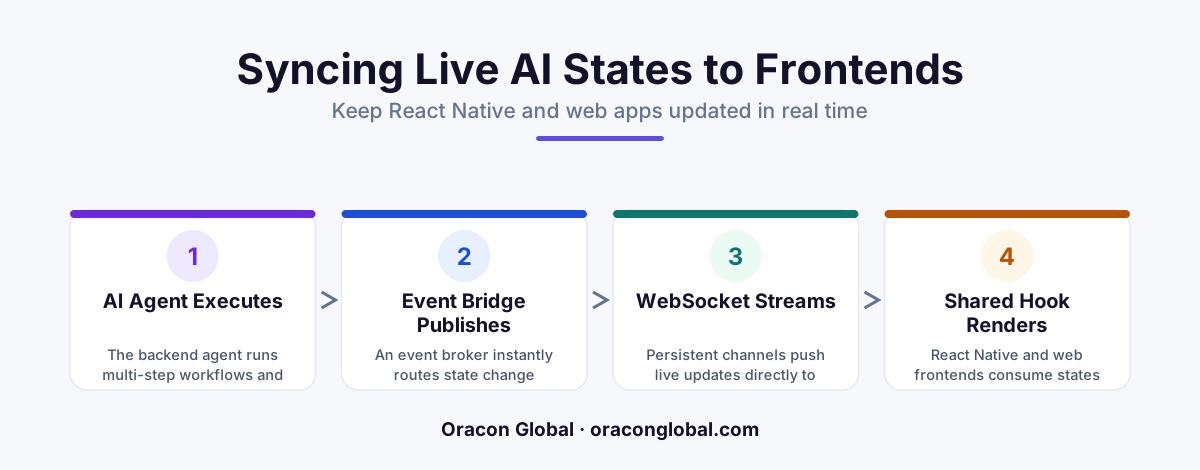
To prevent web and mobile frontends from freezing during long-running backend AI workflows, replace traditional request-response APIs with an event-driven synchronization layer. By using WebSockets, Server-Sent Events, and a centralized Redis state machine, you can push instant, granular state updates directly to your React Native and web apps as the AI executes tasks.
When a user types a prompt into a modern application, they expect more than just a spinning loading wheel. Today's custom business applications are no longer simple wrappers around a single API call. Instead, they run complex backend AI agents that execute multi-step workflows, search multiple databases, call external APIs, and run validation routines.
If your application relies on traditional HTTP request-response patterns, these long-running backend processes present a major technical challenge. Web and mobile frontends easily fall out of sync with the backend, leading to frozen screens, unexpected timeouts, and frustrated users who do not know if their task is actually running. To solve this, you need a robust approach to real-time AI state synchronization across your web portals and React Native mobile apps.
At Oracon Global, our senior in-house team builds tailored, production-ready systems that handle these exact real-time challenges. In this article, we will break down the architectural blueprint we use to keep React Native and web frontends perfectly aligned with backend AI tool execution states.
The Core Challenge: Why AI Workflows Break Traditional Frontends
Traditional web and mobile applications are built for speed. A user clicks a button, the app sends an API request, the database updates in milliseconds, and the app returns a success message.
AI-native workflows do not work this way. An AI agent performing a business task might need thirty seconds to several minutes to complete its run. During this time, it executes several distinct steps:
- Intent Parsing: Understanding the user's request and planning the task.
- Data Retrieval: Querying database tables, vector search engines, or document repositories.
- Tool Execution: Running code, calling third-party vendor APIs, or updating internal ledgers.
- Synthesis & Response: Formatting the final output and validating it against safety rules.
If your frontend app sends a standard API request and waits for a single response, the connection will likely time out. If you implement basic polling (forcing the app to ask "Are you done yet?" every two seconds), you overload your servers, drain mobile batteries, and still suffer from a laggy, disjointed user interface. To create a smooth, premium experience, your frontend must receive instant, step-by-step updates as each backend tool executes.
The Architectural Solution: Event-Driven State Synchronization
To keep cross-platform frontends in sync, you must decouple the backend AI execution from the client-facing web server. Instead of waiting for a final answer, the backend should treat every step of the AI's progress as an event. These events are broadcasted in real time to any active user session.
A reliable custom app architecture for real-time synchronization relies on three key layers:
1. The Backend State Machine
As your AI agent runs, it must write its progress to a fast, centralized cache database (such as Redis) rather than directly to a heavy primary database. This cache acts as the single source of truth for the active session. Every time the AI starts a task, calls an external tool, or receives an API response, it updates its state in the cache and broadcasts a small event payload.
2. The Live Communication Bridge
To deliver these updates to the client instantly, you need a persistent, bi-directional channel. For web apps and React Native AI integration, you have two primary options:
- WebSockets: Perfect for interactive, two-way communication where the frontend also needs to send quick commands back to the running AI.
- Server-Sent Events (SSE): A lightweight, unidirectional alternative that allows the backend to stream updates to the frontend over a standard HTTP connection.
3. The Unified Frontend State Manager
On the client side, your web app (React) and mobile app (React Native) should share a similar state architecture. By using a state management library (like Zustand or Redux), the frontend listens to the live communication bridge and updates the local UI state immediately when a new step event arrives.
Implementing the Architecture: Step-by-Step State Flow
Let us look at how this event-driven sync layer operates in practice when a user initiates a multi-step workflow on their mobile device or laptop:
- Initiation: The user taps "Generate Report" in your React Native app. The app sends a quick POST request to the backend. The backend returns a status code of
202 Acceptedalong with a uniquejob_id. The mobile app immediately transitions the screen to a dynamic progress view. - Subscription: The app opens a connection to the real-time bridge, subscribing to updates for that specific
job_id. - Execution & Streaming: The backend AI agent begins its work. As it queries documents, it broadcasts a
"retrieving_documents"event. The frontend receives this and displays a polite message: "Searching contract files...". - Granular Updates: When the AI calls an external API, it broadcasts a
"processing_api_data"event. The UI updates with a progress bar. - Completion: Once the final output is generated, the backend writes the result to the primary database and broadcasts a
"completed"event. The frontend displays the finished report and safely closes the real-time connection.
Ensuring Reliability on Mobile and Web Frontends
When building for cross-platform environments, web browsers and mobile operating systems handle network connections differently. Here is how to keep both frontend backend state sync systems robust:
Handling Mobile Network Dropouts
Mobile phones constantly switch between cellular towers and Wi-Fi networks. If a user walks into an elevator, their connection will drop. Your React Native app must include an automatic reconnection loop. When the connection drops, the app should instantly attempt to reconnect and query the backend state machine for any missed steps using the active job_id.
Preventing Frontend Render Flooding
If your backend AI is fast, it might emit dozens of micro-events per second. If your frontend tries to re-render the screen for every single update, the app will stutter. Implement a throttling layer in your frontend state manager to batch UI updates, ensuring smooth animations and transitions.
Sharing Code Across Platforms
Because both your web interface and mobile app likely use JavaScript-based frameworks, you can share the exact same state-sync hook library. This keeps development clean, reduces bugs, and guarantees that your customers see the identical, polished interface whether they are on their phone or their office desktop.
Build Real-Time AI Apps That Work
Creating a modern AI application requires more than just calling an API. To build software that your team or customers love using every day, the user experience must feel lightning-fast, transparent, and completely reliable. Decoupling your backend AI workflows from your frontends with a custom event-driven synchronization layer is the only way to achieve this standard at scale.
At Oracon Global, our senior in-house developers design and build custom web applications, mobile apps, and enterprise AI engines that work together seamlessly. Best of all, we do not lock you into proprietary platforms—our clients retain 100% ownership of their custom code and IP.
Want to build a custom application with a real-time sync architecture that keeps your mobile and web frontends responsive? Contact Oracon Global today to discuss your project with our engineering team.
Frequently asked questions
Why do standard REST APIs fail when syncing frontend apps with backend AI agents?
REST APIs rely on a client request to send a response, which forces frontends to constantly poll the server or wait indefinitely for long-running AI workflows to complete, leading to timeouts and laggy user interfaces.
What is the best way to handle real-time AI updates on React Native?
A lightweight WebSocket connection or Server-Sent Events (SSE) client, managed by a global state library like Redux or Zustand, allows the React Native app to receive and render incremental state updates without reloading.
How do you prevent frontend UI stuttering during complex, multi-step AI tasks?
By decoupling the AI execution engine from the web server using a message broker like Redis or RabbitMQ, which broadcasts small, predictable state payloads directly to the client at each step of the workflow.
Can the same state synchronization architecture be shared between web and mobile apps?
Yes, a unified backend state machine can push identical event payloads to both web (React) and mobile (React Native) clients, allowing you to share the same state-handling logic across both platforms.
Read next
Beyond Chatbots: How to Build AI Agents That Actually Do Work for Your Business
Most businesses use AI to answer questions. Here is how to build custom AI agents that actually take action, connect to your internal tools, and handle complex workflows.
Beyond the Wrapper: How to Build Custom AI Agents for Business That Actually Work
Many businesses invest in basic AI wrappers only to find they lack the security and context needed for real work. Here is how to build custom AI agents that integrate deeply with your workflows and databases.
Enterprise AI Maintenance Costs: Budgeting for Year Two and Beyond
Building an AI system is only half the battle. Discover the practical, ongoing operational costs of enterprise AI, including token management, model drift, and continuous security audits.
Oracon Global builds production-grade AI agents, automation and apps — and you own the code and IP. Tell us what you want to automate.
Book a call →See our work