

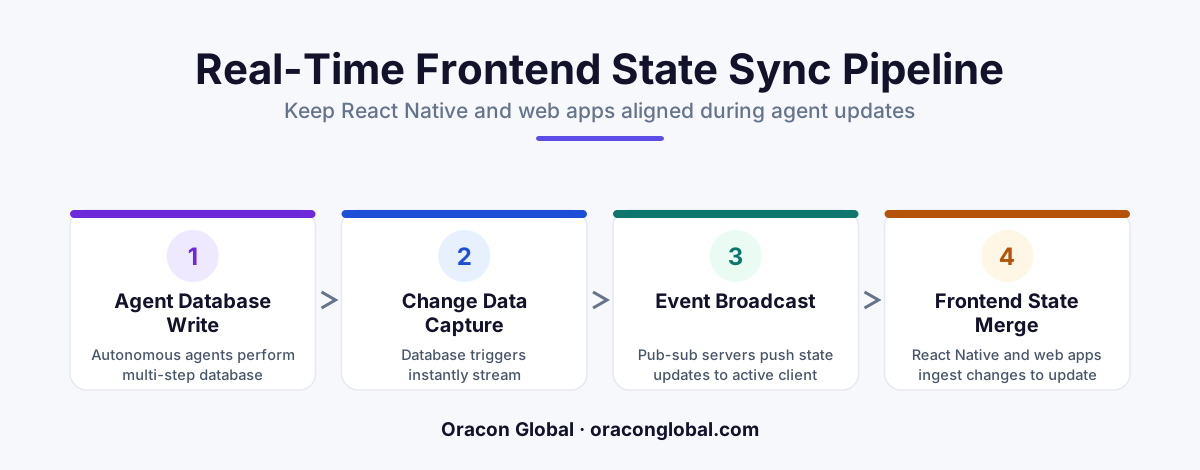
To prevent React Native mobile apps and web frontends from showing conflicting data during complex AI agent workflows, you must move away from standard client-side polling. By building an event-driven state sync layer using PostgreSQL Write-Ahead Logs, a Redis Pub/Sub message broker, and WebSocket connections, you can stream granular state updates to all platforms simultaneously without degrading database performance.
When a human operator updates a record in a business application, the database transaction is usually instantaneous. A single SQL query runs, a row updates, and the frontend updates. But when an autonomous AI agent takes over a workflow, database interactions change completely.
An AI agent executing a complex operation—such as matching a freight carrier, verifying an invoice, and updating inventory—operates in multi-step chains. It reads, reasons, writes, calls an external API, waits, and writes again. This entire process can take anywhere from three seconds to two minutes.
If a user has your web portal open on their desktop while checking your React Native app on their phone, these slow, incremental agentic database updates cause immediate synchronization problems. One screen shows the invoice as "Processing," the other shows "Approved," and the database is caught somewhere in between. To solve this, you need a custom real-time state sync layer designed specifically to handle the asynchronous, multi-step nature of agentic workflows.
The Problem with Traditional State Management in the AI Era
Most modern web and mobile applications rely on standard REST APIs or GraphQL queries. When a user loads a page, the client fetches the current state. To keep things fresh, developers often implement polling (asking the server for updates every few seconds) or basic WebSocket connections.
This approach breaks down during complex, multi-step AI agent executions for three reasons:
- Database Thrashing: Having hundreds of active mobile and web users polling the database for the status of long-running AI operations quickly degrades database performance.
- State Fragmentation: React Native apps run on a different JavaScript engine than web browsers. Without a unified stream, the mobile and web clients process state transitions at different speeds, leading to conflicting user interfaces.
- Lack of Progress Granularity: Standard database schemas usually store final states (e.g., "Pending" or "Completed"). They do not capture the micro-steps of an AI agent, leaving users staring at a frozen loading spinner with no context.
To keep your web and mobile app alignment seamless, you must decouple your frontends from direct database queries and introduce an event-driven real-time state sync layer.
Step 1: Capture Micro-States with Change Data Capture (CDC)
Instead of forcing your AI agents to explicitly notify the frontend every time they perform an action, the sync layer should listen directly to the database. This is achieved using Change Data Capture (CDC).
Every time your AI agent updates a row in PostgreSQL or MySQL, the database writes that change to its Write-Ahead Log (WAL). Tools like Debezium or native database triggers can read this log in real time. Because this happens at the log level, it places virtually zero load on your active database engine.
By capturing these database changes instantly, you convert static database writes into a live stream of state events. If the AI agent updates an "agent_status" column from "analyzing_pdf" to "extracting_line_items," that exact delta is published immediately.
Step 2: Build the Redis Pub/Sub and WebSocket Message Broker
Once you have a stream of database changes, you need a highly scalable way to distribute those events to thousands of connected web and mobile devices. A lightweight message broker is the best tool for this job.
A typical architecture uses a Redis Pub/Sub channel linked to a Node.js or Go WebSocket gateway. The process works like this:
- The CDC tool detects a database change from the AI agent.
- It publishes the change payload to a Redis channel named after the specific business object (e.g.,
orders:12345). - The WebSocket gateway, which maintains open connections to all active web and mobile clients, subscribes to that Redis channel.
- The gateway instantly pushes the lightweight JSON payload down the WebSocket pipeline to any device currently viewing order 12345.
This approach ensures that your React Native app and web portal receive the exact same update at the exact same millisecond, achieving true multi-platform state sync.
Step 3: Unify the Client-Side State Engine
Receiving real-time data is only half the battle; your apps must render it gracefully. Because React Native and React Web share a JavaScript foundation, you can share a significant portion of your state management logic.
Using a lightweight state manager like Zustand or Redux Toolkit, you can build a unified "Sync hook." When this hook mounts on either platform, it opens a connection to the WebSocket gateway, subscribes to the relevant data channel, and listens for incoming patches.
Instead of replacing the entire client-side dataset with every update, the sync engine should apply incremental patches (using JSON Patch standards). This prevents UI flickering, preserves local user inputs, and ensures that the React Native interface remains responsive even on older mobile hardware.
Example Client-Side Sync Pattern
"By streaming micro-state updates—such as showing the exact file an AI agent is reading—users feel the system is working instantly, completely eliminating the frustration of silent loading screens."
Ensuring Resilience During Network Dropouts
Mobile devices constantly drop connections as users switch between Wi-Fi and mobile data. A robust real-time data sync architecture must handle these dropouts without leaving the mobile app in an inconsistent state.
To solve this, implement an event versioning system. Every state update sent through the WebSocket channel should include an incremental sequence number (e.g., version: 104). When a React Native app loses its connection and reconnects, it sends its last known version number to the gateway. The gateway then replays only the missed events, ensuring the mobile app catches up smoothly without requiring a full, heavy database reload.
Building for the Future of Agentic Workflows
As business operations become more autonomous, the systems we build must shift from static request-response patterns to continuous, real-time event streams. Keeping your web and mobile platforms perfectly aligned during complex AI tasks isn't just about clean code—it's about creating a reliable, trustworthy user experience.
At Oracon Global, our senior in-house engineering team designs and builds custom web and mobile architectures, AI agents, and real-time state sync layers that scale to thousands of concurrent users. We deliver fully custom software where our clients retain 100% ownership of the code and intellectual property from day one.
Are you ready to design a robust, synchronized architecture for your next custom software project? Contact the team at Oracon Global today to discuss your vision.
Frequently asked questions
Why do traditional database sync methods fail during AI agent operations?
AI agents perform long-running, multi-step operations that modify data incrementally. Traditional client polling either hammers the database with queries or displays stale, out-of-sync information on different devices.
Do I need to write separate sync engines for React Native and web frontends?
No. By establishing a unified WebSocket gateway, both your React Native mobile app and React-based web frontend can consume the exact same structured event stream using a shared state management library.
Will this real-time sync layer slow down my production database?
Not if it is built correctly. By reading directly from the database transaction log (CDC) instead of executing heavy SELECT queries, the sync layer operates with near-zero overhead on your primary database.
Can this architecture handle offline scenarios for mobile users?
Yes. While the real-time sync layer handles online streaming, the client-side state engine can cache incoming payloads locally to reconcile state smoothly when a mobile user recovers their network connection.
Read next
Beyond Chatbots: How to Build AI Agents That Actually Do Work for Your Business
Most businesses use AI to answer questions. Here is how to build custom AI agents that actually take action, connect to your internal tools, and handle complex workflows.
Beyond the Wrapper: How to Build Custom AI Agents for Business That Actually Work
Many businesses invest in basic AI wrappers only to find they lack the security and context needed for real work. Here is how to build custom AI agents that integrate deeply with your workflows and databases.
Enterprise AI Maintenance Costs: Budgeting for Year Two and Beyond
Building an AI system is only half the battle. Discover the practical, ongoing operational costs of enterprise AI, including token management, model drift, and continuous security audits.
Oracon Global builds production-grade AI agents, automation and apps — and you own the code and IP. Tell us what you want to automate.
Book a call →See our work