

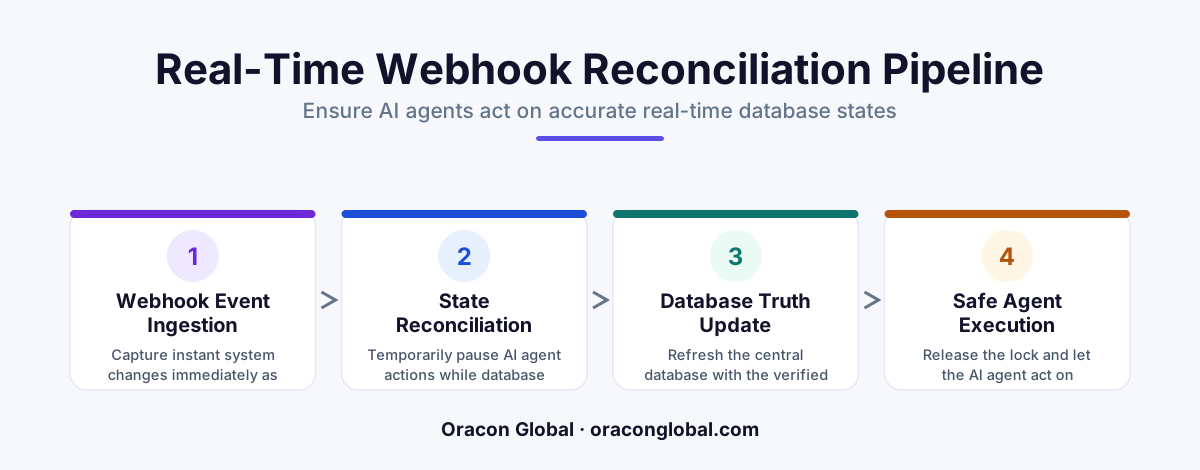
AI digital employees operate at millisecond speeds, but legacy systems often experience database sync delays. Building a webhook reconciliation pipeline ensures that before an AI agent executes an action, it validates the database state in real-time, preventing errors caused by stale, race-condition data.
Imagine hiring an operations manager who makes decisions based on yesterday's printouts while the rest of the office works on live, shared spreadsheets. It would not take long for shipping errors, double-bookings, and billing mistakes to pile up.
This is exactly what happens when you deploy AI digital employees without a dedicated webhook reconciliation pipeline. While autonomous AI agents are highly capable of executing complex workflows, they are fundamentally dependent on the data they can see. If your database state is delayed by even a few seconds due to API lag, background processing, or replication delays, your AI will act on outdated database states. In the world of automated business operations, a three-second delay is all it takes to trigger a costly operational error.
To build reliable, production-grade AI systems, you must ensure that your digital employees always operate on absolute, real-time truth. Here is how to build a robust webhook reconciliation pipeline to keep your AI agents perfectly in sync.
The Stale State Problem in AI Agent Workflows
Traditional software systems are designed for human latency. If a user clicks a button and the dashboard takes two seconds to update, the human naturally pauses, notices the loading spinner, and waits.
AI digital employees do not wait. They operate at the speed of API calls. When an event triggers an AI workflow, the agent immediately fetches the relevant database records and executes its assigned tasks.
If your customer relationship management (CRM) platform, ERP, or billing system sends a webhook indicating a status change, but your internal database takes a moment to process and replicate that change, a race condition occurs. The AI reads the old state, assumes a task still needs to be done, and executes an action that may have already been completed or canceled. This is why a real-time webhook reconciliation pipeline is a non-negotiable layer for any enterprise-grade AI architecture.
Step 1: Establishing an Event Ledger (The Single Source of Truth)
The first step in preventing your AI digital employees from acting on stale data is to decouple the incoming webhooks from the AI’s decision-making engine. You should never let an incoming webhook trigger an AI action directly without validation.
Instead, route all incoming webhooks into a dedicated event ledger. This ledger acts as a high-speed, temporary landing zone.
- Capture and Timestamp: Every incoming payload is immediately saved with a high-precision timestamp.
- Deduplication: External APIs often send duplicate webhooks. The ledger filters out identical payload IDs before they reach the AI.
- Sequence Verification: The system checks the sequence ID of the event to ensure that older updates do not overwrite newer ones if they arrive out of order.
Step 2: Building the Active Verification Gate
Once the event is logged, the pipeline must verify the current state of the database before handing the task over to the AI agent. This is where the actual real-time database sync validation happens.
Instead of allowing the AI to read blindly from a potentially lagging read-replica database, the pipeline runs a lightweight validation check. It queries the master database or performs a direct, real-time API call to the source system to confirm the record's current status.
"If the status returned by the direct verification gate matches the status in the event ledger, the transaction is cleared. If there is a mismatch, the pipeline holds the execution and schedules a retry."
This simple gate prevents the AI from initiating workflows based on phantom states, saving your team from manual cleanups of duplicate orders or erroneous customer communications.
Step 3: Implementing a Hold-and-Retry Queue
What happens when the pipeline detects a mismatch between the webhook event and the actual database state? Instead of failing the entire workflow or letting the AI guess, the pipeline places the event into a short-term holding queue.
A typical hold-and-retry mechanism operates on an exponential backoff model:
- First Check (0 seconds): State mismatch detected. Event is paused.
- Second Check (2 seconds): Pipeline queries the database again. If the sync is complete, the AI is cleared to run.
- Third Check (10 seconds): If the database is still lagging, the pipeline makes one final attempt before flagging the event for human review.
By absorbing these minor database synchronization delays inside the pipeline, your AI digital employees only see stable, fully reconciled data.
Step 4: Providing Clean Context Windows to the AI Agent
When the data is fully reconciled and verified, the pipeline compiles a clean, state-verified context package for the AI digital employee.
Instead of giving the AI raw, messy webhook logs and expecting it to figure out what happened, the pipeline translates the reconciled state into a structured JSON payload. This payload contains the exact, verified variables the AI needs to complete its task. This keeps the AI's focus sharp, reduces token usage, and eliminates the risk of the LLM hallucinating a response based on conflicting historical logs.
Moving from Fragile Automations to Resilient Digital Employees
Building a custom webhook reconciliation pipeline transforms your AI integrations from fragile, error-prone scripts into resilient digital employees that you can trust with critical business operations.
At Oracon Global, our senior in-house engineering team designs and builds high-performance, custom AI architectures that seamlessly integrate with your existing ERPs, databases, and enterprise software. We ensure that your AI agents, workflow automations, and custom apps operate on robust, secure, and highly optimized pipelines. Best of all, when you build with us, you retain 100% ownership of your code and intellectual property.
Are you ready to build custom AI agents that execute flawlessly without operational bottlenecks? Contact the team at Oracon Global today to discuss your project.
Frequently asked questions
What is a webhook reconciliation pipeline?
It is a dedicated middleware system that captures, deduplicates, orders, and validates event notifications (webhooks) from various business platforms before allowing an AI agent to act on that data.
Why can't AI digital employees just query the main database directly?
While they can, high-volume database queries can cause latency. More importantly, legacy databases often experience replication lag or delayed webhook updates, meaning the data the AI reads is already outdated by a few seconds.
What kinds of errors occur when an AI acts on outdated database states?
Common errors include double-booking inventory, sending outdated shipping notifications, processing refunded invoices, or initiating duplicate API calls based on a status that changed a second prior.
Do we need to rebuild our entire backend database to fix this?
No. A reconciliation pipeline acts as an intelligent event buffer and verification layer between your existing database and your AI agent, requiring no disruptive changes to your core database architecture.
Read next
Beyond Chatbots: How to Build AI Agents That Actually Do Work for Your Business
Most businesses use AI to answer questions. Here is how to build custom AI agents that actually take action, connect to your internal tools, and handle complex workflows.
Beyond the Wrapper: How to Build Custom AI Agents for Business That Actually Work
Many businesses invest in basic AI wrappers only to find they lack the security and context needed for real work. Here is how to build custom AI agents that integrate deeply with your workflows and databases.
Enterprise AI Maintenance Costs: Budgeting for Year Two and Beyond
Building an AI system is only half the battle. Discover the practical, ongoing operational costs of enterprise AI, including token management, model drift, and continuous security audits.
Oracon Global builds production-grade AI agents, automation and apps — and you own the code and IP. Tell us what you want to automate.
Book a call →See our work