

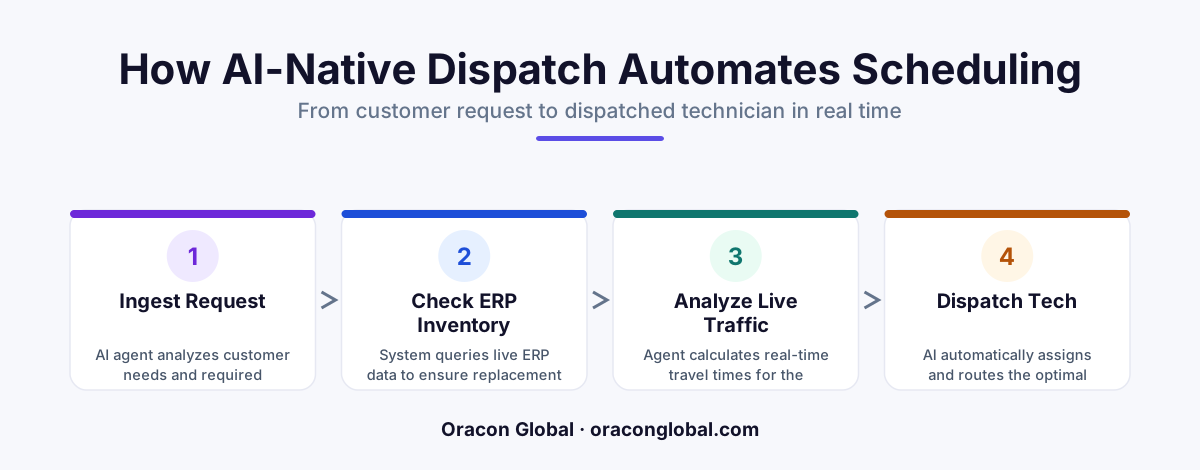
An AI-native dispatch agent automates fleet scheduling by continuously cross-referencing incoming service tickets with technician skills, live GPS traffic, and real-time ERP inventory. Instead of relying on manual dispatchers to solve complex routing puzzles, this system operates in the background to dispatch the right technician with the right parts, saving fuel and protecting service-level agreements.
Managing a specialized service fleet is a constant exercise in solving three-dimensional puzzles. When an urgent work order comes in, dispatchers cannot simply assign the closest truck. They must verify if the technician has the precise certification for the equipment, check if the specific replacement part is sitting in that technician's truck bed, and calculate whether local highway traffic will cause them to miss the service-level agreement (SLA) window.
When done manually, this coordination bottleneck leads to missed appointments, wasted fuel, and frustrated clients. Traditional dispatch software relies on rigid, rule-based calendars that break the moment a technician gets stuck in traffic or realizes a critical part is out of stock. To solve this, forward-thinking operators are turning to a custom AI-native dispatch agent—an autonomous digital assistant that sits between your ERP, live GPS trackers, and traffic APIs to keep your fleet running at maximum efficiency.
The Core Architecture of an AI-Native Dispatch Agent
Unlike a simple scheduling app, an AI-native agent does not just wait for human input. It actively monitors your entire operational ecosystem. To build a system that works reliably without constant supervision, the agent must be structured around three core data pillars:
- Live ERP and Inventory Data: The agent needs a direct connection to your enterprise resource planning (ERP) system to verify warehouse stock levels, truck inventory, and technician skill profiles in real time.
- Geospatial and Traffic APIs: Integration with live mapping platforms allows the agent to calculate true travel times based on current road congestion, construction delays, and vehicle size restrictions.
- The Orchestration Layer: An LLM-powered decision engine that processes incoming work orders, interprets natural language notes from customers, and matches the job to the optimal technician.
By connecting these pipelines, the field service AI agent transforms from a simple calendar assistant into an autonomous coordinator capable of making complex routing decisions in seconds.
Step 1: Unifying Your Live ERP Inventory and Technician Skill Profiles
The biggest point of failure in fleet scheduling is sending a technician to a job site without the right tools or parts. To prevent this, the AI agent must query your ERP before making any assignment.
We build this connection using custom API middleware. When a new service ticket is generated, the agent reads the diagnostic codes or customer description to identify the required parts. It then queries the ERP database to check the inventory levels of nearby trucks. If Technician A is closer but lacks the required heating element in their truck stock, while Technician B is ten minutes further away but has the part on board, the agent automatically assigns the job to Technician B.
Simultaneously, the agent cross-references your HR database or ERP skill matrices. This ensures that high-voltage electrical repairs are only routed to technicians holding active certifications, eliminating compliance risks and reducing second-visit rates.
Step 2: Implementing Real-Time Traffic and Route Optimization
Distance on a map rarely reflects actual travel time in urban environments. A technician five miles away might be trapped behind a major highway accident, while a technician eight miles away has a clear run down the backroads.
To achieve true route optimization AI, the agent must continuously ingest live GPS coordinates from your fleet's telematics system alongside active traffic data. The agent uses this information to:
- Calculate dynamic ETAs based on live road conditions.
- Reschedule non-urgent maintenance visits if an emergency call disrupts the morning schedule.
- Batch geographically clustered service calls to minimize windshield time and fuel consumption.
If a sudden traffic jam delays a technician on the way to a high-priority commercial client, the agent instantly detects the potential SLA violation. It can automatically swap the ticket to an available technician nearby or send an automated, human-sounding update to the waiting customer.
Step 3: Building the Agentic Decision Engine and Human-in-the-Loop Safeguards
An AI agent should make your operations smoother, not create a black box that managers cannot control. While the agent runs autonomously in the background, we build clear, custom administrative boundaries to keep your human team in the loop.
For standard, routine service calls, the agent operates on autopilot—creating the dispatch, updating the ERP, and notifying the technician via their mobile app. However, if a high-value client experiences an emergency or if a routing decision requires a trade-off that impacts your budget, the agent flags the ticket and presents three optimized options to your human dispatcher. The dispatcher can approve the recommendation with a single click, allowing your team to oversee a massive fleet without getting bogged down in repetitive data entry.
The Bottom Line for Fleet Operators
Building a custom AI-native dispatch agent is not about replacing your human dispatchers; it is about giving them a tireless digital partner. By removing the manual stress of cross-referencing inventory spreadsheets, Google Maps, and technician calendars, your team can focus on handling complex customer escalations and growing the business.
At Oracon Global, our senior in-house engineering team designs and builds custom AI agents, custom ERP systems, and workflow automations tailored to your exact operational workflows. Every line of code and piece of intellectual property we write is 100% owned by you from day one.
Ready to streamline your fleet scheduling automation and connect your field operations directly to your live ERP data? Get in touch with us at Oracon Global today to discuss how we can build a custom agent for your team.
Frequently asked questions
How does the AI dispatch agent know if a technician has the right part for a job?
The agent connects directly to your ERP or inventory management system via API, checking the specific technician's truck stock and local warehouse levels before assigning the ticket.
Can the AI agent handle sudden traffic delays or emergency calls?
Yes, the agent continuously monitors live traffic APIs and GPS locations to automatically recalculate ETA windows, swap assignments, or alert customers when a delay occurs.
Do we need to replace our existing ERP or CRM to use an AI dispatch agent?
No, an AI-native agent can be built to sit on top of your current software, communicating with legacy systems through custom API middleware without disrupting your daily operations.
How does a human dispatcher maintain control over the autonomous system?
We design the agent with custom approval gates, allowing human managers to oversee high-priority dispatches, manually override assignments, or set strict rule thresholds.
Read next
Beyond Chatbots: How to Build AI Agents That Actually Do Work for Your Business
Most businesses use AI to answer questions. Here is how to build custom AI agents that actually take action, connect to your internal tools, and handle complex workflows.
Beyond the Wrapper: How to Build Custom AI Agents for Business That Actually Work
Many businesses invest in basic AI wrappers only to find they lack the security and context needed for real work. Here is how to build custom AI agents that integrate deeply with your workflows and databases.
Enterprise AI Maintenance Costs: Budgeting for Year Two and Beyond
Building an AI system is only half the battle. Discover the practical, ongoing operational costs of enterprise AI, including token management, model drift, and continuous security audits.
Oracon Global builds production-grade AI agents, automation and apps — and you own the code and IP. Tell us what you want to automate.
Book a call →See our work