

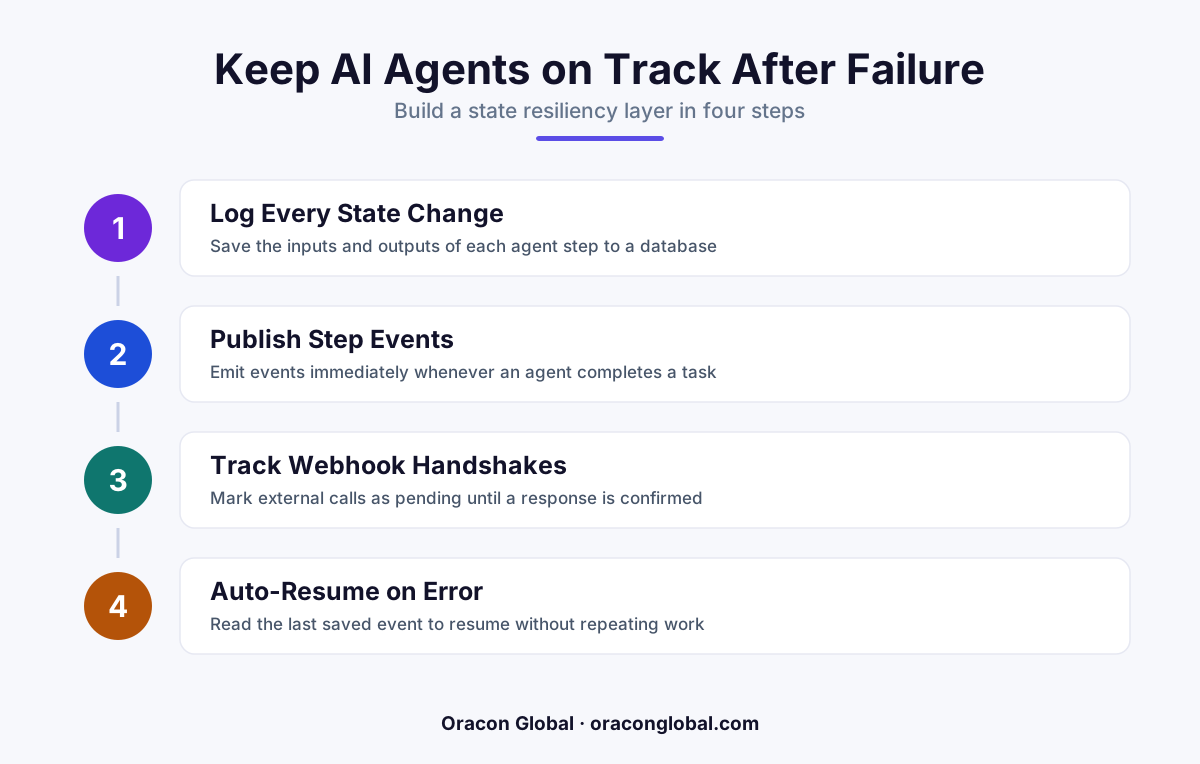
An event-driven state resiliency layer acts as a black box flight recorder for your AI agents, saving the exact state of every LLM call and tool execution. If an external API or webhook fails, the agent does not restart from scratch; instead, it resumes from the last successfully saved checkpoint, protecting your data integrity and token budget.
Imagine hiring an operator who, every time their phone line drops for a split second, forgets everything they did that morning, deletes their spreadsheets, and starts the entire workday over from scratch. You would replace them immediately.
Yet, this is exactly how many production AI agents behave when left to run on standard backend architectures. When an AI agent executes a complex, multi-step workflow—such as matching an invoice, updating an inventory ledger, and drafting an email reply—it relies heavily on external webhooks to confirm that downstream tasks are complete. If one of those webhooks fails due to a brief network hiccup, a rate limit, or a temporary API outage, the agent loses its context. It either stalls completely or restarts the entire loop from the beginning, repeating expensive LLM reasoning steps and risking duplicated database entries.
To build reliable business systems, you need a way to make your workflows durable. Implementing an event-driven state resiliency layer ensures your AI digital employees never lose their place, saving your business from broken workflows and runaway API bills.
The Anatomy of a Webhook Failure in Agentic Workflows
Traditional software systems handle failures with simple retry mechanisms. If a payment gateway fails to send a confirmation webhook, the system waits a few seconds and tries again. This works because traditional software is deterministic; inputting the same data always yields the exact same output.
AI agents are different. They operate in non-deterministic environments where each step relies on the contextual output of the previous step. A typical agentic workflow might look like this:
- Step 1: The agent reads an incoming customer support ticket and decides which legacy API tool to query.
- Step 2: It queries the database and formats a payload for an external dispatch tool.
- Step 3: It triggers the dispatch tool and waits for a webhook confirming a technician has been scheduled.
- Step 4: Upon receiving the webhook, it drafts a personalized confirmation email and sends it to the customer.
If the webhook in Step 3 fails to deliver or times out, a basic agent architecture has no way to know that Steps 1 and 2 were already completed successfully. If the system restarts the agent, the LLM will run those initial cognitive steps again. This wastes tokens, delays response times, and can result in the agent scheduling a duplicate technician because it has no memory of its prior actions.
What is an Event-Driven State Resiliency Layer?
An event-driven state resiliency layer acts as a flight data recorder for your AI agent. Instead of treating the agent's task as a single, continuous run, the resiliency layer breaks the workflow down into discrete, state-managed events.
Every time the agent performs an action—whether it is an internal reasoning step, an API call, or waiting for an external webhook—the input, expected output, and current execution state are saved to a persistent database ledger. This ledger is decoupled from your main application database, acting as a dedicated state machine for agent operations.
If an interruption occurs, the agent does not guess what to do next. It queries the resiliency layer, identifies the last successfully recorded state, loads the cached context, and resumes execution precisely where it left off.
Building the Resiliency Architecture: Step-by-Step
Creating a highly resilient agent environment requires a shift from linear coding to an event-driven state pattern. Here is how to structure this layer within your application stack.
1. Establish a State Ledger Database
You need a fast, lightweight database (such as Redis or PostgreSQL) to store the transaction logs of your agent's journey. Each run of an agent should be assigned a unique Execution_ID. Under this ID, you will store a sequential list of steps, their status (e.g., Pending, Completed, Failed), and the exact payload returned by each tool.
2. Implement Idempotency Keys
To prevent the agent from performing the same action twice during a recovery phase, assign a unique idempotency key to every external API call and database write. If the agent recovers from a crash and attempts to re-send a request to your CRM or ERP, the receiving system will recognize the key and safely return the existing result instead of creating a duplicate entry.
3. Use an Event Broker for Webhook Queueing
Never allow external webhooks to hit your AI agent directly. Instead, route all incoming webhooks through an event broker (like RabbitMQ or AWS SQS). The broker holds the incoming webhook events in a durable queue. If the AI agent is offline or recovering from an error, the queue safely holds the message until the agent is ready to process it, preventing lost signals.
4. Design a Resumption Engine
When an agent is triggered to resume after a failure, the first block of code it runs should be a state check. The agent reads its Execution_ID from the state ledger, skips every step marked as Completed, injects the cached data from those steps into its context window, and immediately jumps to the step that caused the failure.
"By saving the state of intermediate LLM decisions, you protect both your data integrity and your API budget from the compounding costs of repetitive agent reasoning loops."
The Business Benefits of State Resiliency
Investing in a robust state resiliency layer yields immediate returns for enterprise AI deployments. It directly impacts your bottom line and user experience in three major ways:
- Dramatic Token Cost Savings: Long-context LLM queries are expensive. If an agent has to re-read a 50-page PDF and re-analyze it because a webhook failed at the very end of the process, you pay for those tokens twice. Caching intermediate states keeps your operating costs highly predictable.
- Elimination of Data Duplication: When agents interact with legacy business software, duplicate entries can cause chaos in inventory tracking, invoicing, and customer records. Resiliency layers enforce strict execution boundaries to prevent accidental double-processing.
- Improved User Experience: Instead of showing a generic error screen or spinning wheel when a network glitch occurs, your application can silently recover in the background. The end user simply sees a successful workflow execution, entirely unaware that a micro-failure occurred and corrected itself.
Building Production-Grade AI Systems
Moving an AI agent from a promising demo to a production-grade business tool requires addressing the realities of unstable networks, slow legacy APIs, and failing webhooks. An event-driven state resiliency layer provides the structural foundation your software needs to remain reliable under pressure.
At Oracon Global, our senior in-house team specializes in building custom AI-native applications, workflow automations, and resilient agent architectures that keep business operations running smoothly. When we build your software, you own 100% of the code and intellectual property from day one.
Ready to build durable, production-ready AI solutions for your business? Contact Oracon Global today to discuss your project with our engineering team.
Frequently asked questions
Why do standard retry policies fail for complex AI agent workflows?
Standard exponential backoff retries the entire process from the beginning. For AI agents, this means repeating expensive LLM calls and duplicate tool actions, which wastes API credits and can corrupt database states.
What is a state resiliency layer in the context of AI?
It is a dedicated database ledger that records the inputs, outputs, and intermediate states of every step in an AI agent's execution path, allowing it to recover gracefully from network interruptions.
How does this architecture save money on LLM token costs?
By caching the successful outcomes of previous steps, the agent skips already-completed steps upon recovery, ensuring you never pay for the same long-context LLM prompt twice.
Can this resiliency pattern be retrofitted into existing systems?
Yes. An event-driven state resiliency layer sits alongside your core application as middleware, intercepting webhook events and tracking agent execution without requiring a complete rewrite of your backend database.
Read next
Beyond Chatbots: How to Build AI Agents That Actually Do Work for Your Business
Most businesses use AI to answer questions. Here is how to build custom AI agents that actually take action, connect to your internal tools, and handle complex workflows.
Beyond the Wrapper: How to Build Custom AI Agents for Business That Actually Work
Many businesses invest in basic AI wrappers only to find they lack the security and context needed for real work. Here is how to build custom AI agents that integrate deeply with your workflows and databases.
Enterprise AI Maintenance Costs: Budgeting for Year Two and Beyond
Building an AI system is only half the battle. Discover the practical, ongoing operational costs of enterprise AI, including token management, model drift, and continuous security audits.
Oracon Global builds production-grade AI agents, automation and apps — and you own the code and IP. Tell us what you want to automate.
Book a call →See our work