

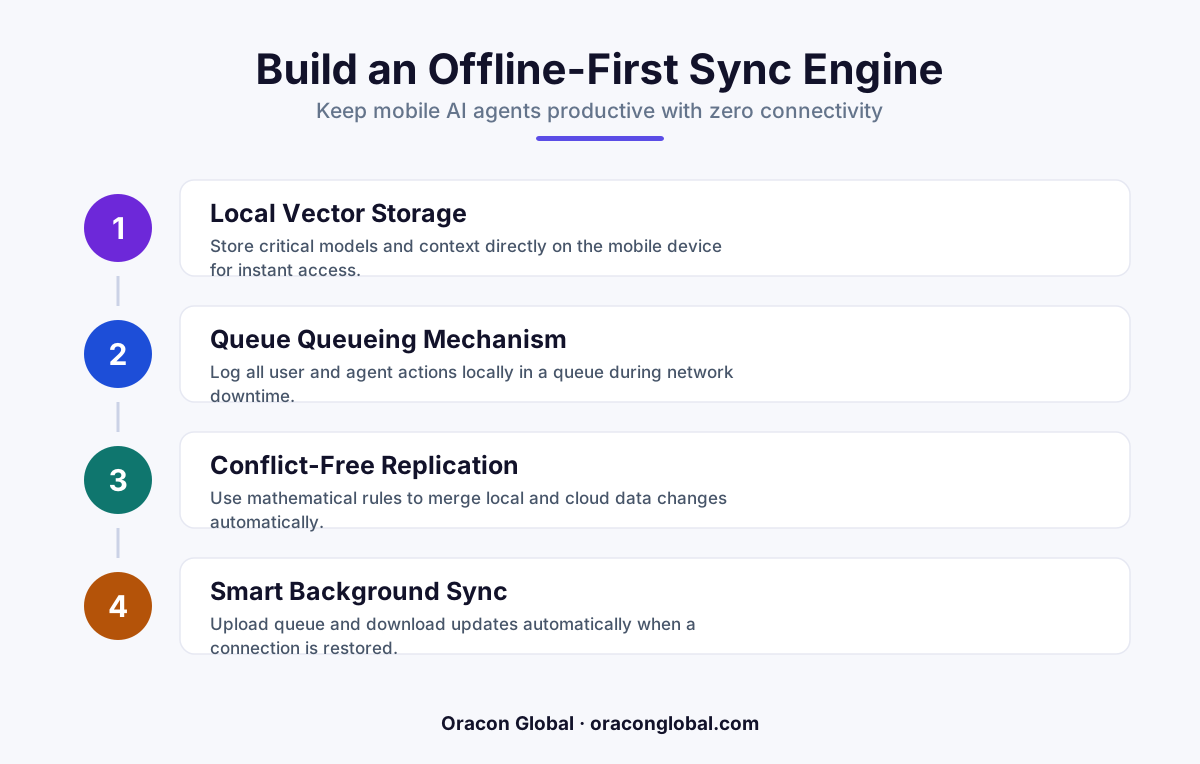
An offline-first sync engine allows mobile field apps to store data locally and run lightweight on-device AI models. When connectivity is restored, a conflict-free resolution protocol syncs the data back to central databases, preventing field inspectors from losing progress.
Conducting field inspections in remote areas, underground facilities, or industrial plants presents a major challenge for modern digital operations. Standard mobile applications rely heavily on a constant internet connection to fetch database records, validate inputs, and process workflows. When the connection drops, these apps freeze, data is lost, and field teams are left writing notes on paper.
The problem is even more complex when you introduce AI agents to assist inspectors. These agents need access to historical maintenance records, equipment manuals, and live decision trees to guide the technician on-site. If your app requires a persistent cloud connection to run these processes, your field agents become useless the moment a technician steps into a low-bandwidth zone.
To solve this, engineering teams must transition from cloud-dependent designs to an offline-first sync engine. By building local storage capabilities and intelligent data-reconciliation pipelines directly into your custom mobile apps, you can keep your field operations moving seamlessly, regardless of network availability.
The Core Challenge of Low-Bandwidth Field Inspections
Most enterprise apps are built on a request-response model. The user taps a button, the app sends an API call to the cloud, the database updates, and the app displays the result. In a remote field environment—like an offshore wind farm, an agricultural facility, or a deep basement—this model breaks down entirely.
When engineers attempt to patch this issue by simply adding a basic local cache, they quickly run into three major roadblocks:
- Stale Data Access: An inspector might be looking at an outdated equipment schematic because the local cache has not updated in days.
- Write Conflicts: Two technicians working in the same facility might update the same asset record while offline, resulting in overwritten data once they both reconnect.
- AI Agent Paralysis: If an AI agent relies entirely on cloud-hosted Large Language Models (LLMs) and vector databases, it cannot analyze photos, summarize notes, or suggest repair steps without a stable connection.
A true offline-first architecture flips this dynamic on its head. The local device, not the cloud server, is treated as the primary source of truth. All user actions and AI agent decisions are written immediately to a local database, and a synchronization layer quietly handles the cloud handshake in the background.
Step 1: Implementing a Local-First Database Layer
To build a robust offline-first sync engine, you must start with a reliable, lightweight local-first database running directly on the mobile device. This database must support fast read and write operations, local search queries, and binary data storage for photos and voice memos.
Common industry standards for local storage include SQLite, SQLCipher (for encrypted enterprise data), or document-based NoSQL engines like Couchbase Lite. The choice depends on your existing data structures, but the implementation rules remain the same:
First, structure your local schema to support version tracking. Every database table must include metadata columns for tracking changes. At a minimum, each row requires:
- A globally unique identifier (UUID) generated on the device, rather than an auto-incremented integer from the server.
- A timestamp showing when the record was last modified locally.
- A dirty flag or sync-state token (e.g.,
synced,pending_create,pending_update). - A version sequence number to track revisions.
Step 2: Designing the Delta Sync and Queueing Protocol
Sending your entire database back and forth over a weak cellular network is inefficient and costly. Your sync engine must rely on delta synchronization, which means transferring only the exact changes made since the last successful sync.
To do this, build an outbound change queue on the mobile device. When a field inspector completes a checklist or notes a defect, the action is saved locally and a corresponding event is added to the outbound queue.
The queue must act as a transactional log of events. If a connection is weak, the sync engine attempts to send the oldest events first. If the transfer fails midway, the queue pauses, preserves the remaining events, and resumes once the connection improves.
On the server side, you need a matching ingestion layer. The server receives the delta package, processes the transactions in the exact order they occurred, and returns an acknowledgment payload. Only when the mobile app receives this confirmation does it clear the successfully synced events from its local queue.
Step 3: Managing Conflicts with Deterministic Rules
When multiple technicians perform field inspections simultaneously without internet access, conflicting updates are inevitable. For example, Tech A might mark a pump as "Operational" at 10:15 AM while offline, while Tech B marks the same pump as "Needs Maintenance" at 10:17 AM while also offline.
To prevent data corruption, you need a clear conflict resolution strategy. The three most effective approaches for custom mobile apps are:
- Last-Write-Wins (LWW): A simple approach where the system compares the device-generated modification timestamps and keeps the newest change. While easy to build, it risks overwriting valuable human decisions if device clocks are out of sync.
- Conflict-Free Replicated Data Types (CRDTs): A mathematical approach where data structures are designed to merge automatically without conflicts. This is ideal for collaborative text fields or counter variables.
- Deterministic State Machines: A set of business rules that dictate which update takes priority. For example, a safety critical status change (like "Hazard Detected") always overrides an "Operational" status update, regardless of which came first.
Step 4: Running Light AI Agents on Low-Bandwidth Devices
If you want AI agents to assist your field team offline, you cannot rely entirely on API calls to massive frontier models. Instead, you need a hybrid architecture that splits the workload between the local device and the cloud.
For fully offline tasks, modern mobile chipsets are highly capable of running optimized, small-footprint language models locally on the device. These smaller models can handle basic structured tasks, such as:
- Parsing unstructured inspection notes into clean, structured database fields.
- Validating that all required safety steps have been documented before an inspector leaves a zone.
- Analyzing images locally to detect obvious wear, corrosion, or safety violations.
For more complex tasks requiring deeper reasoning, the AI agent can queue its requests locally. The agent writes its intent, prompt, and local context to the sync queue. Once the device detects a stable, high-bandwidth connection, the queue is pushed to your cloud backend, where larger models process the request and send the results back to the device.
Keep Your Field Operations Moving Forward
Building an offline-first sync engine is not just about keeping an app from crashing; it is about ensuring your operations never grind to a halt because of poor cellular coverage. When your custom mobile apps are designed to work independently of the cloud, your field teams remain productive, your data stays accurate, and your AI tools continue to deliver value in the real world.
At Oracon Global, our senior in-house engineering team specializes in building robust, production-grade applications, custom AI integrations, and advanced sync architectures tailored for demanding business environments. We write clean, resilient code, and our clients retain 100% ownership of their intellectual property.
If you are planning to build or upgrade your custom business applications to support reliable offline workflows, contact Oracon Global today to discuss how we can build a solution for your team.
Frequently asked questions
What is an offline-first sync engine for mobile apps?
It is a software architecture that saves data to a local database on the device first, allowing the app and its features to work without an internet connection, and then syncs with the cloud once a connection is restored.
Can AI agents run on a mobile device without internet?
Yes, by using optimized, small-footprint language models on the device or by queueing complex reasoning tasks locally until the device reconnects to a higher-bandwidth network.
How do you handle data sync conflicts when the app goes back online?
We use conflict-free replicated data types (CRDTs) or a deterministic, state-based reconciliation pipeline that compares timestamps and version tokens to merge changes without losing user input.
Do we need to rewrite our entire backend to support offline-first sync?
No. You can build a sync middleware layer on top of your existing APIs to manage the local database state, queue outgoing requests, and process delta updates.
Read next
Beyond Chatbots: How to Build AI Agents That Actually Do Work for Your Business
Most businesses use AI to answer questions. Here is how to build custom AI agents that actually take action, connect to your internal tools, and handle complex workflows.
Beyond the Wrapper: How to Build Custom AI Agents for Business That Actually Work
Many businesses invest in basic AI wrappers only to find they lack the security and context needed for real work. Here is how to build custom AI agents that integrate deeply with your workflows and databases.
Enterprise AI Maintenance Costs: Budgeting for Year Two and Beyond
Building an AI system is only half the battle. Discover the practical, ongoing operational costs of enterprise AI, including token management, model drift, and continuous security audits.
Oracon Global builds production-grade AI agents, automation and apps — and you own the code and IP. Tell us what you want to automate.
Book a call →See our work