

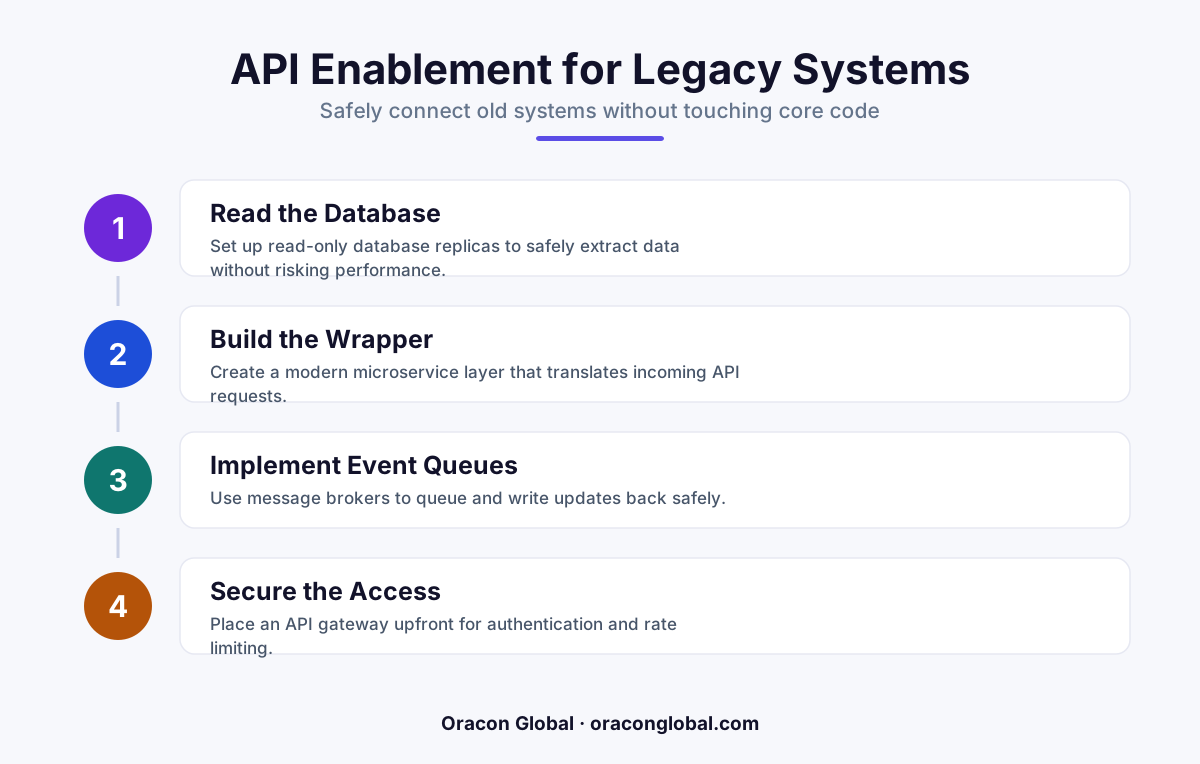
Old software can usually be given an API without rewriting it, by building a translation layer that sits on top of the system and speaks to it the way it already understands. This lets you connect legacy tools to modern apps, dashboards, and AI agents without risking the system that runs your business.
Most businesses have at least one system nobody wants to touch. It runs payroll, inventory, or scheduling. It has no documentation, the vendor stopped answering emails years ago, and somehow it still works. The problem is that it was never built to talk to anything else. No API, no export button that plays nice with modern software, nothing.
The good news: you almost never need to replace a legacy system to get it talking to modern apps or AI agents. You need to build a bridge around it. This is one of the most common problems we solve at Oracon, and it's rarely as risky or expensive as founders assume.
Why legacy systems resist connection
Old systems weren't designed badly. They were designed for a different world, one where software rarely needed to share data in real time with anything else. A few common blockers show up again and again:
- The system stores data in a proprietary or outdated database format with no public documentation.
- It only exposes information through a screen a human reads, not a format a computer can parse.
- It runs on infrastructure that's fragile enough that nobody wants to risk touching the original code.
- The original developers or vendor are gone, so there's no one to ask for help.
None of these problems mean the system is unreachable. They just mean you need a different way in than a modern app would normally expect.
Build a bridge, not a rebuild
The instinct many teams have is to migrate off the legacy system entirely. Sometimes that's the right call. But it's expensive, slow, and risky if that old system is quietly running something critical.
A safer and faster path is to leave the legacy system exactly as it is, and build a translation layer on top of it. This layer speaks to the old system in whatever language it understands, and speaks to your new tools, apps, or AI agents in a modern, standard way. Everything stays decoupled. If the bridge has an issue, the legacy system underneath is unaffected.
What this actually looks like in practice
There isn't one single technique. The right approach depends on how the legacy system stores and shares data. A few patterns we use most often:
- Database-level access. If the legacy system runs on a real database, even an old one, we can often connect directly to it (read-only first, always) and build an API on top that exposes clean, safe endpoints.
- File and report parsing. Many old systems export data as flat files, PDFs, or spreadsheets on a schedule. A pipeline can watch for these exports and automatically turn them into structured data other systems can use.
- Screen-level automation. When there's truly no other way in, a controlled automation layer can interact with the system's interface the way a person would, and expose the result as an API for everything else to use.
- Middleware translation. For systems with some limited connectivity, a middleware layer can convert their outdated formats (old XML structures, fixed-width files, custom protocols) into the modern JSON that today's apps and AI tools expect.
In most projects, it's a combination of these, chosen based on what's safest and least invasive for that specific system.
Why this matters more now than it used to
A legacy system with no API used to just be an annoyance. Now it's a bottleneck. If you want a mobile app for your field team, a dashboard for your operators, or an AI agent that can check inventory and answer a customer without a human typing it in manually, that legacy system needs to be part of the conversation. You can try Oracon's live AI demos on our site to see what this looks like once a system is properly connected, including how Aria, our site assistant, pulls and responds using structured data behind the scenes.
Once a bridge exists, a legacy system stops being a dead end and becomes just another data source. That opens up real possibilities:
- An AI agent can check stock levels in the old inventory system before promising a customer a delivery date.
- A new mobile app for your team can pull live scheduling data without anyone re-typing it.
- Reports that used to take a person half a day to compile can be generated automatically overnight.
What to watch for before you start
Not every bridge should be built the same way, and rushing this step causes more damage than the legacy system ever would on its own. A few things worth getting right from day one:
- Start read-only. Build the connection to pull data out safely before you ever let anything write back in.
- Rate-limit everything. Old systems weren't built for high-frequency requests. A bridge that hits it too hard can slow the whole business down.
- Log every interaction. If something goes wrong, you want a clear record of exactly what the bridge asked for and what it got back.
- Plan for change. Legacy systems sometimes get patched or updated without warning. A well-built bridge should fail loudly and safely, not silently feed bad data downstream.
Done carefully, this kind of project is far less disruptive than people expect, and it buys you years of runway before a full replacement is ever necessary.
You don't need to replace it to modernize it
The system running quietly in the background of your business probably isn't the problem. The absence of a way to talk to it is. Once that's solved, everything you've been putting off, new apps, automation, AI agents that actually do useful work, becomes possible without touching the thing that's kept your business running for years. Oracon's senior in-house team builds these kinds of bridges regularly, alongside the custom apps, AI agents, and automation that connect to them. If you're staring at a legacy system wondering whether it can ever be part of your modern stack, get in touch with Oracon Global and we'll walk you through what's actually possible.
Frequently asked questions
Can any legacy system be given an API, even really old ones?
Almost always yes. If a human can operate it or a report can be exported from it, there is usually a way to build a bridge around it, even if the original vendor is long gone.
Will adding an API mean changing our core legacy system?
No. The safest approach wraps the system from the outside, leaving its original code, database, and logic untouched.
How long does it usually take to build this kind of bridge?
It depends on how the legacy system exposes data (database, files, screen, or reports), but most bridges are scoped and built faster than a full system replacement, often in weeks rather than years.
Does this let us connect AI agents to old software?
Yes. Once a legacy system has a reliable API layer, AI agents and automation tools can read from and write to it safely, without needing direct access to fragile internal code.
Read next
Beyond Chatbots: How to Build AI Agents That Actually Do Work for Your Business
Most businesses use AI to answer questions. Here is how to build custom AI agents that actually take action, connect to your internal tools, and handle complex workflows.
Beyond the Wrapper: How to Build Custom AI Agents for Business That Actually Work
Many businesses invest in basic AI wrappers only to find they lack the security and context needed for real work. Here is how to build custom AI agents that integrate deeply with your workflows and databases.
Enterprise AI Maintenance Costs: Budgeting for Year Two and Beyond
Building an AI system is only half the battle. Discover the practical, ongoing operational costs of enterprise AI, including token management, model drift, and continuous security audits.
Oracon Global builds production-grade AI agents, automation and apps — and you own the code and IP. Tell us what you want to automate.
Book a call →See our work