

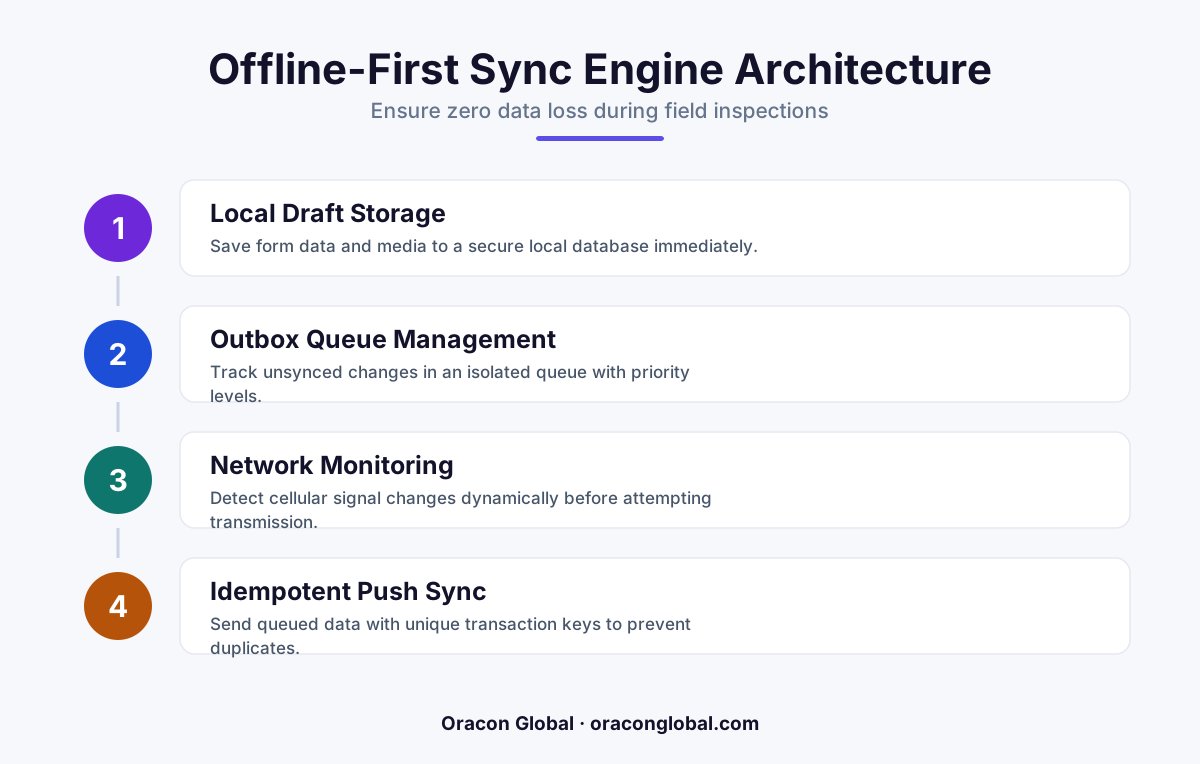
Standard out-of-the-box database sync tools fail when complex mobile forms, high-resolution media, and multi-vendor backend APIs collide on unstable networks. By building a custom push synchronization engine with local transactional queuing and state tracking, business operators can ensure zero data loss during remote field operations.
Field operations are the backbone of industries ranging from energy and construction to logistics and property management. Inspectors, technicians, and safety auditors travel to remote sites to log critical compliance data, take high-resolution photos, and record equipment metrics. However, these remote sites often share one frustrating characteristic: terrible cellular coverage.
When field teams use mobile applications built on standard, out-of-the-box database replication tools, a dropped signal usually means one of two things. Either the application freezes entirely, forcing the worker to wait for a signal, or it silently fails to save the data, resulting in lost inspections, duplicated work, and compliance headaches. To prevent these issues, engineering teams need to look beyond basic offline-first frameworks and build a custom multi-vendor push synchronization engine.
The Hidden Trap of Standard Offline Sync Tools
Many mobile app development projects start with a simple premise: use a standard offline library to sync local device storage with a cloud database. While this works beautifully in clean office environments with perfect Wi-Fi, it falls apart in the real world of field inspections.
Standard offline syncing solutions typically try to replicate the entire database state between the device and the server. When an inspector fills out a complex, multi-page compliance form and attaches five high-resolution site photographs, the payload becomes massive. If the network connection drops halfway through this heavy sync process, standard tools often discard the progress and try to restart the entire sync from scratch once a signal reappears. This constant looping drains the device battery, consumes unnecessary cellular data, and frequently ends with timed-out connections.
Furthermore, modern enterprise operations rarely rely on a single database. A typical field inspection might need to send labor hours to an ERP system, update safety logs in a compliance database, and push equipment photos to a cloud storage bucket. Standard replication tools are simply not designed to coordinate structured data writes across multiple, distinct vendor APIs over an unstable connection.
Anatomy of a Resilient Multi-Vendor Push Sync Engine
To keep your native mobile apps reliable in dead zones, the synchronization architecture must treat every form submission as a transactional event. Instead of replicating database states, the app must capture human actions as local, immutable events and queue them for delivery.
A custom push synchronization engine relies on three core architectural pillars to manage this process safely:
- The Local Transactional Outbox: When an inspector taps "Submit," the mobile app saves the completed form and its associated metadata to a secure, local SQLite database on the device. This write happens instantly, regardless of whether the phone has a signal. The submission is tagged as "Pending Sync" and assigned a unique, cryptographic transaction ID.
- The Payload Splitter and Media Queue: To prevent heavy attachments from blocking critical text data, the engine splits the submission. The text form data is packaged into a small, lightweight JSON payload, while heavy media files are routed to a background upload queue that utilizes chunked file transfers.
- The Sequential Push Coordinator: A dedicated synchronization service monitors the network state. When a stable connection is detected, the coordinator processes the queue sequentially. It delivers the lightweight form data first, receives a receipt confirmation from the backend, and then begins uploading the associated media files in the background.
Designing the Backend Coordination Layer
Once the mobile app successfully pushes the data packet off the device, a centralized backend coordination layer takes over. This layer acts as a traffic controller, ensuring that the single form submission is parsed, validated, and distributed to your various third-party databases and vendor APIs without conflict.
Step 1: Idempotency Validation
On spotty networks, mobile apps frequently retry uploads because they did not receive a confirmation packet back from the server, even though the server actually received the data. To prevent duplicate records in your databases, the backend coordination layer must run an idempotency check. It inspects the unique transaction ID of each incoming payload; if that ID has already been processed, the backend simply sends a success receipt back to the device and discards the duplicate write.
Step 2: Schema Translation and Distribution
Once validated, the coordination engine maps the unified mobile payload to the specific schemas required by your external vendors. It translates the field data into a format your ERP can read, updates your safety compliance database, and links the URLs of the successfully uploaded media files directly to those newly created records.
Step 3: Asynchronous Error Isolation
If one vendor API is down or experiencing lag, the push synchronization engine must not halt the entire queue. By using isolated queues for each target vendor, the system can write to your primary databases immediately while safely holding the pending updates for the struggling third-party API in a retry queue. The field worker's app shows a successful sync because their data is safe in your cloud, while the backend handles the downstream integration retries quietly.
Improving the Field Worker Experience
A technical solution is only as good as the user experience it supports. When designing field inspection mobile apps, the user interface must reflect the actual status of the sync engine without causing anxiety or confusion for the non-technical staff using the software.
First, never lock the user interface during a sync event. Inspectors should be able to complete a form, hit save, and immediately move on to their next task. The application should handle the queue quietly in the background.
Second, provide clean, visual cues that display the status of the sync queue. A simple, unobtrusive status bar indicating "3 forms saved locally, syncing in background" gives workers confidence that their hard work is safe on their device and will upload automatically as soon as they drive back into cell range.
Building Custom Software That Endures
Off-the-shelf sync tools are excellent for simple consumer apps, but enterprise field operations demand a higher level of predictability and resilience. Designing a custom push synchronization engine ensures that your critical business data survives the realities of remote work sites, bad weather, and spotty cellular networks.
At Oracon Global, our senior in-house engineering team designs and builds robust, custom mobile and web applications, AI-native systems, and advanced database architectures. We deliver production-grade software that is engineered to handle real-world challenges, with 100% of the code and intellectual property owned entirely by you.
If you are ready to eliminate data loss from your field operations and build a mobile architecture that keeps your business moving forward, contact Oracon Global today to discuss your next custom development project.
Frequently asked questions
Why do standard offline database tools fail during complex field inspections?
Standard tools sync entire database tables blindly, which leads to merge conflicts, failed media uploads, and timed-out connections when handling complex forms across multiple backend vendor APIs.
What is a custom push synchronization engine?
It is a dedicated middleware layer that queues local mobile app changes, serializes them into transactional payloads, and pushes them sequentially to various third-party databases only when a stable connection is verified.
How does this architecture handle large files like inspection photos?
It separates raw data from heavy media, saving form text to a local transactional queue immediately while chunking and uploading media files in a background worker thread that resumes automatically upon reconnection.
Can this system integrate with legacy enterprise resource planning platforms?
Yes, because the custom sync layer processes payloads before they hit your core databases, translating mobile inputs into clean, schema-compliant formats that legacy systems can ingest without crashing.
Read next
Beyond Chatbots: How to Build AI Agents That Actually Do Work for Your Business
Most businesses use AI to answer questions. Here is how to build custom AI agents that actually take action, connect to your internal tools, and handle complex workflows.
Beyond the Wrapper: How to Build Custom AI Agents for Business That Actually Work
Many businesses invest in basic AI wrappers only to find they lack the security and context needed for real work. Here is how to build custom AI agents that integrate deeply with your workflows and databases.
Enterprise AI Maintenance Costs: Budgeting for Year Two and Beyond
Building an AI system is only half the battle. Discover the practical, ongoing operational costs of enterprise AI, including token management, model drift, and continuous security audits.
Oracon Global builds production-grade AI agents, automation and apps — and you own the code and IP. Tell us what you want to automate.
Book a call →See our work