

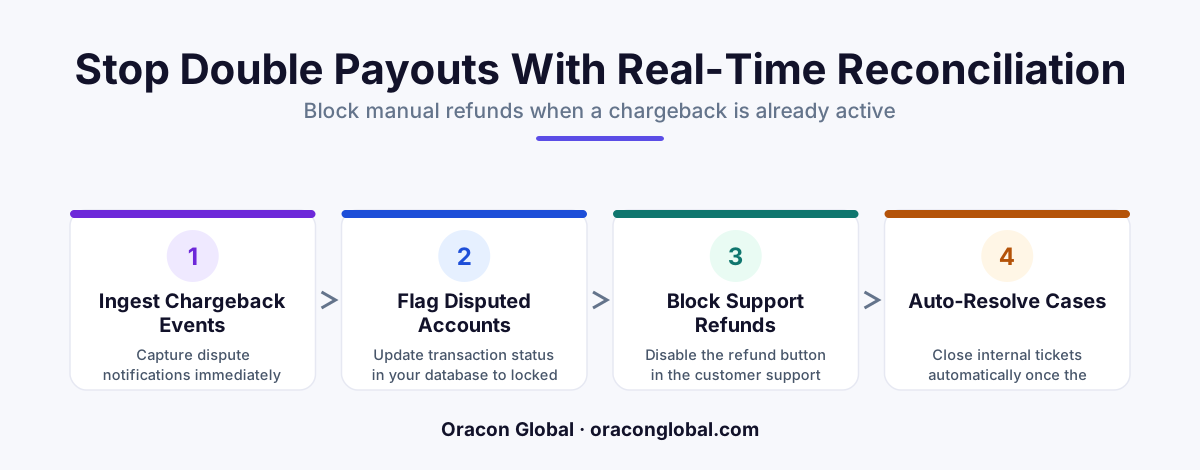
When a customer disputes a charge, your merchant processor instantly locks the funds, yet support teams often refund the customer to resolve a complaint. By building a real-time reconciliation pipeline, you can automatically lock the refund action in your CRM or helpdesk the moment a dispute is initiated.
It is a scenario that plays out daily in high-volume e-commerce, SaaS, and subscription businesses. A frustrated customer files a chargeback with their credit card issuer because of a billing dispute or a shipping delay. The bank immediately clawbacks the funds from your merchant account, places a hold on the capital, and levies a chargeback fee against your business.
Unaware that the bank has already intervened, the customer contacts your customer support team demanding a refund. Seeking to resolve the issue quickly and maintain a high satisfaction score, a helpful support agent processes a manual refund in your helpdesk or billing portal.
Just like that, your business has been "double-looted." You have lost the original transaction amount to the chargeback, lost it again to the manual refund, paid a non-refundable merchant dispute fee, and lost the inventory. To stop this leaky bucket, operations teams need a chargeback reconciliation pipeline that bridges the gap between payment gateways and support desks in real-time.
The Cost of Siloed Payment and Support Data
Most customer support platforms do not communicate natively with payment gateways. A support ticket in Zendesk, Salesforce, or HubSpot exists independently of the transaction records in Stripe, Adyen, or Braintree. This lack of connection creates a dangerous visibility gap.
When a dispute is filed, the bank gives merchants a window to respond with evidence. While that dispute is active (under investigation), the transaction state changes. However, because this state change occurs inside the merchant account dashboard—where customer support agents rarely have access for security and compliance reasons—the agents act on stale customer data.
Implementing a real-time payment audit system ensures that any change in transaction status is immediately reflected where your front-line team works. By automating this data sync, you remove human error from the equation and protect your operating margins.
Architecting a Real-Time Reconciliation Pipeline
Building a robust pipeline to prevent duplicate refunds does not require replacing your legacy software. Instead, you can construct an event-driven middleware layer that translates payment events into support actions.
Step 1: Webhook Ingestion and Normalization
The pipeline starts at your payment gateway. Every major payment processor emits webhook events when a transaction is disputed, updated, or closed. Your pipeline must listen for specific event payloads, such as Stripe’s charge.dispute.created or Adyen’s CHARGEBACK notification.
Because payment gateways structure their payloads differently, a normalization layer is necessary. This layer extracts standard fields regardless of the source vendor:
- Transaction ID: The original reference number.
- Dispute Status: Active, Won, Lost, or Under Investigation.
- Customer Identifier: Email address, metadata ID, or account number.
- Disputed Amount: The exact financial value on hold.
Step 2: The State Resolution Engine
Once normalized, the pipeline queries your internal database or ERP to locate the corresponding customer record and active support tickets. This matching process must happen within milliseconds. If a customer is chatting live with an agent, any delay in status propagation could result in a premature refund.
Step 3: Executing the Support Guardrail
Once the system matches the dispute to an active customer, it must restrict manual refunds. Rather than relying on agents to read a text-based warning banner, the pipeline should programmatically enforce the rule. Depending on your support architecture, the pipeline can:
- Disable the Refund Button: Modify the interface of your custom admin panel or helpdesk app to grey out the refund action for that specific transaction.
- Inject an Imperative System Note: Create an automated, high-priority ticket internal note stating that a chargeback is underway and manual refunds are locked.
- Route to a Specialist: Automatically reassign the ticket to a billing operations specialist trained in customer support exception handling.
Handling Edge Cases and API Failures
A production-ready pipeline must be resilient to network drops and out-of-order messages. If your gateway sends a dispute event, but your support CRM is undergoing scheduled maintenance, the event must not be lost.
To prevent this, place an event queue (such as RabbitMQ or AWS SQS) between your webhook ingestion endpoint and the state resolution engine. If your support platform API rate-limits your calls or goes offline, the queue retries the delivery using an exponential backoff strategy, ensuring that eventual consistency is maintained.
Additionally, the pipeline must handle resolved disputes. If your business wins the chargeback, or if the customer withdraws the dispute, the system must receive the updated event (e.g., charge.dispute.closed) and safely unlock the transaction state in your support tools, returning autonomy to your agents.
Improving Your Billing Operations Automation
Plugging the double-refund leak is only the first step. Once you have a real-time data pipeline feeding payment states into your customer databases, you can expand its utility to optimize your entire chargeback response process.
For instance, your pipeline can automatically compile the transaction logs, shipping tracking data, and customer communication histories needed to fight fraudulent chargebacks. Instead of having an operations manager manually hunt for evidence across three different dashboards, the system can package these details and submit them directly back to the payment API.
Partnering with Experts to Build Custom Workflows
While the logic behind a reconciliation pipeline is straightforward, building resilient integrations between payment gateways, ERPs, and legacy CRMs requires deep engineering expertise. Off-the-shelf software rarely fits the unique database schemas and operational workflows of growing enterprises.
At Oracon Global, our senior in-house development team builds robust, custom software, AI agents, and workflow automations tailored to your exact business specifications. We construct secure pipelines that keep your data in sync, protect your revenue, and ensure you retain 100% ownership of your code and intellectual property.
Ready to secure your payment workflows and eliminate manual support errors? Contact Oracon Global today to discuss how we can build a custom integration pipeline for your operations team.
Frequently asked questions
Why do support agents issue refunds on active chargebacks?
Support platforms and payment gateways are often siloed, meaning agents cannot see that a customer has already initiated a formal dispute with their bank when reviewing a ticket.
What is double-looting in payment processing?
It is a financial loss occurrence where a merchant loses funds twice for a single transaction: first through the bank-allocated chargeback and second through a manual refund issued by an agent.
How does a real-time reconciliation pipeline prevent duplicate refunds?
It listens to webhook events from your payment processor (like Stripe or Adyen) and instantly flags, disables, or redirects corresponding refund requests in your helpdesk or ERP.
Do we need to rewrite our entire billing system to fix this?
No, you can build a lightweight, event-driven middleware bridge that connects your existing payment gateway webhooks directly to your customer support platform APIs.
Read next
Beyond Chatbots: How to Build AI Agents That Actually Do Work for Your Business
Most businesses use AI to answer questions. Here is how to build custom AI agents that actually take action, connect to your internal tools, and handle complex workflows.
Beyond the Wrapper: How to Build Custom AI Agents for Business That Actually Work
Many businesses invest in basic AI wrappers only to find they lack the security and context needed for real work. Here is how to build custom AI agents that integrate deeply with your workflows and databases.
Enterprise AI Maintenance Costs: Budgeting for Year Two and Beyond
Building an AI system is only half the battle. Discover the practical, ongoing operational costs of enterprise AI, including token management, model drift, and continuous security audits.
Oracon Global builds production-grade AI agents, automation and apps — and you own the code and IP. Tell us what you want to automate.
Book a call →See our work