

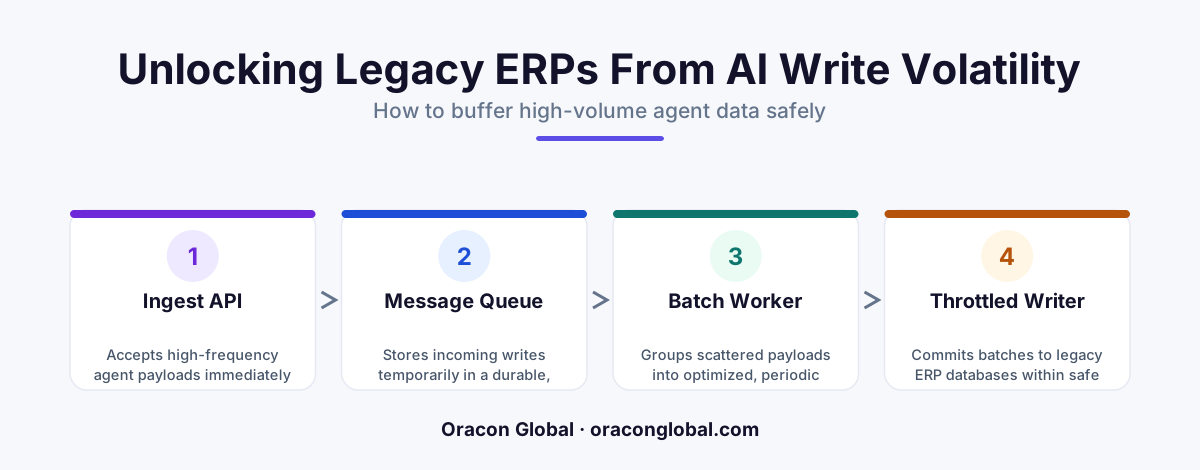
When autonomous AI agents write to legacy ERP systems at machine speed, they easily lock database transaction logs and freeze core business operations. Building a real-time API payload buffer decouples the AI write-volume from the database, organizing incoming data into safe, throttled batches. This approach keeps your old software running reliably while allowing your modern AI workers to operate at full capacity.
Autonomous AI agents can process unstructured business documents, reconcile invoices, and update inventory states in milliseconds. However, when these high-speed digital workers attempt to write that data back to a legacy ERP system, a silent bottleneck often emerges: database transaction log locks.
Legacy ERP systems were built with human operational speeds in mind. They expect data to arrive at the rate of customer service reps typing on keyboards or warehouse staff scanning barcodes. When an AI agent attempts to execute hundreds of concurrent writes per second, the legacy database's transaction log fills up, tables lock, and the entire business system grinds to a halt. To prevent this, engineering teams must decouple the AI agent's execution speed from the ERP database's intake capacity using a real-time API payload buffer.
Understanding the Transaction Log Bottleneck
Every reliable relational database relies on a transaction log to guarantee data integrity. Before any change is permanently written to a database table, it is recorded in the transaction log. This ensures that if the system crashes mid-update, the database can recover safely.
When an AI agent performs AI agent database writes on legacy systems, it often triggers complex cascades of database triggers, index updates, and foreign key validations. If the AI agent sends too many parallel requests, the following issues occur:
- Row and Table Locking: The database locks specific records to prevent concurrent updates from corrupting data. High-volume AI writes cause these locks to pile up, blocking other users and processes.
- Transaction Log Saturation: The physical disk space allocated for database logs fills up faster than the database can flush transactions to disk, halting all incoming write operations.
- API Timeout Spirals: As the database slows down, the AI agent's connection pools exhaust themselves waiting for responses, leading to dropped tasks and expensive reprocessing loops.
Upgrading a legacy ERP system to handle modern concurrent loads is rarely an option due to high costs, risk of data loss, and vendor lock-in. The practical solution is to build an intermediary layer that manages the flow of incoming data.
The Architecture of a Real-Time API Payload Buffer
An API payload buffer acts as a shock absorber between your high-speed AI tools and your legacy database. Instead of allowing the AI agent to call the ERP database directly, all write operations are routed through a dedicated middleware buffer. This buffer accepts payloads instantly, acknowledges the receipt to the AI agent, and then writes the data to the ERP at a rate the legacy system can safely handle.
1. The Ingestion Queue
The first component of the buffer is a lightweight, memory-efficient ingestion queue. This queue must have exceptionally high write throughput. Tools like Redis or RabbitMQ work perfectly here. When the AI agent completes an automated task, it posts the payload to this queue. Because the queue does not perform heavy relational schema validations, it can accept thousands of writes per second without breaking a sweat, instantly freeing the AI agent to move on to its next task.
2. The Batching and Throttling Engine
Rather than sending messages to the legacy ERP one by one, the buffer groups individual payloads into small, optimized batches. For instance, if an AI agent processes 500 invoices, the buffer might group them into 10 batches of 50. A throttling mechanism then releases these batches to the ERP at a controlled interval—such as one batch every two seconds—ensuring the transaction log has ample time to flush to disk between writes.
3. The Fail-Safe State Store
What happens if the legacy ERP goes offline or rejects a specific batch due to a schema error? The buffer must include a persistent state store. If a write fails, the buffer holds the payload, marks it for retry, and alerts operators without losing the data. This guarantees 100% data preservation, even when legacy systems suffer unexpected downtime.
How to Implement a Payload Buffer Without Latency Spikes
A common concern with buffering is that business data might become stale. If a customer changes an address or an inventory count drops to zero, operators need to see that change quickly. Building an efficient buffer requires balancing database safety with real-time visibility.
To achieve near real-time updates without locking your legacy ERP, your buffer should employ dynamic write-coalescing. If multiple updates occur on the same database record within a short window, the buffer merges them, executing only the final state write to the database.
This approach drastically reduces transaction volume. For example, if an AI pricing agent recalculates a product's price four times in one minute based on shifting competitor data, the buffer only sends the final, stabilized price to the legacy ERP, saving three unnecessary transaction log writes.
Key Benefits of Decoupling AI and Legacy ERP Integration
By placing a real-time buffer between your modern AI agents and your legacy ERP integration, you unlock several structural advantages for your business software architecture:
- Guaranteed Legacy System Stability: Your accounting, logistics, and inventory teams can use the ERP all day without experiencing freezes or slowdowns caused by background AI operations.
- Reduced LLM and Infrastructure Costs: AI agents do not have to waste expensive API tokens waiting for slow database responses or retrying failed transactions.
- Simplified System Maintenance: If your ERP needs to go offline for routine maintenance, the payload buffer simply stores the incoming writes and processes them automatically once the ERP is back online.
Partner with Oracon Global for Resilient AI Integrations
Integrating modern AI agents into legacy business software requires deep engineering experience. Without the right middleware, high-volume automation can easily destabilize the core databases that keep your business running.
At Oracon Global, our senior in-house team specializes in building custom AI-native ERP systems, workflow automations, and resilient API architectures that safely bridge the gap between cutting-edge AI and your existing business infrastructure. We build custom solutions tailored precisely to your operational needs, and our clients retain 100% ownership of their code and intellectual property.
Ready to scale your AI operations without risking your database stability? Contact the engineering team at Oracon Global today to discuss your integration needs.
Frequently asked questions
Why do AI agents lock legacy ERP transaction logs in the first place?
Legacy ERP systems were designed for human data entry speeds. AI agents process files, invoices, and updates in parallel, executing hundreds of database writes per second, which exhausts the transaction log capacity and locks tables.
What is a real-time API payload buffer?
It is an intermediary software layer that intercepts high-volume API requests from AI agents, stores them temporarily in a highly durable queue, and feeds them to the legacy ERP at a controlled, safe rate.
Will introducing a buffer cause critical business data to become stale?
No. A well-designed buffer operates in near real-time, holding payloads for only milliseconds or seconds to group them into optimized batch writes, ensuring your ERP remains updated without freezing up.
Do we need to rewrite or upgrade our entire legacy ERP to implement this?
Not at all. The API payload buffer lives entirely outside your ERP as a middleware layer, meaning you do not have to modify your core legacy database schemas or pay for expensive system upgrades.
Read next
Beyond Chatbots: How to Build AI Agents That Actually Do Work for Your Business
Most businesses use AI to answer questions. Here is how to build custom AI agents that actually take action, connect to your internal tools, and handle complex workflows.
Beyond the Wrapper: How to Build Custom AI Agents for Business That Actually Work
Many businesses invest in basic AI wrappers only to find they lack the security and context needed for real work. Here is how to build custom AI agents that integrate deeply with your workflows and databases.
Enterprise AI Maintenance Costs: Budgeting for Year Two and Beyond
Building an AI system is only half the battle. Discover the practical, ongoing operational costs of enterprise AI, including token management, model drift, and continuous security audits.
Oracon Global builds production-grade AI agents, automation and apps — and you own the code and IP. Tell us what you want to automate.
Book a call →See our work