

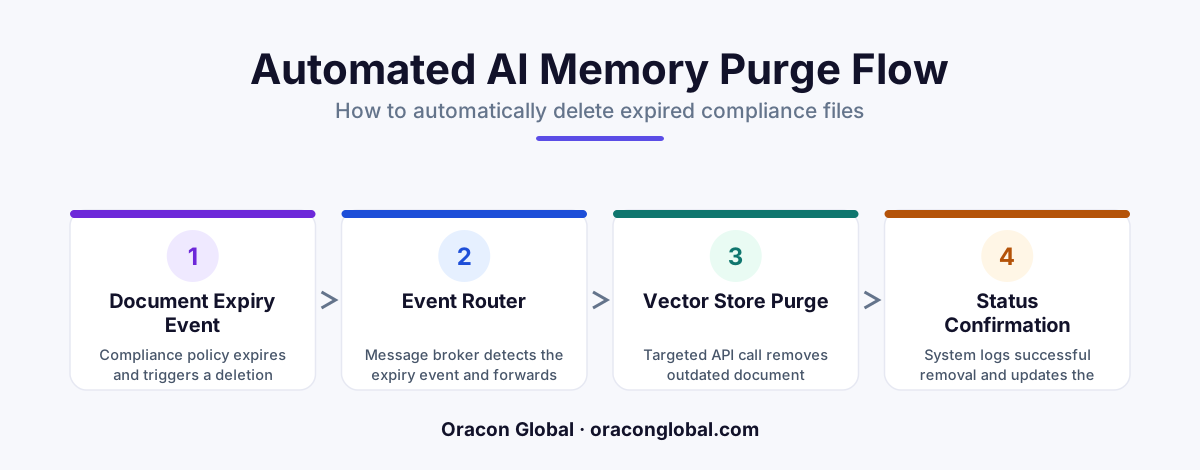
Leaving expired regulatory and compliance files in your vector databases degrades AI accuracy and exposes your business to liability. By building an event-driven lifecycle pipeline, you can automatically track document expiration dates and purge stale vector embeddings without manual database maintenance.
When businesses build custom artificial intelligence systems to handle regulatory compliance, contract management, or internal operations, they invest heavily in setting up robust retrieval-augmented generation (RAG) pipelines. These systems convert complex PDFs, policy manuals, and audit sheets into mathematical representations called vector embeddings. These embeddings are stored in AI memory stores, allowing your AI agents to retrieve the exact information they need in seconds.
But what happens when a compliance document expires? In industries governed by strict regulatory frameworks like healthcare, finance, or international trade, keeping outdated policy documents in your active AI memory is a massive liability. If a customer-facing or internal AI agent retrieves advice from an expired 2024 compliance file instead of the active 2026 version, your business faces immediate operational and legal risks. To prevent this, you need a system that handles data destruction as seriously as data ingestion.
Building an event-driven vector lifecycle pipeline is the most reliable way to automatically purge expired compliance documents from your AI memory stores. Here is how to design and implement a zero-maintenance cleanup architecture.
The Hidden Danger of "Zombie" Vectors
Many product teams assume that deleting a source PDF from their cloud storage bucket automatically updates their AI. It does not. The vector database retains the embedded text fragments indefinitely unless a specific deletion command is issued directly to that database.
These orphaned embeddings, or "zombie vectors," cause two main issues:
- Hallucinations and Stale Information: If your AI agent performs a semantic search, it may pull matching text chunks from both active and expired compliance documents. The system will merge these conflicting sources, leading to incorrect outputs.
- Compliance and Privacy Violations: Data privacy regulations like GDPR and HIPAA require companies to destroy sensitive customer or operational data after a set period. Holding onto these records inside a vector database violates these retention policies.
To keep your AI accurate and legally compliant, you must establish automated vector database management practices that treat vector data as temporary, ephemeral assets with strict expiration dates.
The Architecture of an Event-Driven Lifecycle Pipeline
A manual approach to vector cleanup—such as running a nightly cron job to search and destroy old entries—is highly inefficient. It subjects your database to heavy, slow scan queries during peak hours and leaves a dangerous window where expired documents remain searchable. An event-driven architecture solves this by acting instantly when a document expires.
A resilient vector lifecycle pipeline relies on three core components:
1. Metadata Tagging at Ingestion
Every time a compliance document is parsed and chunked, you must tag the resulting vectors with explicit metadata. Do not rely solely on the raw text. Your ingestion worker must write metadata tags directly to the vector payload, including:
document_id: A unique identifier linking back to your relational database.expiration_timestamp: An ISO 8601 UTC timestamp defining exactly when the document becomes invalid.document_type: A category tag (e.g., "regulatory_policy" or "vendor_contract") to allow for bulk updates if rules change.
2. The Event Queue and Scheduler
Instead of scanning the entire vector database to find expired files, use a dedicated scheduler. When a document is uploaded, your backend calculates its expiration date and publishes a delayed event to an event queue or a serverless scheduling engine. This event contains the target document_id and is scheduled to trigger at the exact moment of expiration.
3. The Purge Worker
When the expiration event fires, a lightweight, serverless purge worker consumes the message. This worker executes a targeted delete operation against the vector database using the document_id metadata filter. Because it targets specific IDs, the operation is instantaneous and bypasses the need for expensive, database-wide scans.
Step-by-Step: Implementing the Cleanup Workflow
Building this automated pipeline requires a clear separation of concerns between your application logic, your storage layer, and your AI memory. Here is how the workflow operates under the hood:
- Document Registration: A compliance officer uploads a new PDF to your internal portal. Your system saves the document record in a relational database like PostgreSQL, logging a hard expiration date of December 31st.
- Vectorization & Injection: Your document parser splits the PDF into semantic chunks, generates embeddings using an LLM, and writes them to your vector store. Crucially, each chunk is saved with the metadata field:
{ "doc_id": "pdf_987", "expires_at": 1798761600 }. - Event Scheduling: Your backend registers a delayed message in your event framework, set to execute on December 31st at midnight UTC.
- Trigger and Purge: At the scheduled millisecond, the event fires. The purge worker receives the payload
{ "target_id": "pdf_987" }and runs a hard delete command:db.delete(filter={"doc_id": "pdf_987"}). - Verification: The worker logs the successful removal to your audit trails, ensuring your compliance team has cryptographic proof of data destruction.
Optimizing Performance and Minimizing Index Rebuild Costs
Vector databases construct complex index trees to allow for rapid similarity searches. Frequently writing and deleting individual vectors can cause index fragmentation, occasionally degrading search speeds or increasing cloud computing costs.
To keep your databases running efficiently, consider grouping your deletions if you handle high volumes of documents. Instead of firing thousands of individual deletion API calls throughout the day, your event queue can collect expired document IDs and execute a single, batch-based delete payload every hour. This keeps your search indices stable while ensuring expired data is removed within a tight, highly acceptable compliance window.
Keep Your AI Memory Lean and Secure
Automating your data lifecycle is no longer optional. As businesses transition from simple chatbots to autonomous AI digital employees that write to databases, make decisions, and interact with customers, keeping stale, incorrect data out of your AI's reach is critical. Implementing data privacy automation at the database level ensures your AI remains grounded only in the most accurate, up-to-date guidelines.
At Oracon Global, our senior in-house team builds custom AI agents, production-grade RAG systems, and AI-native apps that work reliably at scale. We design robust database structures and workflow automations that keep your intellectual property secure, clean, and fully under your control. Every line of code we write is 100% owned by you.
Want to ensure your AI applications are built on safe, production-grade architecture? Contact Oracon Global today to discuss how we can build or optimize your custom AI setup.
Frequently asked questions
Why can't I just run a daily script to delete expired vectors?
Daily batch scripts are resource-heavy and create a lag window where expired, highly sensitive compliance data remains searchable by your AI agents. An event-driven pipeline purges data the exact minute it expires.
Does deleting a document from our cloud storage automatically delete it from our vector database?
No. Unless you build an explicit sync or event-driven pipeline, the vector database will retain the mathematical embeddings, allowing your AI to retrieve and recall information from deleted files.
How do we track when a specific vector embedding is set to expire?
You must store expiration timestamps and compliance metadata directly within the vector payload or link the vector ID to a relational database record that manages the document's lifecycle.
Will deleting expired vectors slow down our active AI applications?
Direct, ID-based deletes in modern vector databases are highly efficient and will not degrade performance. In fact, keeping your vector database lean improves search speed and retrieval accuracy.
Read next
Beyond Chatbots: How to Build AI Agents That Actually Do Work for Your Business
Most businesses use AI to answer questions. Here is how to build custom AI agents that actually take action, connect to your internal tools, and handle complex workflows.
Beyond the Wrapper: How to Build Custom AI Agents for Business That Actually Work
Many businesses invest in basic AI wrappers only to find they lack the security and context needed for real work. Here is how to build custom AI agents that integrate deeply with your workflows and databases.
Enterprise AI Maintenance Costs: Budgeting for Year Two and Beyond
Building an AI system is only half the battle. Discover the practical, ongoing operational costs of enterprise AI, including token management, model drift, and continuous security audits.
Oracon Global builds production-grade AI agents, automation and apps — and you own the code and IP. Tell us what you want to automate.
Book a call →See our work