

When employees edit shared documents, your AI digital employees instantly become out of sync. By building an event-driven chunking pipeline triggered by webhook events from your storage provider, you can automatically re-chunk, re-vector, and update your enterprise knowledge base without manual oversight.
When an operations manager updates a shipping price sheet on a shared drive, they expect the company’s systems to reflect that change instantly. However, if your business relies on a standard Retrieval-Augmented Generation (RAG) setup, that edit might not reach your AI digital employees until a scheduled batch run occurs overnight. For several hours, your AI assistant is actively quoting outdated rates to high-value clients.
Most enterprise RAG installations suffer from a freshness problem. They treat corporate knowledge bases as static libraries rather than living, breathing documents. To build AI tools that operators and customer support teams can actually trust, you need a real-time document chunking pipeline that automatically updates your dynamic vector database sync pipeline the moment a file is saved.
The Problem with Nightly Batch Processing
The standard industry workaround for updating an AI's context window is the nightly batch job. Every evening at midnight, a script scrapes your shared directories, splits every document into paragraphs (chunking), generates mathematical representations of those paragraphs (vectors), and uploads them to a vector database.
This approach introduces three distinct operational points of failure:
- The Stale Data Gap: Throughout the business day, your team is making hundreds of micro-edits to contract templates, inventory sheets, and compliance checklists. Your AI operates in a state of permanent lag.
- High Computational Overhead: Re-processing thousands of pages of static text every night wastes immense computing power and API tokens on files that have not changed in months.
- Query Collision: If a major batch upload fails or stalls midway through, the AI's search capabilities become fragmented, leading to broken responses and hallucinations.
To eliminate these issues, we must shift from scheduled batching to an event-driven, real-time architecture that targets only the modified sections of a document.
Architecture of an Event-Driven Chunking Pipeline
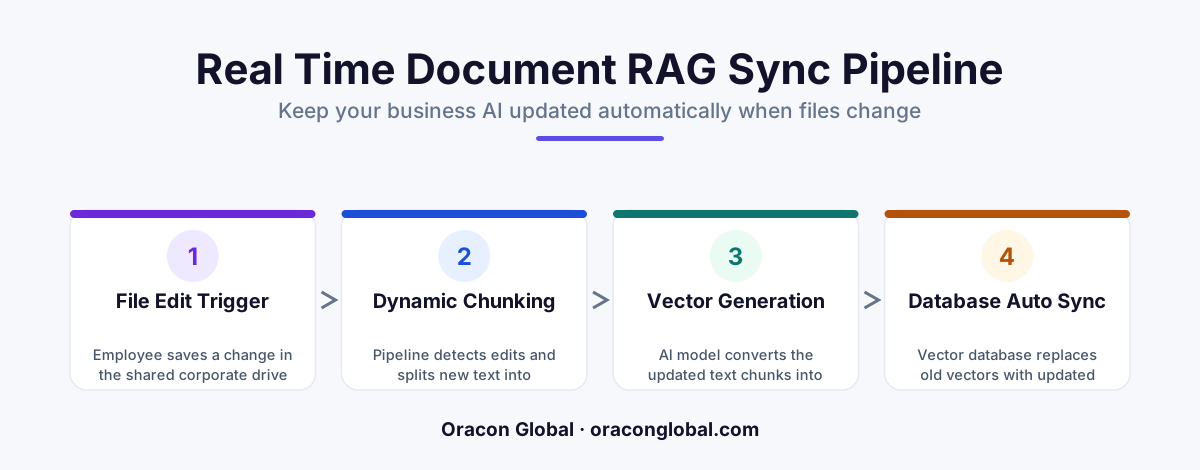
A resilient real-time pipeline treats every document edit as a distinct event. Instead of sweeping entire folders, the system listens for precise signals from your cloud storage providers, processes only what is necessary, and performs atomic updates. Here is how the workflow operates:
Step 1: Listening to File Storage Webhooks
Whether your team uses Google Workspace, Microsoft OneDrive, or a custom internal wiki, these platforms expose webhooks for file modifications. When an employee hits save, the storage API sends a lightweight payload to your backend gateway indicating that a specific file ID has changed.
Step 2: Intelligent Delta Detection
Before running expensive parsing models, the pipeline fetches the modified file and runs a quick cryptographic hash comparison against the version stored in your relational database. If the document size changed but the core text blocks match, the pipeline terminates early to prevent unnecessary vector generation.
Step 3: Stateful Semantic Chunking
If changes are detected, we do not throw away the whole file. Instead, the pipeline parses the document using semantic chunking. This technique splits text based on logical transitions and structural headers rather than arbitrary character counts. The system then compares the newly generated chunks with the old database records to isolate only the modified, added, or deleted paragraphs.
Step 4: Target Vector Swapping
Once the changed paragraphs are identified and converted into new vector embeddings, the pipeline updates the vector index. Rather than locking the database during this process, we perform an atomic swap at the document-metadata level to ensure that queries searching the update RAG knowledge base never experience a single millisecond of downtime.
Designing the Pipeline for High-Frequency Edits
In a busy corporate environment, multiple employees might edit the same operational manual simultaneously. Without proper safety measures, rapid-fire saves can cause race conditions, resulting in duplicate chunks and corrupted search results.
To keep your enterprise semantic search highly accurate, your custom middleware must include an event debouncing layer. When a webhook event arrives, the system places it into a distributed message queue with a short delay (e.g., 60 seconds). If another save event for the same document ID arrives within that window, the timer resets. This simple safeguard ensures that a user frantically saving their work every few seconds only triggers a single backend chunking run.
Handling Permissions and Document Deletions
An often overlooked aspect of maintaining a real-time knowledge base is document deletion and access control. If an HR manager deletes a sensitive draft policy from the shared drive, that information must vanish from the vector search space instantly.
Your pipeline must handle hard and soft deletions gracefully:
- Soft Deletes: When a file is moved to a "Trash" folder, the pipeline receives a webhook. It immediately flags those vector chunks as inactive in the metadata filter, ensuring the AI stops retrieving them while giving administrators a recovery window.
- Hard Deletes: If a document is permanently purged, the database executor runs a targeted delete query matching the file's unique ID, wiping all associated vectors from the index in under a second.
- Role-Based Access Control (RBAC): By attaching permission tags (such as department IDs or security levels) directly to the metadata of each chunk, your AI query engine can filter search results dynamically based on the specific employee asking the question.
Building vs. Buying Your AI Infrastructure
While off-the-shelf RAG wrappers promise instant setups, they rarely handle the complex edge cases of real-time corporate file systems. They either lock you into proprietary hosting models or lack the granular API hooks needed to integrate with legacy enterprise databases.
At Oracon Global, our senior in-house team builds custom, scalable AI architectures tailored exactly to your operations. We construct robust, event-driven data pipelines that integrate directly with your existing document repositories, ensuring your AI agents work with flawless, up-to-the-minute information. Best of all, you retain 100% ownership of the code and intellectual property we build for you.
If you are ready to move past slow, manual batch updates and build an AI platform that adapts to your team's workflow in real time, contact Oracon Global today to discuss your project.
Frequently asked questions
Why does static document chunking fail in busy office environments?
Static systems rely on scheduled nightly batch uploads, meaning your AI agents spend the entire workday operating on stale data, answering customer queries with outdated pricing, or referencing retired internal policies.
How do you identify which specific document parts changed?
By leveraging cloud storage webhooks and comparing document hashes, the pipeline pinpoints edited sections rather than wiping and reprocessing the entire corporate directory, saving massive API and computational costs.
Does this pipeline require employees to change how they work?
No, employees continue using their preferred shared drives and document suites normally; the backend automation listens silently to file-save events and updates the vector database in the background.
How do you prevent partial vector updates from breaking AI queries?
We implement a staging collection in the vector database and run atomic swaps, ensuring the AI model only queries fully processed, verified document states rather than mid-update fragments.
Read next
Beyond Chatbots: How to Build AI Agents That Actually Do Work for Your Business
Most businesses use AI to answer questions. Here is how to build custom AI agents that actually take action, connect to your internal tools, and handle complex workflows.
Beyond the Wrapper: How to Build Custom AI Agents for Business That Actually Work
Many businesses invest in basic AI wrappers only to find they lack the security and context needed for real work. Here is how to build custom AI agents that integrate deeply with your workflows and databases.
Enterprise AI Maintenance Costs: Budgeting for Year Two and Beyond
Building an AI system is only half the battle. Discover the practical, ongoing operational costs of enterprise AI, including token management, model drift, and continuous security audits.
Oracon Global builds production-grade AI agents, automation and apps — and you own the code and IP. Tell us what you want to automate.
Book a call →See our work