

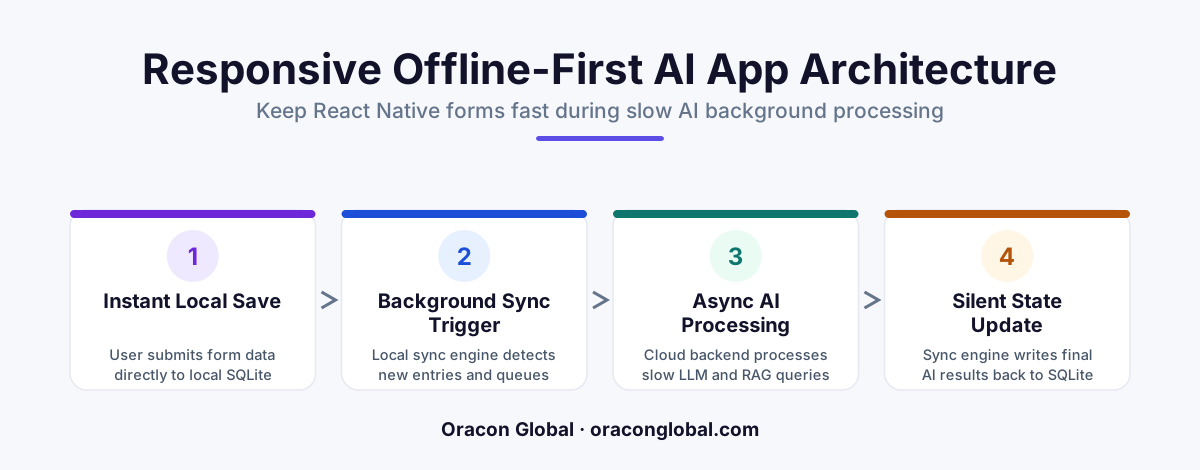
Instead of locking your mobile app with a loading spinner while backend AI evaluations process, write form data immediately to a local SQLite database. A background worker then queues, transmits, and reconciles the AI payload asynchronously, keeping the user interface completely fluid.
In traditional mobile app development, a form submission is a straightforward request-response cycle. The user fills out a few fields, taps "Submit," a loading spinner displays for a fraction of a second, and the database confirms the write. But when you introduce custom artificial intelligence, LLM evaluations, or Retrieval-Augmented Generation (RAG) lookups directly into that submission flow, that neat little cycle breaks.
AI backend evaluations are notoriously slow. Running a prompt through a large language model, parsing unstructured data, querying vector databases, or executing multi-agent validation loops can easily take five to fifteen seconds. If your mobile application forces a user to stare at a frozen screen or a spinning wheel for fifteen seconds, they will assume the app has crashed. Worse, they might tap the submit button repeatedly, triggering duplicate expensive backend processes.
To deliver a premium, responsive experience, you need to decouple the user interface from the slow backend processes. The most reliable way to achieve this is through a robust mobile app architecture that utilizes local SQLite synchronization.
The Core Challenge: Latency-Prone AI Pipelines
When we build custom mobile applications at Oracon Global, we prioritize intuitive, smooth interactions. In a standard setup, if a user fills out an field-inspection form or enters customer notes, an AI agent might immediately analyze that text to categorize the input, extract tasks, or flag anomalies.
If the mobile app makes a synchronous HTTP POST request directly to this AI pipeline, the application state is held hostage by the network speed and the LLM provider's token-generation time. If the network drops mid-way, the user loses their draft, and the backend has no clean recovery mechanism.
To make responsive mobile forms a reality alongside a slow AI backend, the application must treat every write as local first. By implementing SQLite synchronization, your app saves the data locally in milliseconds, updates the user interface instantly, and delegates the slow AI work to a silent, resilient background worker.
The Architecture: Decoupling UI from AI
To successfully build this mobile app architecture, we divide the data flow into three distinct layers: the React Native frontend, the local SQLite storage engine, and the asynchronous backend API queue.
1. The Instant Local Write
When the user taps the submit button on a form, the React Native application does not make an external API call. Instead, it writes the raw form data directly to an in-app SQLite database. SQLite is incredibly lightweight, safe, and handles transactions in microseconds. The app immediately displays a success state or moves the user to the next screen, giving the illusion of instant execution.
2. The Queue and Status Schema
To manage local data successfully, your SQLite schema needs a robust status tracking system. Every row in your local table should include metadata tracking columns such as:
- sync_status: A string state indicating if the record is 'pending', 'syncing', 'completed', or 'failed'.
- retry_count: An integer tracking how many times the sync has been attempted.
- ai_evaluation_result: A nullable text field that stores the structured JSON response once the AI agent finishes its work.
- last_error: A text field to capture network or validation errors for troubleshooting.
3. The Background Synchronization Worker
A background task runner monitors the SQLite table for any rows marked as 'pending". When the device is online, this worker changes the status to 'syncing' and sends the payload to your backend. Because this happens out of the main thread, the user can continue navigating, drafting new forms, or reading offline data without experiencing a single dropped frame.
Reconciling the AI Output on the Mobile Device
The trickiest part of an asynchronous AI architecture is getting the results of the evaluation back to the user without disrupting their workflow. Since the AI might take ten seconds to determine if an uploaded image matches compliance rules or to summarize a text field, the backend must process this as a multi-stage operation.
Here is how a clean reconciliation flow works:
- The mobile background worker POSTs the local SQLite record to your backend server.
- The backend immediately responds with a
202 Acceptedstatus code and a unique job ID, letting the mobile app know the payload is safe in the queue. - The mobile worker updates the local SQLite row status to 'processing' and stores the job ID.
- The backend spins up the slow AI agent or RAG pipeline. Once the evaluation completes, the server stores the structured result in the primary database and triggers a silent push notification or a WebSocket event to the mobile client.
- Upon receiving the update, the React Native app writes the new AI insights directly to the local SQLite row and flags it as 'completed'.
This flow guarantees that the user is never stuck waiting, and the local state of the application remains perfectly aligned with your cloud infrastructure.
Why Custom Architecture Beats Out-of-the-Box Solutions
It is tempting to look for generic sync libraries or backend-as-a-service wrappers to handle offline synchronization. However, generic sync engines are designed for simple relational database replication—they do not understand the nuanced, multi-step nature of generative AI pipelines.
A custom-built local sync architecture gives you complete control over how retry logic handles LLM rate limits, server timeouts, and unexpected model hallucinations. If a backend prompt fails because an external API is down, your custom mobile client can gracefully back off and try again later, rather than corrupting the local application database or locking out the user.
Partnering with Oracon Global for High-Performance Mobile Apps
Building high-performance mobile and web applications that integrate seamlessly with cutting-edge AI requires a deep understanding of native mobile engineering, distributed databases, and asynchronous architectures. At Oracon Global, our senior in-house team specializes in crafting tailored digital ecosystems—from responsive mobile frameworks to secure AI-native ERP systems and workflow automations.
We build robust, custom codebases where you retain 100% ownership of the IP. If you are ready to build a mobile application that remains lightning-fast even during complex backend AI operations, get in touch with Oracon Global today to discuss your architecture.
Frequently asked questions
Why do backend AI evaluations slow down mobile forms?
AI operations—such as LLM prompts, vector database searches, and multi-step agent actions—often take several seconds to complete, causing traditional synchronous API calls to freeze or lock the mobile interface.
How does local SQLite syncing solve the latency problem?
It allows the mobile app to write form submissions directly to a local, lightweight database instantly. The UI updates immediately, while a background process handles the slow communication with the AI server.
Will users lose data if their internet connection drops?
No. Because the data is saved locally to SQLite first, the app can securely retry the synchronization process once a stable network connection is re-established.
Do we need a complex state management library to run this?
No, you can implement this architecture using native SQLite helpers in React Native along with simple, event-driven sync triggers that keep the local state and backend databases aligned.
Read next
Beyond Chatbots: How to Build AI Agents That Actually Do Work for Your Business
Most businesses use AI to answer questions. Here is how to build custom AI agents that actually take action, connect to your internal tools, and handle complex workflows.
Beyond the Wrapper: How to Build Custom AI Agents for Business That Actually Work
Many businesses invest in basic AI wrappers only to find they lack the security and context needed for real work. Here is how to build custom AI agents that integrate deeply with your workflows and databases.
Enterprise AI Maintenance Costs: Budgeting for Year Two and Beyond
Building an AI system is only half the battle. Discover the practical, ongoing operational costs of enterprise AI, including token management, model drift, and continuous security audits.
Oracon Global builds production-grade AI agents, automation and apps — and you own the code and IP. Tell us what you want to automate.
Book a call →See our work