

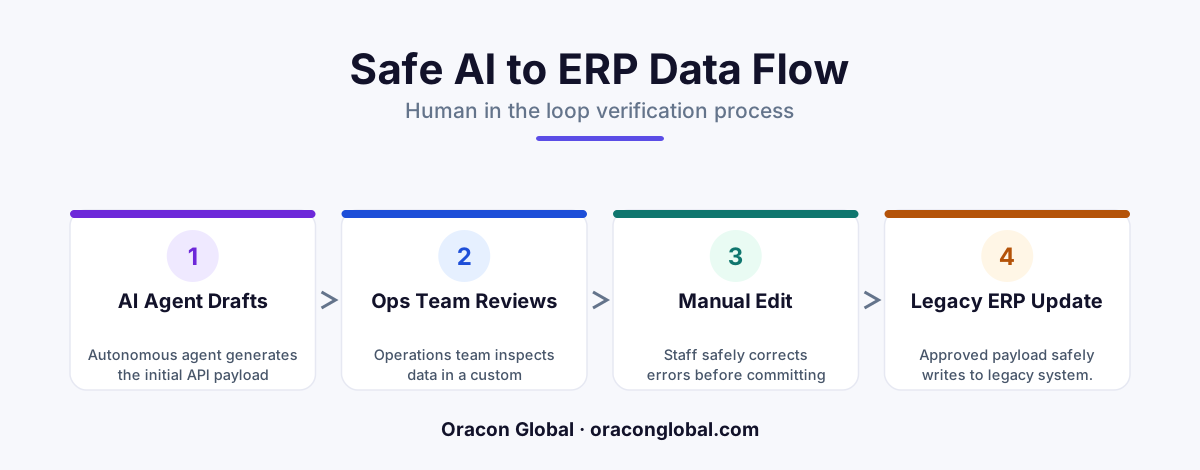
To prevent AI agents from writing corrupted or invalid data to legacy ERPs, insert a middle-tier draft payload editor database. This workspace translates AI decisions into editable JSON schemas, allowing human operators to inspect and modify data before it hits production APIs.=== FAQ=== Q: Why can't we let the AI agent write directly to our legacy ERP? A: Legacy ERPs often lack robust validation rules and transactional rollback capabilities. If an AI agent writes structured data with minor schema mismatches or logical errors, it can corrupt downstream accounting, inventory, and shipping table
Deploying autonomous AI agents to handle high-volume business workflows is one of the most effective ways to scale operations. However, a major bottleneck occurs when these agents need to write data directly into legacy ERP systems. Older enterprise resource planning databases are notoriously brittle; they often lack flexible API validation, meaning a single malformed payload or mismatched SKU code can corrupt database tables and halt downstream workflows.
To bypass this risk, many organizations resort to a slow, manual copying-and-pasting process to verify AI outputs. The solution is to build a custom multi-vendor web workspace that acts as a staging ground. By implementing a draft API payload editor, your operations team can safely review, modify, and commit AI-generated data to legacy ERPs without risking database integrity.
The Danger of Direct Autonomous Writes to Legacy Systems
Legacy ERP platforms were designed for manual data entry or highly predictable, rigid EDI integrations. They do not handle the fluid, probabilistic nature of large language models well. If an AI agent attempts to process an incoming invoice, purchase order, or shipping manifest and write it directly to your ERP, several failure points emerge:
- Mismatched Schema Formats: AI agents sometimes output JSON payloads with subtle variations in field keys, date formats, or nested arrays that legacy endpoints reject.
- Logical Data Discrepancies: An AI might extract a correct-looking quantity or price that violates internal business logic, such as exceeding a credit limit or selecting an inactive warehouse location.
- Lack of Native Rollbacks: Many legacy APIs do not support transactional rollbacks. If a multi-step write fails halfway through, the database is left in an inconsistent, partially updated state.
A structured AI agent human-in-the-loop workflow solves these challenges. By decoupling the AI’s generation step from the actual ERP write, you create a secure validation boundary.
Architecting the Draft Payload Database
Instead of sending payloads directly to your ERP, the AI agent writes its output to a custom middleware database. This database stores the proposed transaction as a "draft" state. The web application then reads this draft and renders it as an intuitive, editable form for your human operators.
The Draft State Schema
To manage this workflow, the middleware database requires a structured schema to track each payload's lifecycle. Every draft record should contain:
- The Raw LLM Extraction: The original JSON payload returned by the AI agent, kept for debugging and audit purposes.
- The Normalized Form Schema: A flattened version of the data mapped directly to your legacy ERP's input requirements.
- Validation Flags: Automated system checks that highlight potential errors (such as unmapped SKUs or math discrepancies) before a human looks at it.
- State Tracker: A status column tracking whether the record is
Draft,In Review,Approved, orCommitted.
Designing the Custom Operations Workspace
The magic of this architecture lies in the user interface. A standard database GUI is too complex for busy operations teams. Instead, a custom web app simplifies the JSON payload into a visual, high-speed workspace designed for rapid scanning.
When an operator logs into the workspace, they are presented with a queue of pending transactions. Selecting a transaction opens a split-screen view. On the left, the system displays the source document (such as a customer PDF, email, or vendor manifest). On the right, it displays the editable draft form fields populated by the AI.
Smart Input Validation and Inline Editing
Rather than making operators read raw JSON code, the workspace renders text inputs, dropdown menus, and date pickers. If the AI agent flagged a low-confidence extraction—such as a handwritten serial number—that specific field is highlighted in yellow.
If an operator spots an error, they can type directly into the input field to correct it. Our senior in-house team at Oracon Global designs these custom inputs to validate data dynamically as the user types. For example, if an operator changes a SKU, the interface queries the ERP's read-only database replica in real-time to confirm the new SKU exists, preventing invalid entries before submission.
Executing the Secure ERP Commit
Once the operator is satisfied with the data, they click the "Approve & Commit" button. This action triggers the final step of the middleware pipeline:
The web application locks the draft state to prevent duplicate submissions, converts the edited form data back into the exact JSON schema required by the legacy ERP, and routes it to the API gateway wrapper.
If the legacy ERP API returns a success code, the workspace updates the draft status to Committed and archives the record alongside the operator's ID for audit compliance. If the legacy ERP throws an unexpected network error, the middleware catches the failure, keeps the draft active, and alerts the operator so they can try again or escalate the ticket.
Empowering Teams to Manage Exceptions
Building a custom multi-vendor web workspace changes the role of your operations team. Instead of spending hours performing repetitive manual data entry, they become system editors. They only focus on the anomalies and edge cases that the AI highlights, while clean transactions are verified and approved in a single click.
This approach allows your business to scale transaction volumes without adding administrative overhead, all while keeping your core database completely safe from unverified AI writes. If you want to deploy AI digital employees that integrate seamlessly with your legacy infrastructure, our experienced developers can build the custom software you need. Contact Oracon Global today to discuss your workflow challenges.
Frequently asked questions
Why can't we let the AI agent write directly to our legacy ERP?
Legacy ERPs often lack robust validation rules and transactional rollback capabilities. If an AI agent writes structured data with minor schema mismatches or logical errors, it can corrupt downstream accounting, inventory, and shipping tables, requiring hours of manual database recovery.
How does a draft payload editor differ from a simple approval button?
A simple approval button is all-or-nothing; if the AI makes a minor error, the operator must reject the entire run and restart. A draft payload editor turns the proposed API write into an interactive form, allowing the operator to correct small mistakes on the fly and submit the clean payload instantly.
Does this architecture slow down my operations team?
No, it significantly accelerates their workflow. Instead of manually copying and pasting data from emails and PDFs into ERP screens, operators simply scan pre-populated form fields, make quick corrections, and click approve, reducing processing times from minutes to seconds.
What technologies are used to build this middleware workspace?
We build these custom workspaces using modern web frameworks like React or Vue for the frontend, coupled with a lightweight relational database like PostgreSQL to store the draft states, and an event-driven backend to manage the queue between the AI agent and legacy REST or SOAP APIs.=== ALT=== A web application interface displaying a side-by-side view of an AI-generated draft payload and editable form fields=== BODY=== <p>Deploying autonomous AI agents to handle high-volume business workflows is one of the most effective ways to scale operations. However, a major bottleneck occurs when these agents need to write data directly into legacy ERP systems. Older enterprise resource planning databases are notoriously brittle; they often lack flexible API validation, meaning a single malformed payload or mismatched SKU code can corrupt database tables and halt downstream workflows.</p> <p>To bypass this risk, many organizations resort to a slow, manual copying-and-pasting process to verify AI outputs. The solution is to build a custom multi-vendor web workspace that acts as a staging ground. By implementing a <strong>draft API payload editor</strong>, your operations team can safely review, modify, and commit AI-generated data to legacy ERPs without risking database integrity.</p> <h2>The Danger of Direct Autonomous Writes to Legacy Sys
Read next
Beyond Chatbots: How to Build AI Agents That Actually Do Work for Your Business
Most businesses use AI to answer questions. Here is how to build custom AI agents that actually take action, connect to your internal tools, and handle complex workflows.
Beyond the Wrapper: How to Build Custom AI Agents for Business That Actually Work
Many businesses invest in basic AI wrappers only to find they lack the security and context needed for real work. Here is how to build custom AI agents that integrate deeply with your workflows and databases.
Enterprise AI Maintenance Costs: Budgeting for Year Two and Beyond
Building an AI system is only half the battle. Discover the practical, ongoing operational costs of enterprise AI, including token management, model drift, and continuous security audits.
Oracon Global builds production-grade AI agents, automation and apps — and you own the code and IP. Tell us what you want to automate.
Book a call →See our work