

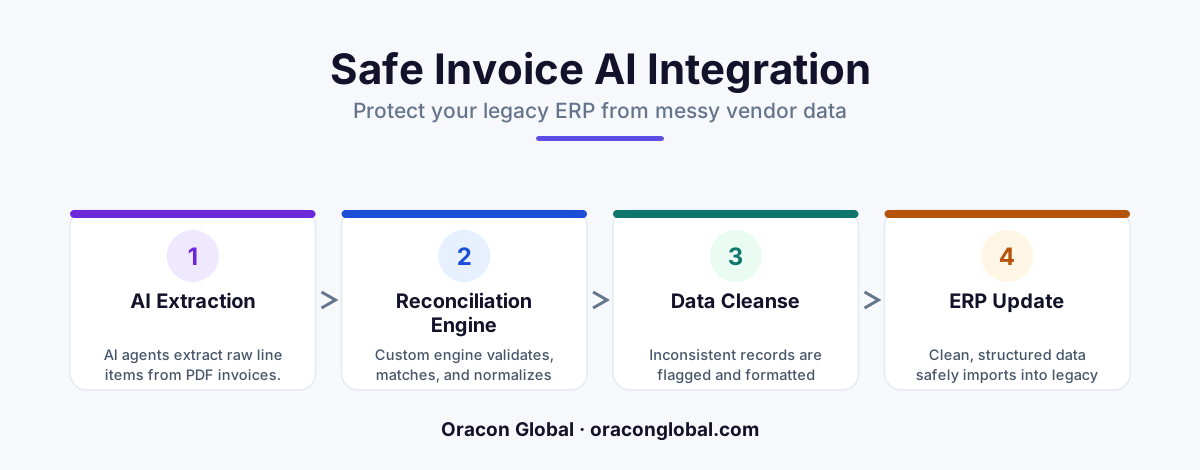
When AI agents extract line-item data from varying vendor PDFs, they often try to write inconsistent formatting, mismatched SKUs, and rounded numbers directly into legacy ERPs. Building a custom multi-vendor reconciliation engine solves this by acting as a middle-tier validation layer that normalizes, matches, and audits the data before committing it to your financial database.
Many finance teams adopt autonomous AI agents to automate tedious document processing workflows. On paper, the value proposition is clear: an AI agent reads a pile of multi-page vendor PDFs, extracts the line items, and logs them into your legacy ERP. But in production, this simple pipeline often breaks down.
The problem is not the AI's ability to read the PDF invoice. Modern language models are highly capable of turning unstructured documents into structured JSON data. The real issue is consistency. Vendor A writes a part number as SKU-102-BLUE, Vendor B calls it 102-BLU, and Vendor C skips the SKU entirely, leaving only a text description. If your AI agent drops these inconsistent line items directly into a strict, legacy database, your ERP will reject the write, throw a database schema error, or worse, accept the mismatched data and corrupt your inventory and financial records.
To solve this, operations teams must build a custom invoice reconciliation engine. This middleware layer sits between your AI extraction tools and your core ERP, acting as a deterministic gatekeeper that cleans, translates, and validates every transaction before it touches your ledger.
Why AI Extraction Agents Fail at Legacy Database Writes
Legacy ERP systems are built on rigid relational databases. They require perfect consistency, strict data types, and absolute mathematical precision. If an API call attempts to write an invoice with a missing tax field, an unregistered vendor ID, or a fractional rounding discrepancy, the legacy system will either crash or create a duplicate entry that your accounting team will have to spend hours untangling.
AI extraction agents are probabilistic. Even the best models make subtle formatting choices that vary from run to run. For example, an AI agent might process three identical PDF invoices from the same supplier and output the line items in slightly different formats:
- Invoice 1: Tax calculated as a flat dollar amount in a single metadata field.
- Invoice 2: Tax broken down line-by-line in the main items array.
- Invoice 3: Tax omitted entirely because the vendor labeled it "Government Levy".
Without a robust middle layer, your AI agent is essentially guessing how to map these variations to your static ERP tables. This leads to broken database pipelines, silent data corruption, and a massive backslide in operational efficiency as your team switches from manual data entry to manual database debugging.
The Architecture of a Custom Multi-Vendor Reconciliation Engine
A custom invoice reconciliation engine acts as a buffer. Instead of allowing your AI agent to write directly to your ERP, the agent writes its extracted JSON payload to a secure intermediate database. The reconciliation engine then processes this payload through a series of rigid, deterministic steps before pushing the verified data to your ERP.
Step 1: The Normalization Pipeline
The first job of the reconciliation engine is to normalize the extracted data. This means converting raw strings, dates, currencies, and numbers into a standardized format. For instance, dates like "10/12/26", "Dec 10, 2026", and "2026-12-10" are all converted to standard ISO 8601 format. Currencies are checked and converted to your primary operational currency using real-time foreign exchange tables, and all line-item quantities are rounded to the precise decimal places required by your database schema.
Step 2: Deterministic Entity Mapping
Before any invoice line is written to your ERP, the engine must match the external vendor's data with your internal business records. The reconciliation engine uses hardcoded mapping tables to resolve inconsistencies. If Vendor X references a product as "Industrial Bolt Type 4", the engine checks your mapping dictionary to translate this to your internal catalog ID SKU-BOLT-004. If the engine cannot find a highly confident match, it halts the pipeline for that specific invoice and flags it for human review rather than guessing and corrupting your inventory logs.
Step 3: The Mathematical Audit Guardrail
AI models are notorious for making minor mathematical rounding errors, especially when dealing with nested multi-page tables. A custom engine runs a hardcoded mathematical verification on the normalized payload. It recalculates the sum of all individual line items, adds the extracted tax and shipping rates, and compares the result to the total invoice amount extracted by the AI agent. If the math does not balance to the penny, the transaction is diverted to an exception queue.
Building the Human-in-the-Loop Exception Dashboard
An enterprise-grade reconciliation engine should never operate on an "all-or-nothing" basis. If one line item out of a fifty-page invoice fails validation, you do not want to reject the entire batch or freeze your processing pipeline. You need a dedicated human-in-the-loop triage queue.
When the engine flags an inconsistency, it should write the failed payload to a secure holding table and notify an operations administrator. This dashboard should display the original PDF invoice side-by-side with the flagged JSON data, highlighting the exact field that failed validation (such as an unmatched vendor SKU or a rounding error). Once a human operator corrects the mismatch or approves the exception, the engine updates its mapping dictionary, processes the write, and pushes the clean data directly to your ERP. This ensures that your system gets smarter with every manual correction.
Protecting Legacy ERP Systems from High-Volume Automation
Legacy ERP systems were never designed to handle the high-volume, parallel API requests that autonomous AI agents can generate. If your business processes thousands of invoices a day, a fleet of AI agents writing directly to your ERP database can easily lock tables, exhaust API limits, and degrade system performance for your physical employees.
To prevent this, the reconciliation engine acts as a rate-limiting queue. It pools validated invoices and schedules database writes during off-peak hours or distributes them in controlled, low-impact batches throughout the day. This architecture guarantees that your core financial system remains responsive and protected from traffic spikes, regardless of how quickly your AI agents are parsing incoming documents.
Partner with a Senior Development Team to Secure Your Workflows
Automating financial workflows requires a delicate balance of flexible AI processing and rigid, unbreakable software engineering. Building a custom validation engine ensures that your operations remain fully automated without sacrificing the integrity of your financial records.
At Oracon Global, our senior in-house development team builds robust AI agents, workflow automation pipelines, and custom middleware layers that integrate seamlessly with legacy systems. We deliver tailored, highly secure software solutions worldwide, and your business retains 100% ownership of the code and intellectual property.
Want to see how we build reliable systems? Check out the live AI demos on our website, or get in touch with us today to discuss how we can secure your document processing pipelines.
Frequently asked questions
Why can't AI agents write invoice data directly to my legacy ERP?
Legacy ERPs require strict, deterministic data formatting. AI agents excel at extracting unstructured data from PDF invoices, but different vendors format line items, SKUs, and taxes differently. Writing this raw data directly to an ERP leads to broken database schemas, duplicate records, and massive accounting errors.
What does a custom reconciliation engine actually do?
It acts as an intelligent buffer layer between your AI extraction agent and your ERP database. It takes the JSON payload generated by the AI, runs it through deterministic validation rules, maps inconsistent vendor SKUs to your internal catalog, and flags any math discrepancies for human review before any data is saved.
Do we need to replace our existing ERP system to implement this?
No. A custom reconciliation engine is designed specifically to protect your legacy system. It integrates with your current ERP via its existing APIs or database write layers, acting as a modern middleware guardrail so you don't have to undergo a risky and expensive ERP replacement.
How does this prevent duplicate invoice payments?
The reconciliation engine runs a series of cryptographic and deterministic checks, comparing invoice numbers, vendor IDs, line-item totals, and purchase orders against your live database. If an AI agent attempts to process an invoice that has already been logged under a slightly different name or format, the engine blocks the write and alerts your team.
Read next
Beyond Chatbots: How to Build AI Agents That Actually Do Work for Your Business
Most businesses use AI to answer questions. Here is how to build custom AI agents that actually take action, connect to your internal tools, and handle complex workflows.
Beyond the Wrapper: How to Build Custom AI Agents for Business That Actually Work
Many businesses invest in basic AI wrappers only to find they lack the security and context needed for real work. Here is how to build custom AI agents that integrate deeply with your workflows and databases.
Enterprise AI Maintenance Costs: Budgeting for Year Two and Beyond
Building an AI system is only half the battle. Discover the practical, ongoing operational costs of enterprise AI, including token management, model drift, and continuous security audits.
Oracon Global builds production-grade AI agents, automation and apps — and you own the code and IP. Tell us what you want to automate.
Book a call →See our work