

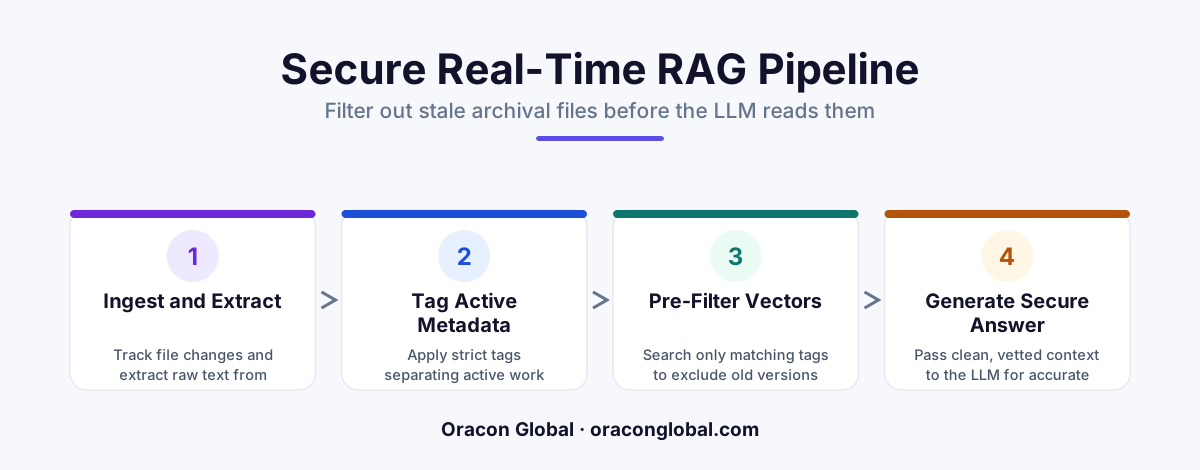
When AI agents query corporate knowledge bases, they often fetch outdated or archival documents, leading to incorrect actions. By implementing a hybrid RAG pipeline with strict metadata pre-filtering, you can restrict vector search queries to active, authorized directories and ignore stale PDF versions entirely.
When you build an AI agent to help your team navigate company documentation, the first instinct is to point it at your shared cloud storage drive and let it index everything. On day one, the demo looks incredible. The agent answers questions, drafts summaries, and pulls up policy details in seconds.
By day ten, the cracks begin to show. A user asks about the current company holiday policy, and the AI agent confidently quotes the guidelines from 2018. Another user asks about onboarding procedures, and the agent pulls data from a folder explicitly labeled [DEPRECATED] Archive - Do Not Use.
The problem is not the intelligence of the LLM. The problem is your retrieval pipeline. Standard vector search indexes semantic meaning, not document authority. To a vector database, a well-written PDF from six years ago looks just as relevant as one uploaded yesterday. To build a reliable system, you need a hybrid RAG pipeline that uses metadata pre-filtering to block access to archival directories and outdated file versions.
The Structural Flaw in Pure Vector Search
Many early-stage retrieval-augmented generation (RAG) systems rely entirely on dense vector embeddings. During this process, documents are chopped into chunks, converted into numerical vectors, and stored in a vector database. When a user asks a question, the system looks for the chunks with the closest mathematical similarity to the query.
While powerful, this approach has no inherent concept of time, folder structure, or document status. A vector database does not know that:
- The folder named "v4-drafts" should supersede "v3-final".
- Anything in the "/Archive/" directory tree should be completely invisible to customer-facing agents.
- A PDF marked as "inactive" in your relational database should be ignored, regardless of how perfectly it matches the user's prompt.
Without metadata constraints, your AI agent is operating with a blind spot. It will routinely retrieve stale, conflicting information, leading to hallucinations that confuse your team and put business operations at risk.
How Metadata Pre-Filtering Saves Your Context Window
To prevent AI agents from reading the wrong files, you must filter your data before the vector search even begins. This is known as metadata pre-filtering.
Some developers attempt to solve this with post-filtering, where the vector database returns the top 20 most similar chunks, and then code is run to discard any chunks originating from archival folders. This is highly inefficient. If the top 20 results are all pulled from a highly detailed but deprecated 100-page archival PDF, post-filtering will discard them all, leaving your LLM with zero context to answer the prompt.
Pre-filtering avoids this entirely by hardcoding constraints directly into the database query. The query sent to the hybrid database looks like this in plain English: "Find the most semantically similar chunks to this query, but only search records where 'status' equals 'active' AND 'directory' does not start with '/Archive/'."
Building the Database Schema
To implement this, every document chunk stored in your database must carry a structured payload. A clean, resilient schema should include the following metadata attributes alongside the vector embedding:
- document_id: A unique identifier linking the chunk back to the source file.
- file_path: The full directory path (e.g., "/human-resources/policies/2026/travel.pdf").
- is_archived: A boolean flag indicating if the file resides in an archive folder.
- version: An integer tracking the document iteration.
- state: A status string (e.g., "draft", "published", "deprecated").
- last_modified: A timestamp used to resolve conflicts when multiple versions exist.
The Step-by-Step Architecture of a Hybrid RAG Pipeline
A production-ready hybrid RAG pipeline combines traditional keyword search (like BM25), vector search, and structured metadata filters into a single, cohesive workflow. Here is how the execution flow works when a user asks a question:
Step 1: Parse and Enrich incoming Documents
When a team member uploads a PDF, an event-driven pipeline parses the document. Before any vectors are generated, the system analyzes the file path and properties. If the file is located in a directory containing words like "archive", "old", "deprecated", or "draft", the parser automatically flags the is_archived property as true.
Step 2: Construct the Filtered Query
When a user submits a prompt to the AI agent, the application backend constructs a compound query. It extracts the semantic intent for the vector search, while simultaneously generating a strict metadata filter. For example, the query will enforce that is_archived == false and state == 'published'.
Step 3: Execute the Hybrid Search
The database executes the pre-filter first, instantly ignoring thousands of old chunks. It then performs vector similarity search and keyword matching only on the active subset of documents. This keeps search latency low and ensures that 100% of the returned results are accurate, authorized, and up to date.
Step 4: Rerank and Deliver
A reranking model evaluates the filtered results to ensure the most contextually relevant chunks are positioned at the top before being passed to the LLM. The AI agent now generates an answer based strictly on active corporate truth.
Keeping the Pipeline Synced in Real Time
A static database quickly becomes stale. Your team is constantly moving files, updating PDFs, and renaming folders. If someone drags an old policy PDF into an "Archive" folder on your company drive, your RAG pipeline must reflect that change instantly.
To handle this, build an event-driven listener that hooks into your team's document storage platform. When a file is moved, renamed, or deleted, the listener triggers a lightweight background worker. Instead of re-embedding the entire document—which is slow and expensive—the worker simply updates the metadata attributes (like file_path or is_archived) for all database chunks associated with that document_id. This keep-alive sync layer ensures your AI agent never operates on outdated directory structures.
Own Your AI Architecture
Building a RAG pipeline that is secure, accurate, and resilient requires a senior development approach. Off-the-shelf wrappers and basic PDF search tools cannot handle the complex access controls and real-time directory updates that growing businesses require.
At Oracon Global, our senior in-house team builds custom AI agents, AI-native systems, and robust RAG architectures designed for real-world operations. We write clean, high-performance code, and our clients own 100% of their software and intellectual property.
If you are ready to build a reliable, secure AI system that integrates seamlessly with your business data, contact Oracon Global today to discuss your project.
Frequently asked questions
Why can't vector search alone prevent AI agents from reading archival folders?
Vector databases search for semantic similarity, not document metadata. An old PDF from 2018 might contain language that closely matches a user query, causing the vector search to retrieve it instead of the current version unless explicit metadata filters are applied beforehand.
What is the difference between pre-filtering and post-filtering in RAG?
Pre-filtering applies metadata constraints to the database query before the vector search runs, ensuring only active, valid documents are evaluated. Post-filtering runs the vector search first and then discards unauthorized results, which is slower, more expensive, and often misses relevant documents that were crowded out of the initial search pool.
How do you handle real-time file updates in this pipeline?
The system uses an event-driven file watcher linked to a parsing queue. When a document is modified, deleted, or moved to an archival folder, its database metadata is instantly updated, and the old vector embeddings are either flagged as inactive or purged from the index.
Do we need to rewrite our entire vector database to implement metadata filtering?
No. Most modern vector databases and relational databases with vector extensions natively support metadata payloads alongside embeddings, allowing you to add fields like folder path, status, and version number to your existing schema.
Read next
Beyond Chatbots: How to Build AI Agents That Actually Do Work for Your Business
Most businesses use AI to answer questions. Here is how to build custom AI agents that actually take action, connect to your internal tools, and handle complex workflows.
Beyond the Wrapper: How to Build Custom AI Agents for Business That Actually Work
Many businesses invest in basic AI wrappers only to find they lack the security and context needed for real work. Here is how to build custom AI agents that integrate deeply with your workflows and databases.
Enterprise AI Maintenance Costs: Budgeting for Year Two and Beyond
Building an AI system is only half the battle. Discover the practical, ongoing operational costs of enterprise AI, including token management, model drift, and continuous security audits.
Oracon Global builds production-grade AI agents, automation and apps — and you own the code and IP. Tell us what you want to automate.
Book a call →See our work