

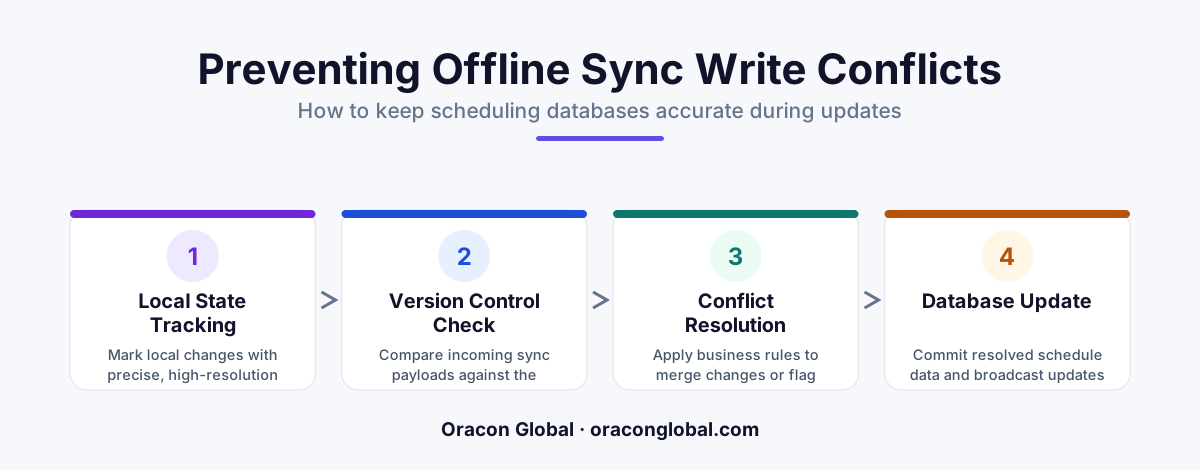
Preventing offline database sync conflicts requires moving away from "last-write-wins" logic. By implementing a state-machine ledger that tracks individual change intents rather than entire database rows, your web app can automatically resolve scheduling overlaps without dropping field data.
For businesses running field operations, a reliable mobile app is the backbone of daily revenue. Your technicians are out in basements, concrete parking garages, and remote rural areas where cellular coverage is spotty at best. To keep them productive, your app must work offline. They need to log parts, adjust job times, and update statuses without staring at a loading spinner.
However, building an offline-first database sync engine introduces a massive operational risk: multi-user sync conflicts. If a field technician goes offline at 10:00 AM, makes changes to their schedule, and syncs back at 10:30 AM, what happens if a dispatcher updated that same schedule from the office at 10:15 AM? In many standard applications, the last write simply wins, silently erasing the dispatcher's live updates and throwing the day's logistics into chaos.
Preventing these conflicts requires moving away from basic database overrides and implementing an intelligent, intent-based sync architecture. Here is how to design a custom field service mobile app database structure that keeps your central scheduling system safe.
The Danger of "Last-Write-Wins" in Scheduling
Most off-the-shelf databases and simple API setups rely on a default behavior known as Last-Write-Wins (LWW). When a device connects to the network, it pushes its current state to the server, and the server blindly saves it. While this works fine for single-user productivity apps, it is dangerous for a real-time scheduling app used by dozens of coordinators and field workers simultaneously.
Consider this scenario:
- 10:00 AM: Tech A goes offline in a hospital basement. Their local calendar shows a 1:00 PM appointment with Client X.
- 10:15 AM: The dispatch office realizes Client X needs to reschedule to 3:00 PM. The dispatcher updates the web console. The live database now reads 3:00 PM.
- 10:20 AM: Offline Tech A shifts their local 1:00 PM appointment to 1:15 PM to accommodate a traffic delay, unaware of the office change.
- 10:30 AM: Tech A regains signal. Their app syncs. Under an LWW architecture, the database is updated to 1:15 PM. The dispatcher's 3:00 PM update is completely overwritten and lost.
To solve this, your mobile database architecture must transition from syncing raw data states to syncing operational intents.
Step 1: Implement Intent-Based Event Logs
Instead of saving entire database rows, your offline-first app should record specific, discrete actions. Think of this as event sourcing for your mobile fleet. When a technician edits a job, the app does not save a modified "Job" object. Instead, it appends a message to a local queue: "Tech A requested a 15-minute arrival delay."
When the connection is restored, the mobile app does not overwrite the backend database. It uploads this queue of event intents. The backend then processes these events in chronological order, matching them against the current live state of the database. This event-based approach allows your system to identify exactly what changed, when it changed, and whether that change is still valid.
Step 2: Build a Staging Ledger for Incoming Syncs
Never let offline devices write directly to your primary scheduling tables. Instead, route all incoming offline sync payloads to a staging ledger—a secure, isolated database table that acts as a waiting room.
Once the events are in the staging ledger, a background reconciliation worker processes them using a three-tier validation process:
- Temporal Validation: Compare the timestamp of the offline edit with the last-modified timestamp of the live record. If the live record has changed since the offline app last pulled data, flag a potential conflict.
- Contextual Validation: Check if the proposed change violates real-world business constraints. For example, does moving this job create a double-booking on the technician's calendar?
- Deterministic Resolution: Apply pre-defined business rules to resolve the conflict automatically, without requiring human intervention.
Step 3: Define Clear Business Resolution Rules
A technical conflict does not always require a manual decision. Often, your business logic can dictate the correct outcome. When designing your database conflict resolution logic, establish clear, hardcoded rules for common scenarios:
Rule 1: Office Authority on Cancellations. If a dispatcher cancels a job on the live web dashboard, any offline updates made by the technician to that specific job are discarded, as the job no longer exists.
Rule 2: Field Authority on Progress. If a technician marks a job as "In Progress" or "Completed" while offline, this state always overrides any scheduling adjustments made by the office, as physical work has already occurred.
Rule 3: Delta Merging. If the office edits the billing address and the offline technician edits the notes field, the system merges both updates instead of forcing one to overwrite the other.
Step 4: Graceful Human Fallback Loops
There will always be instances where business rules cannot resolve a conflict—such as two users booking the exact same time slot. When this happens, the system must hold the change in the staging ledger and notify the dispatch team via a dedicated resolution dashboard.
The dashboard should present the dispatcher with a clear, side-by-side comparison: "Tech A updated travel time at 10:20 AM, but Dispatcher B rescheduled the job at 10:15 AM. Which schedule should we keep?" This keeps your live database perfectly clean while giving your team complete control over complex edge cases.
Protecting Your Field Logistics
A great field service app is defined by how it handles the unpredictable nature of working on the road. By decoupling offline writes from your live scheduling database and processing updates through a structured event-driven staging layer, you protect your business from costly dispatch errors and double-bookings.
At Oracon Global, we design and build custom web apps, mobile products, and backend architectures tailored to complex operational workflows. Our senior in-house team handles everything from offline-first synchronization layers to AI-driven resource scheduling. If you are ready to build software that stands up to real-world field conditions, reach out to Oracon Global today to discuss your project.
Frequently asked questions
Why does "last-write-wins" fail for field service scheduling?
It blindly overwrites the database based on whoever synced last. If a dispatcher changes a tech's 2 PM slot at 1:05 PM, and an offline tech syncs their 1:00 PM local edit at 1:10 PM, the dispatcher's change is permanently lost.
What is intent-based state tracking in database syncing?
Instead of saving a complete updated row to the database, the mobile app sends a specific delta or action, such as "request to extend travel time by 15 minutes," which the backend can safely evaluate.
How does a shadow ledger prevent scheduling conflicts?
A shadow ledger stores incoming offline sync requests in a temporary queue first, allowing a background validation worker to check for real-time calendar overlaps before committing them to the primary database.
Do we need a complex real-time framework to build this?
No. A standard relational database like PostgreSQL paired with local SQLite storage on the mobile device can handle this when configured with a robust event-driven conflict resolution schema.
Read next
Beyond Chatbots: How to Build AI Agents That Actually Do Work for Your Business
Most businesses use AI to answer questions. Here is how to build custom AI agents that actually take action, connect to your internal tools, and handle complex workflows.
Beyond the Wrapper: How to Build Custom AI Agents for Business That Actually Work
Many businesses invest in basic AI wrappers only to find they lack the security and context needed for real work. Here is how to build custom AI agents that integrate deeply with your workflows and databases.
Enterprise AI Maintenance Costs: Budgeting for Year Two and Beyond
Building an AI system is only half the battle. Discover the practical, ongoing operational costs of enterprise AI, including token management, model drift, and continuous security audits.
Oracon Global builds production-grade AI agents, automation and apps — and you own the code and IP. Tell us what you want to automate.
Book a call →See our work