

When field auditors save hundreds of records in dead zones, standard hybrid app syncs often crash and lose data. Building a custom push synchronization layer with local transactional queueing, unique cryptographic payload IDs, and a server-side staging bucket ensures zero dropped audits across diverse iOS and Android devices.
In field operations, nothing is more frustrating than a team spending hours completing detailed infrastructure audits only to discover half the data vanished during the upload process. When operators run high-volume field audits using hybrid mobile apps, network connectivity is rarely stable. A inspector might step into a concrete basement, lose cellular signal, and continue saving hundreds of data points, photos, and compliance checkmarks to their device.
Most standard out-of-the-box syncing solutions handle simple, low-volume data well. But when multiple inspectors use a mix of Android and iOS devices to upload massive batches of records simultaneously, standard sync layers choke. They drop database writes, create duplicate entries, or freeze the user interface. To prevent this, you need a custom data synchronization layer tailored for robust, offline-first mobile apps.
Why Traditional Hybrid Mobile Syncs Drop Audit Data
Hybrid frameworks like React Native or Flutter are excellent for cross-platform speed, but their default data bridge can become a bottleneck under heavy loads. During an offline field audit sync, several technical failures typically occur at once:
- The Memory Overflow Trap: When the app regains connectivity, it tries to dump hundreds of audit records and high-resolution images to the server in a single, massive HTTP request. The mobile operating system flags the high memory usage and silently kills the app background process.
- Lack of Write Transaction Isolation: If the network drops halfway through a multi-record upload, the server might save part of the audit while the mobile client registers a total failure. This leads to duplicate records when the app retries.
- API Gateway Throttling: A sudden wave of incoming data from dozens of field teams can look like a denial-of-service attack to your server gateway, triggering rate limits that block legitimate audit submissions.
To solve these issues, you need a dedicated, multi-vendor push synchronization layer. This architecture treats the mobile device as the source of truth, queuing writes locally and pushing them up in structured, resilient batches.
The Architecture of a Custom Push Synchronization Layer
A reliable multi-vendor database sync does not try to maintain a live, constant connection to your primary database. Instead, it decouples the local write on the mobile app from the actual database commit on your server. Here is how we design this architecture at Oracon Global:
1. The Local SQLite Transactional Queue
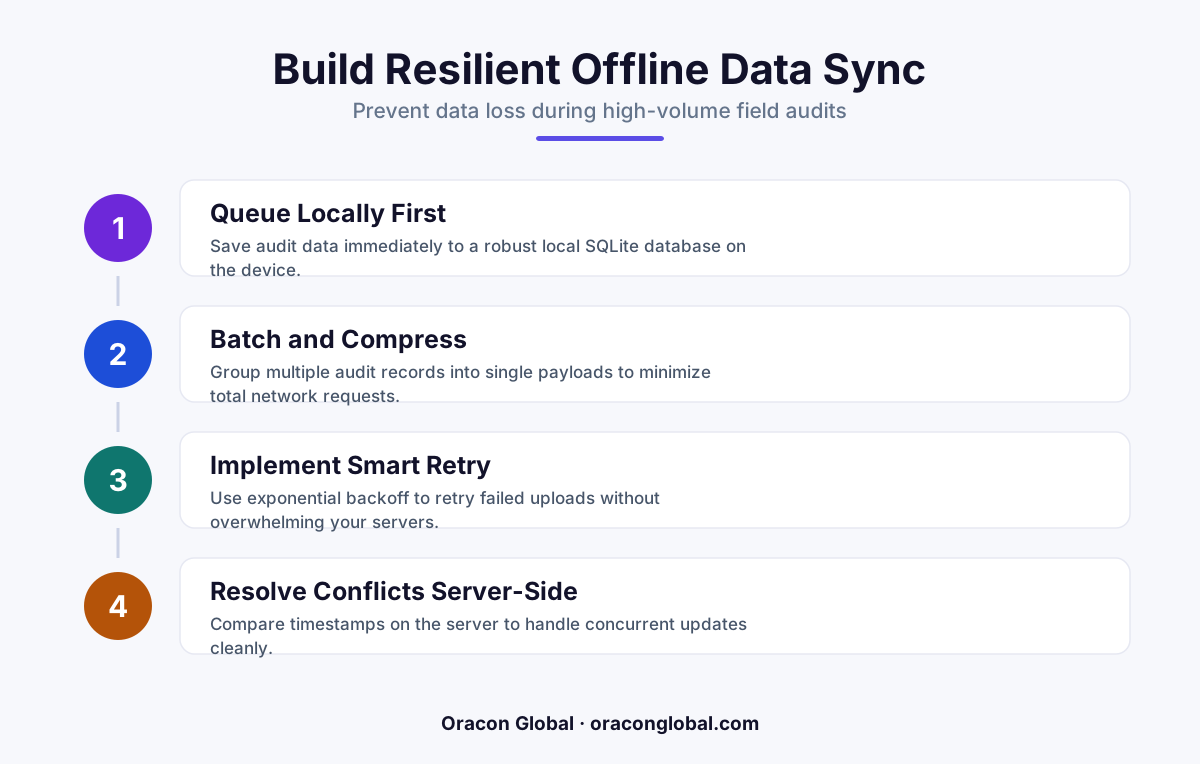
Instead of writing directly to an external API when an auditor clicks "Save," the hybrid app writes the raw JSON payload to a local SQLite database running on the device. This write happens instantly, ensuring a snappy user experience. The record is flagged with a state of pending_upload and is assigned a unique, cryptographically secure payload ID.
2. Deterministic Batching and Chunking
When the app detects a stable network connection, a background worker initiates the push process. Instead of sending all pending audits at once, the worker chunks the data into small, manageable batches (e.g., five audit files and their metadata per request). If batch three fails due to a sudden signal drop, batches one and two are already safely stored on the server, and the app knows exactly where to resume.
3. The Server-Side Staging Bucket
This is the secret to protecting your core systems. The mobile app never writes directly to your production ERP or primary database. Instead, it pushes the data to a secure staging bucket or message queue. The server immediately returns a 202 Accepted status to the mobile device. Once the mobile app receives this confirmation, it safely changes the local record state from pending_upload to synced.
Implementing Conflict Resolution and Deduplication
When building offline first mobile apps, you must expect data conflicts. For example, two inspectors might audit the same piece of equipment at different times while offline. If they upload their reports simultaneously, a naive system might overwrite the newest data with the oldest database writes.
To prevent this, your staging layer should implement a strict reconciliation protocol:
- Idempotency Keys: Every audit action generated on the mobile device must include a unique transaction ID. If the server receives a payload with an ID it has already processed, it acknowledges the upload but silently ignores the duplicate write.
- Vector Clocks and Timestamps: Every edit is stamped with a highly precise local device timestamp and a sequence number. The server-side reconciliation engine uses these to reconstruct the true chronological order of events, ensuring historical accuracy.
- Human-in-the-Loop Exception Queues: If a conflict cannot be resolved automatically (for instance, if two contradictory compliance marks are submitted for the same asset), the system routes the record to an administrative dashboard. The field coordinator can review and resolve the conflict manually, without losing either entry.
Optimizing Hybrid App Performance During Syncs
High-volume data syncs should never compromise the app usability. If an auditor's screen freezes or lags while a sync runs in the background, they are likely to force-close the app, potentially corrupting the local state.
To keep your hybrid mobile app development performant, the sync worker should run on a separate background thread, completely isolated from the main UI thread. In React Native, this can be achieved using native background tasks that trigger even when the app is minimized. Furthermore, file uploads (like audit photographs) should be queued separately from text-based audit forms. A failed image upload should never block the critical compliance data from reaching your desk.
Build Resilient Mobile Tools for Your Field Teams
Losing field data because of poor network coverage is an expensive, frustrating operational failure. Standard sync tools often fall short when your operations scale to high volumes and diverse device types. Building a custom, enterprise-grade push synchronization layer keeps your field data safe, your auditors productive, and your back-office systems accurate.
At Oracon Global, our senior in-house team specializes in building custom web and mobile applications, offline-first architectures, and reliable workflow automation tools. We write clean, high-performance code, and our clients retain 100% ownership of their IP.
If you are ready to eliminate dropped data and build field apps that work flawlessly in any environment, contact us at Oracon Global today to discuss your architecture.
Frequently asked questions
Why do standard sync plugins fail during high-volume field audits?
Out-of-the-box plugins often lack transaction awareness and fail to handle network timeouts gracefully, leading to rate-limiting blocks or silent data drops when pushing large batches of audit records.
What is a push synchronization layer?
It is an architectural pattern that queues local data writes on the mobile device, assigns them deterministic IDs, and systematically pushes them to a secure server staging area for validation before merging with your main database.
Do we need to rebuild our hybrid mobile app to implement this?
No, you do not need a complete rebuild. This sync architecture can be integrated into your existing React Native or Flutter codebase as an independent middleware service running on top of your local SQLite storage.
How does this design handle data conflicts from different inspectors?
By routing incoming pushes to a server-side staging bucket first, the system runs automated validation checks and timestamp reconciliations before writing to the core ERP or database, ensuring human eyes only review true exceptions.
Read next
Beyond Chatbots: How to Build AI Agents That Actually Do Work for Your Business
Most businesses use AI to answer questions. Here is how to build custom AI agents that actually take action, connect to your internal tools, and handle complex workflows.
Beyond the Wrapper: How to Build Custom AI Agents for Business That Actually Work
Many businesses invest in basic AI wrappers only to find they lack the security and context needed for real work. Here is how to build custom AI agents that integrate deeply with your workflows and databases.
Enterprise AI Maintenance Costs: Budgeting for Year Two and Beyond
Building an AI system is only half the battle. Discover the practical, ongoing operational costs of enterprise AI, including token management, model drift, and continuous security audits.
Oracon Global builds production-grade AI agents, automation and apps — and you own the code and IP. Tell us what you want to automate.
Book a call →See our work