

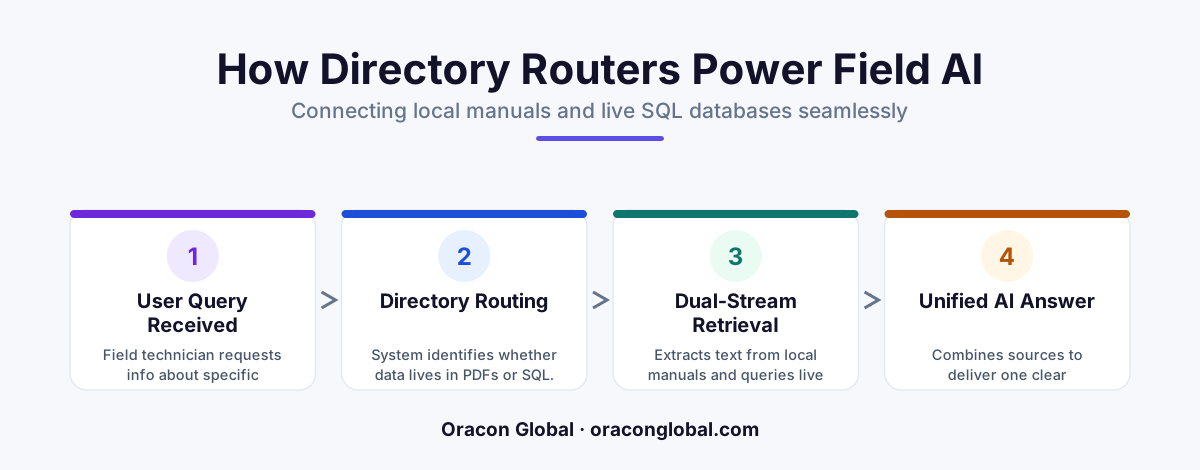
To build a reliable AI agent for field technicians, you must unify unstructured PDF manuals and structured SQL relational data. A custom directory router orchestrates this process, matching queries to the correct technical source and ensuring real-time compliance on the job.
Field technicians do not work in a single data environment. When an industrial chiller or a commercial HVAC system fails on-site, the technician needs two distinct types of information to fix it: the manufacturer's diagnostic steps buried on page 142 of a local PDF manual, and the real-time stock levels of a replacement compressor valve stored in a remote SQL database.
Most off-the-shelf AI tools fail in these scenarios because they try to force all enterprise data into a single format. Turning highly structured SQL tables into vector embeddings destroys relational context, while forcing massive, unstructured PDF manuals into SQL schemas is functionally impossible. To make field service AI agents truly useful, you need a custom directory router that bridges these two worlds dynamically.
The Core Challenge: Unifying Unstructured and Structured Field Data
To understand why a custom directory router is necessary, consider the typical workflow of an on-the-job technician. They ask their mobile support application: "How do I clear error code E-89 on a Model-4 compressor, and do we have the replacement solenoid in the local warehouse?"
This single prompt requires two entirely different data-retrieval strategies:
- Unstructured Retrieval (The PDF Manual): The AI must search through thousands of pages of PDF manuals, locate "Model-4" troubleshooting steps, extract the steps for "Error Code E-89," and present them clearly. This requires a vector database and a retrieval-augmented generation (RAG) pipeline.
- Structured Retrieval (The SQL Database): The AI must query live inventory tables, filter by the specific solenoid part number, check the quantity at the technician's specific regional warehouse, and return a real-time status. This requires deterministic SQL execution.
Without an intelligent router, the AI agent will either hallucinate inventory levels based on outdated manuals, or fail to find the technical schematic because it is querying a structured database for conversational text. A directory router solves this by acting as an traffic controller, analyzing the query intent and sending the sub-tasks to the correct data destinations.
How the Custom Directory Router Architecture Works
The architecture of a directory router for field service AI agents relies on a three-tier system: the intent classifier, the execution engines, and the context merger.
1. The Intent Classifier
When a technician enters a query via voice or text, the message first hits the intent classifier. This is a lightweight, low-latency LLM or a set of semantic classification rules. It evaluates the query to determine if it requires technical troubleshooting steps (PDF lookup), inventory/pricing status (SQL lookup), or both.
2. The Specialized Execution Engines
Once the intent is classified, the router splits the query into specialized pipelines:
- The PDF Vector Path: For manual lookups, the router queries a local vector database. We convert complex PDF schematics and tables into high-density vector embeddings, ensuring that diagrams and troubleshooting matrices are preserved.
- The SQL Query Path: For inventory, customer history, or warranty status, the router translates the request into a secure SQL query. This query runs against your remote relational database using strict parameterization to prevent security vulnerabilities.
3. The Context Merger
If the query requires both data sources, the directory router waits for both pipelines to return their payloads. It then merges the structured SQL data (e.g., "Part #993-Solenoid is in stock at Branch B, Qty: 3") with the unstructured PDF instructions, formatting the combined intelligence into a clean, actionable response for the technician's mobile screen.
Step-by-Step: Syncing Local PDF Manuals and Remote SQL Databases
Building a custom directory router requires setting up continuous synchronization pipelines to ensure the AI agent never serves stale technical instructions or outdated part availability.
Step 1: Parsing and Vectorizing Local PDFs
Industrial manuals are notoriously difficult to parse because they are packed with multi-column text, wiring diagrams, and parts lists. Instead of raw text extraction, we build a pipeline that parses PDFs using visual layout analysis. This ensures tables are captured as structured markdown before they are converted into vector embeddings. These embeddings are stored in a database that can be cached directly on the technician's mobile device for offline utility.
Step 2: Securing and Structuring the SQL Access Layer
The AI agent must never write directly to your SQL database without strict guardrails. The directory router maps user queries to specific, read-only API endpoints or parameterized views rather than raw SQL strings. For example, when checking inventory, the router calls a secure function like get_warehouse_stock(part_id, warehouse_id), preventing any risk of data exposure or accidental database locks.
Step 3: Orchestrating the Routing Logic
We write deterministic routing logic that minimizes latency. If a technician asks a pure repair question, the SQL pipeline is bypassed entirely to save API tokens and processing time. If the query is hybrid, the router triggers parallel asynchronous requests, retrieving the PDF guide and the SQL database records simultaneously to ensure the technician isn't left waiting on a slow cellular connection.
Architectural Tip: Always prioritize local data caching for field apps. Caching vector representations of the most common physical assets directly on the mobile device allows the AI agent to remain highly functional even in basements, remote sites, or areas with poor cellular coverage.
Why Custom Software beats Out-of-the-Box RAG Solutions
Many businesses attempt to build field service assistants using basic, no-code AI platforms. While these systems are quick to set up for simple document search, they break down in high-stakes operational environments. They cannot handle complex database joins, they struggle to read technical CAD drawings converted to PDFs, and they run up massive API bills by sending irrelevant context to the LLM with every query.
A custom-built application gives you full ownership of your IP, zero vendor lock-in, and the ability to design data pipelines tailored precisely to your legacy ERP and inventory systems. Your technicians get instant, reliable answers, and your operations team retains complete control over database security and token utilization.
Take Control of Your Field Operations Data
Empowering your field team with autonomous AI agents requires a solid data architecture that bridges physical documents with live corporate databases. A custom directory router is the key to delivering fast, accurate, and context-aware support to the technicians who keep your business moving.
At Oracon Global, our senior in-house engineering team builds custom AI agents, automated workflow systems, and secure mobile applications designed for complex operational environments. If you are ready to turn your company's technical manuals and relational databases into a competitive advantage, contact Oracon Global today to discuss how we can build your custom AI architecture.
Frequently asked questions
Why can't standard vector databases handle both SQL and PDF data out of the box?
Vector databases excel at semantic search across unstructured text like PDFs, but they struggle with precise, structured relational queries such as live inventory levels or serial numbers stored in SQL databases.
How does a directory router reduce AI token costs?
By determining the query type first, the router only searches the relevant data silo (either the vector index or the SQL database) rather than sending massive, mixed-context payloads to the LLM.
Can this system run offline on a technician's mobile device?
Yes, the directory router can be configured to check a local SQLite cache and pre-downloaded PDF vector embeds on the mobile app when field network connectivity is dropped.
How often should the SQL database and PDF manual index be synchronized?
While PDF manuals only need re-indexing when manufacturer documentation updates, the SQL database sync should run on event-driven webhooks to reflect real-time parts availability.
Read next
Beyond Chatbots: How to Build AI Agents That Actually Do Work for Your Business
Most businesses use AI to answer questions. Here is how to build custom AI agents that actually take action, connect to your internal tools, and handle complex workflows.
Beyond the Wrapper: How to Build Custom AI Agents for Business That Actually Work
Many businesses invest in basic AI wrappers only to find they lack the security and context needed for real work. Here is how to build custom AI agents that integrate deeply with your workflows and databases.
Enterprise AI Maintenance Costs: Budgeting for Year Two and Beyond
Building an AI system is only half the battle. Discover the practical, ongoing operational costs of enterprise AI, including token management, model drift, and continuous security audits.
Oracon Global builds production-grade AI agents, automation and apps — and you own the code and IP. Tell us what you want to automate.
Book a call →See our work