

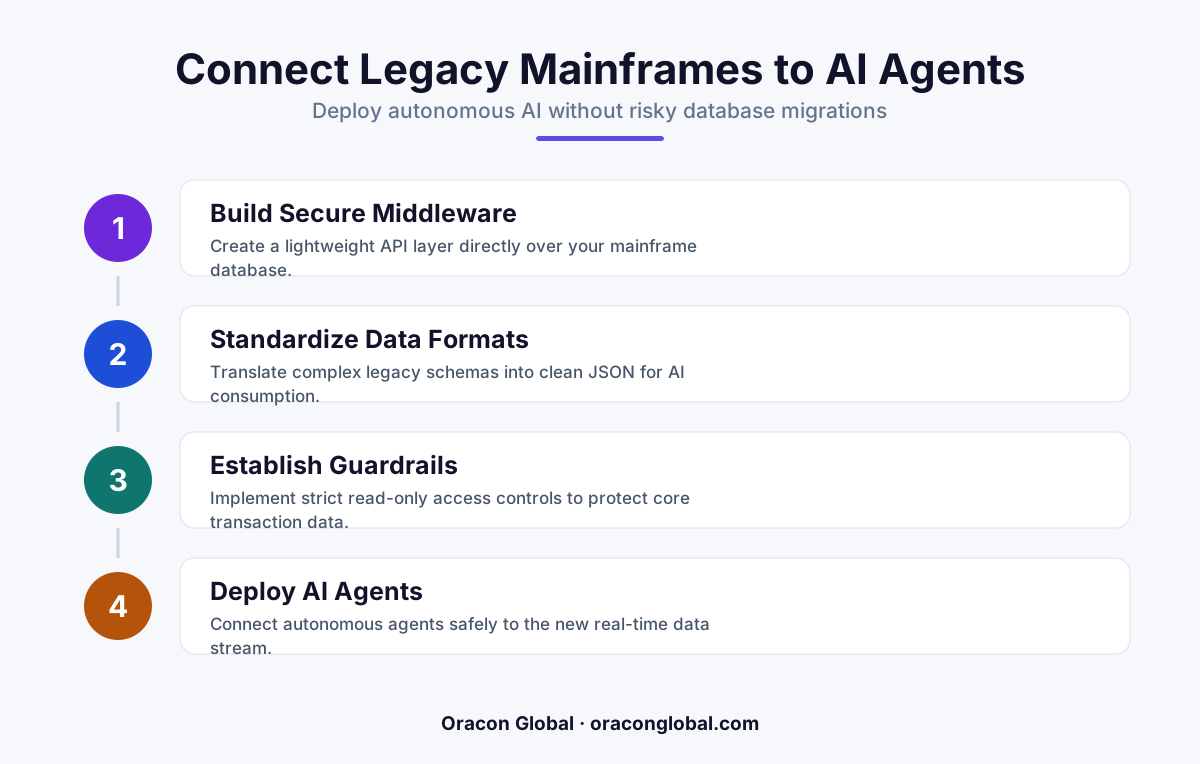
You do not need a multi-million dollar database migration to start using autonomous AI agents. By building a secure, read-optimized middleware layer, you can safely expose legacy mainframe data to AI workers without risking system crashes or data corruption.
For enterprises that have been operating for decades, core business data is rarely sitting in clean, modern cloud databases. Instead, it lives in legacy mainframe databases. These systems are highly stable and reliable, but they were never designed to handle the high-volume, unstructured queries that come with deploying modern autonomous AI agents.
When leadership teams want to leverage artificial intelligence to automate complex workflows, they often hit a wall. IT departments warn that querying old systems directly could cause crashes, while database administrators point out that a full database integration migration could take years and cost millions of dollars.
The good news is that you do not need to replace your mainframe to adopt AI. By building a smart, secure middleware bridge, you can connect your existing systems to autonomous AI agents safely, keeping your core operations protected while stepping into the future of automation.
The Risk of Connecting AI Directly to Legacy Mainframe Databases
To understand why a direct connection is dangerous, we have to look at how legacy databases and AI agents operate. Legacy mainframes are optimized for structured, predictable transactional workloads. They expect specific queries at predictable intervals.
AI agents, on the other hand, operate dynamically. When an agent is trying to solve a problem, it might execute dozens of parallel queries, search unstructured text, or request massive dumps of historical data all at once. This behavior can quickly lead to several critical issues:
- System Latency and Crashes: High-volume, unoptimized queries from an AI can exhaust mainframe resources, slowing down core business operations or causing system-wide downtime.
- Format Mismatches: Mainframe data is often stored in rigid formats (like COBOL copybooks or old relational structures) that LLMs cannot natively parse or understand.
- Data Corruption Risks: If an autonomous agent has write-access to a legacy system, an unexpected hallucination or logic error could overwrite critical historical records.
Attempting a complete database migration to solve these issues is a classic trap. These projects are notoriously slow, prone to budget overruns, and introduce massive operational risk. The smart alternative is to build a modern bridge.
Step 1: Build a Read-Only Caching Layer
The first rule of connecting legacy mainframe databases to AI is simple: never let the AI query the production mainframe directly. Instead, build a read-only replica or a high-speed caching layer that sits between the two systems.
This cache acts as a buffer. You can set up a scheduled, one-way synchronization process that copies relevant business data from the mainframe to a modern, cloud-hosted database (like PostgreSQL or Redis) at regular intervals—whether that is once a day, once an hour, or in real-time depending on your business needs.
When the AI agent needs to look up customer records, check inventory levels, or verify a contract, it queries this modern cache. The legacy mainframe remains completely untouched by the AI's search traffic, ensuring your core business systems run smoothly without any performance degradation.
Step 2: Use an API Translation Middleware Layer
Once you have a safe way to access the data, you need to make sure the AI agent can understand it. Legacy databases often use cryptic column names, coded values, and nested structures that make little sense to a modern language model.
A secure API middleware layer acts as a translator. This custom software sits between your data cache and the AI agent. Its job is to:
- Receive the natural language request from the AI agent.
- Translate that request into a clean SQL or API query.
- Retrieve the raw data from the cache.
- Format the raw data into clean, structured JSON with descriptive keys that the AI can easily read and analyze.
This translation layer ensures that the AI agent does not have to guess what "CUST_TX_09_ALT" means. The middleware translates it to "last_billing_date" before the agent ever sees it, drastically reducing errors and improving the speed of your digital transformation efforts.
Step 3: Establish Safe Write-Back Gateways
While reading data is relatively straightforward, allowing autonomous AI agents to update or write data back to legacy mainframe databases requires a strict safety protocol. If an AI agent updates a billing address or approves an invoice, that change must be written back securely.
Instead of giving the AI direct write permissions, establish a secure write-back gateway. When the AI wants to make a change, it submits the proposed update to a staging table or an event queue. This queue holds the transaction and performs several automated checks:
"By decoupling the AI's decisions from the actual database execution, you create a fail-safe environment where errors are caught long before they touch your core ledger."
For high-value actions, such as transferring funds or changing inventory statuses, you can build a human-in-the-loop review step into this gateway. A human staff member receives a notification, reviews the AI's proposed change, and clicks "approve" to commit the write to the mainframe.
Choosing Progress Over Migration
You do not need to wait for a massive, multi-year IT modernization project to start benefiting from AI automation. By treating your legacy database as a valuable foundation and wrapping it in a modern, secure API and caching layer, you get the best of both worlds.
Your core business data remains safe, secure, and performant inside your time-tested mainframe, while your team gains the leverage of custom AI agents that can read, analyze, and safely act on that data in real-time.
At Oracon Global, our senior in-house team specializes in building custom middleware, robust database integrations, and secure AI agents that work seamlessly with your existing technology stack. If you are ready to explore how to safely connect your legacy systems to modern AI, get in touch with us today to discuss your project.
Frequently asked questions
Do we need to migrate our legacy mainframe to use AI agents?
No, migrating a legacy mainframe is risky and expensive. You can use a secure middleware layer to expose the necessary data to your AI agents safely.
How do we prevent AI agents from overwhelming our old databases?
By using a read-only data caching layer, such as Redis or a synchronized relational replica, the AI agent never queries the main mainframe database directly.
Can autonomous AI agents safely write data back to legacy systems?
Yes, but writes should be handled via a queued staging area or human-in-the-loop review queue rather than allowing the AI to write directly to the core mainframe database.
What is the timeline for building an AI bridge for legacy databases?
A custom middleware layer and a functional AI agent pilot can typically be built and deployed by an experienced team in a matter of weeks, compared to years for a mainframe migration.
Read next
Beyond Chatbots: How to Build AI Agents That Actually Do Work for Your Business
Most businesses use AI to answer questions. Here is how to build custom AI agents that actually take action, connect to your internal tools, and handle complex workflows.
Beyond the Wrapper: How to Build Custom AI Agents for Business That Actually Work
Many businesses invest in basic AI wrappers only to find they lack the security and context needed for real work. Here is how to build custom AI agents that integrate deeply with your workflows and databases.
Enterprise AI Maintenance Costs: Budgeting for Year Two and Beyond
Building an AI system is only half the battle. Discover the practical, ongoing operational costs of enterprise AI, including token management, model drift, and continuous security audits.
Oracon Global builds production-grade AI agents, automation and apps — and you own the code and IP. Tell us what you want to automate.
Book a call →See our work