

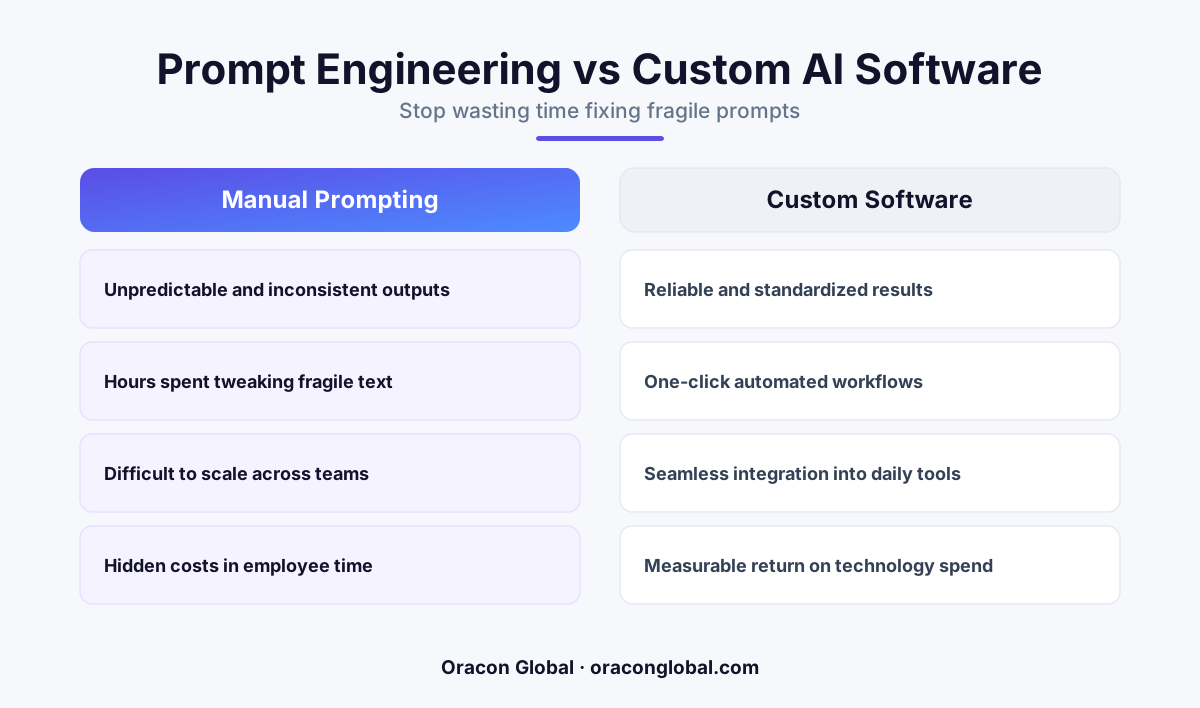
Relying on employees to write complex, fragile prompts to get reliable work out of generic AI tools creates a massive productivity drain. The solution is to transition from open-ended prompt boxes to custom, deterministic AI software that runs automated workflows in the background without human coaxing.
We have all been promised that generative AI would save our teams hours of tedious work. But if you walk through your office or look at your team's screen-share sessions today, you will likely see a different reality. Employees are staring at empty text boxes, carefully constructing paragraph-long prompts, tweaking adjectives, adding negative constraints, and hitting regenerate over and over again, hoping the system finally formats the output correctly.
This is the prompt engineering fatigue trap. When your team spends more time coaxing, correcting, and debugging a generic AI tool than it would take to simply write the email, analyze the spreadsheet, or draft the report themselves, your technology is no longer serving you. You have not automated a workflow; you have just introduced a highly unpredictable, high-maintenance digital colleague that requires constant supervision.
To recapture true operational efficiency, business leaders need to understand why this productivity drain happens and how to transition from fragile prompt boxes to robust, automated business workflows.
The Hidden Cost of the Prompt Box
The open-ended prompt box is a brilliant tool for raw exploration, brainstorming, and writing rough drafts. However, it is an incredibly poor interface for daily business operations. When you ask an employee to use a generic chatbot for structured business tasks, you are asking them to act as a human compiler for an unpredictable machine.
This approach introduces three distinct operational bottlenecks:
- The Trial-and-Error Loop: An employee inputs a task, gets a slightly wrong format, edits the prompt, runs it again, manually reformats the bullet points, and checks the math. A five-minute task quickly balloon into a twenty-minute debugging session.
- High Cognitive Load: Instead of focusing on high-level decision-making, your staff must learn the quirks of specific large language models, worrying about token limits, system instructions, and temperature settings.
- Zero Scalability: If one employee finally crafts a prompt that works, that knowledge remains locked in their personal chat history. There is no central, repeatable system that benefits the rest of the enterprise.
When you calculate the hourly wage of your skilled operators against the time they spend acting as prompt mechanics, the economic promise of off-the-shelf AI quickly falls apart.
Why More Prompts Won't Fix a Broken Workflow
The natural reaction to a failing AI prompt is to write a longer, more detailed prompt. Teams build massive libraries of internal templates, trying to force a generic, conversational model to behave like a piece of reliable enterprise software.
"Prompt engineering is a temporary bridge, not a permanent destination. If your business workflows rely on human beings typing long instructions into text boxes, you have a process vulnerability, not an automated system."
Generic models are designed to predict the next most likely word, not to understand your internal inventory codes, your customer retention policies, or your compliance guidelines. No matter how many paragraphs of context you paste into a browser tab, an off-the-shelf chatbot cannot access your live databases, verify real-time inventory, or update your CRM without manual human intervention. The moment an employee has to copy-paste data between three different windows to make an AI tool work, the workflow is broken.
The Solution: Transitioning to Custom AI Software
To eliminate prompt engineering fatigue and stop the AI productivity drain, businesses must shift their architecture from prompt-driven tools to goal-driven custom AI software.
Instead of giving your team an empty text box and hoping for the best, you build structured applications where the AI operates silently in the background. The user interface looks and feels like standard business software—buttons, forms, dropdowns, and status boards—but the execution engine is powered by structured, secure AI pipelines.
1. Hardcoding the Business Logic
Your business rules should never be left up to an AI's interpretation. In a custom application, we hardcode your operational boundaries, calculations, and database integrations using traditional, deterministic software code. The AI is only used for what it does best: parsing unstructured text, identifying patterns, and generating natural language translations within those strict boundaries.
2. Direct Database and API Connections
Instead of asking an employee to manually retrieve and paste client histories or product specifications into a prompt window, custom software connects directly to your existing systems. The software automatically gathers the exact context required, passes it securely to the model behind the scenes, and updates your records instantly.
3. Structured Input and Output Schemas
By defining strict data schemas, the system ensures that the AI only outputs predictable, perfectly formatted data. If a field requires a date, a currency figure, or a specific status tag, the application guarantees that format before it ever reaches a human screen. No clean-up required.
What Promptless Workflow Automation Looks Like
To visualize the difference between a prompt-heavy process and a truly automated system, consider how a standard operations team handles incoming client requests:
- The Prompt-Heavy Way: An account manager receives an email, copies the text, opens a browser-based AI tool, types a prompt asking the AI to summarize the request and draft a response, copies the draft back to their email client, manually edits the pricing errors because the AI guessed the rates, and hits send.
- The Automated Way: An incoming email triggers an automated pipeline. The custom background software instantly extracts the client's identity, queries the CRM for their active pricing tier, checks the inventory database, drafts a highly accurate, personalized response draft, and places it directly into the account manager's inbox as a pending draft. The operator simply reviews and clicks "Send."
The second method requires zero prompt engineering, zero context switching, and zero manual data transfer. The human operator remains in control as the final decision-maker, but the tedious preparation work is entirely handled by the system.
Take Back Your Team's Time
If you are ready to stop paying your highly skilled team members to troubleshoot generic chatbots, it is time to invest in tools built specifically for your business operations. True leverage comes from software that runs in the background, respects your business rules, and delivers consistent results without human coaching.
At Oracon Global, we build custom AI agents, automated workflows, and tailored enterprise applications designed to fit your unique operational processes. Our senior in-house team designs, develops, and deploys production-ready software where you own 100% of the code and intellectual property. Let's build something that actually works.
Ready to move past the prompt box? Contact Oracon Global today to discuss how we can turn your manual processes into reliable, automated software systems.
Frequently asked questions
Why is prompt engineering becoming a productivity drain for my team?
When employees must constantly tweak, test, and rewrite long instructions to get a generic AI tool to output correct business data, they are acting as manual translators. This context switching and troubleshooting often takes longer than simply doing the task themselves.
How does custom AI software eliminate the need for prompting?
Custom software hardcodes the business logic, data schemas, and API connections into the background architecture. Instead of typing a prompt, your team interacts with clean user interfaces, buttons, and automated triggers while the AI runs reliably behind the scenes.
Does removing the prompt box make the AI less flexible?
No, it makes the AI predictable and useful. By limiting the AI to specific inputs and structured outputs, you ensure it performs core business operations perfectly every time, while leaving creative flexibility for tasks that actually require it.
What is the first step to transition away from manual prompting?
Map your team's daily workflows to identify where they copy-paste data into public LLM windows. Those specific points are the best candidates for automated API integrations and structured, background AI processing.
Read next
Beyond Chatbots: How to Build AI Agents That Actually Do Work for Your Business
Most businesses use AI to answer questions. Here is how to build custom AI agents that actually take action, connect to your internal tools, and handle complex workflows.
Beyond the Wrapper: How to Build Custom AI Agents for Business That Actually Work
Many businesses invest in basic AI wrappers only to find they lack the security and context needed for real work. Here is how to build custom AI agents that integrate deeply with your workflows and databases.
Enterprise AI Maintenance Costs: Budgeting for Year Two and Beyond
Building an AI system is only half the battle. Discover the practical, ongoing operational costs of enterprise AI, including token management, model drift, and continuous security audits.
Oracon Global builds production-grade AI agents, automation and apps — and you own the code and IP. Tell us what you want to automate.
Book a call →See our work