

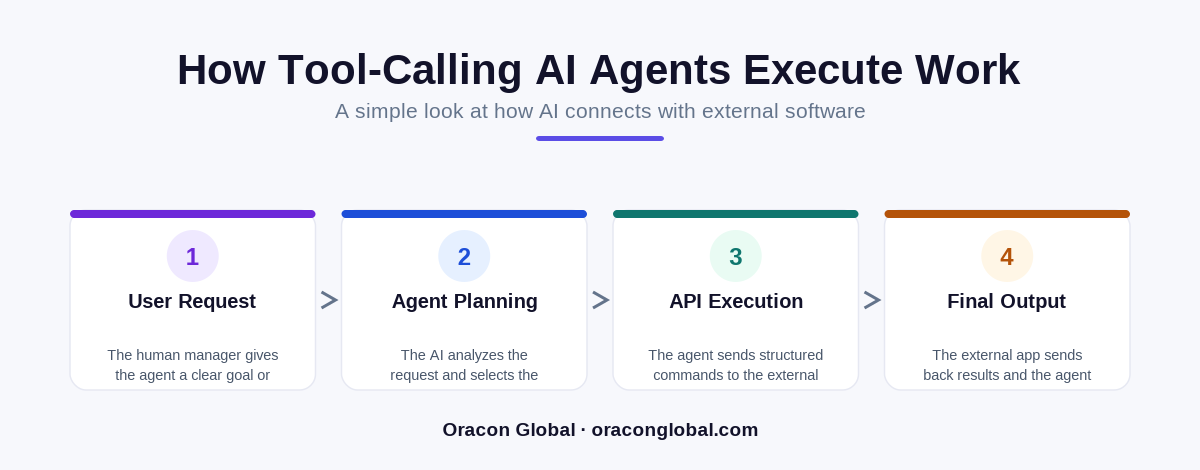
A tool-calling AI agent is an artificial intelligence model that can interact directly with your existing software programs, like databases, spreadsheets, and email apps. Instead of just giving you text responses, it clicks buttons, runs searches, and updates records to finish work on its own.
If you have used basic artificial intelligence over the past few years, you are probably familiar with typing a question into a box and reading a helpful text answer. You ask for an email draft, and it writes one. You ask for a summary of a text document, and it hands you three main bullet points.
That is useful, but it leaves all the hard labor on your shoulders. You still have to copy that email draft into your mail program, find the recipient's address, attach the correct file, and click send. Standard software answers questions, but it leaves you to do the actual work.
This is where a tool-calling AI agent changes the game. Instead of just generating words on a screen, this type of system interacts directly with your existing business applications to complete tasks from start to finish.
What Is a Tool-Calling AI Agent?
A tool-calling AI agent is an intelligent program capable of using external software programs to perform real actions. In simple terms, a tool is any software function that performs a specific job—like searching a database, generating a customer invoice, or sending a message.
When you give an instruction to a simple chatbot, it creates a response using only the information stored in its memory. When you give an instruction to a tool-calling AI agent, it figures out which digital tools it needs to get the job done, opens those tools, runs them in the correct sequence, and presents you with the finished outcome.
Think of the difference like this:
- Standard Chatbot: A reference book that answers questions about how to fix a leaky faucet.
- Tool-Calling AI Agent: A plumber who brings a toolbox, chooses the right wrench, turns off the water line, and fixes the pipe for you.
How Does AI Use Software Tools?
Non-technical founders often ask how software can "talk" to other software. The magic relies on three simple concepts working together behind the scenes.
1. The Instruction Manual (API)
Most modern business applications have an Application Programming Interface (API). An API is simply a digital instruction manual that lets different software programs talk to one another. For example, your accounting app has an API that says, "If you send me a customer name and an amount, I will create a new invoice."
2. The Tool Menu
When engineers set up a tool-calling AI agent, they give it a menu of available APIs. The agent receives a list of clear descriptions, such as:
- Tool A: Look up customer contact details using an email address.
- Tool B: Check warehouse stock for a specific product ID.
- Tool C: Generate a shipping label and send it to the printing queue.
3. The Decision Engine
When a human operator gives the agent a goal, the underlying language model reads the request, looks at its menu of software tools, and selects the exact steps required. If it needs more information to finish the job, it uses one tool to fetch the data and passes that information straight into the next tool.
A Real-World Example: Processing an E-Commerce Refund
To see how this works in practice, let us compare how a standard customer support process runs manually versus how it operates with a tool-calling AI agent.
Imagine a customer sends an email saying, "Hi, my package arrived broken. Order number #8492. I want a refund."
Without automation, a staff member must perform several steps manually:
- Open the customer database app and search for order #8492.
- Verify that the package was delivered within the approved return window.
- Open the payment gateway app to issue the refund.
- Open the inventory software to mark the item as damaged stock.
- Open the email client to draft and send a confirmation note to the customer.
With a tool-calling AI agent, the entire sequence happens automatically in seconds:
The agent reads the incoming email and recognizes the request. It calls your database tool to check order #8492. Seeing that the purchase is valid, it calls your payment processor tool to execute the refund. Next, it updates the inventory record in your stock management app. Finally, it uses your email system to send a personalized confirmation back to the customer.
No human copied and pasted a single piece of information. The agent simply used its software tools to complete the process.
Why Is Tool Calling Important for Business Automation?
The biggest problem with early business applications of artificial intelligence was accuracy and isolation. Large language models were trapped inside text boxes, completely separated from real-time business data. They could easily make up facts or offer outdated information.
Tool calling solves this issue by connecting artificial intelligence to live databases and actual operations. This brings three major benefits to non-technical business founders:
1. Live Information Access
Instead of relying on outdated training data, the agent checks live records in real time before taking any action. It sees current inventory levels, today's schedule, and real-time order statuses.
2. Zero Copy-Pasting
Manual data entry is slow and causes frequent mistakes. Tool-calling agents move information cleanly between your accounting software, customer management tools, and communication channels without human oversight.
3. Reliable Execution
Because the underlying tools perform hardcoded tasks—like creating a PDF or running a mathematical calculation—the chance of human error during routine administrative work is dramatically reduced.
Getting Started with AI-Driven Software Integration
You do not need an in-house engineering team or deep technical knowledge to start using modern software automation. The core requirement is understanding which daily business tasks involve repetitive steps across multiple apps.
If your operations team spends hours moving data between spreadsheets, handling routine support updates, or checking records across different software accounts, tool-calling agents can take over those workflows safely.
At Oracon Global, our senior in-house team builds bespoke AI agents, digital employees, and custom software tailored directly to your business workflows. You keep full ownership of all code and intellectual property, ensuring your company builds long-term value without operational lock-in.
Want to see how automated software integration can streamline your company's operations? Try the live interactive AI agent demos on our website or reach out to the Oracon Global team today to discuss your project.
Frequently asked questions
What is a tool-calling AI agent in simple terms?
It is an intelligent software program that can read information and take real actions in other applications, like sending an email or updating a spreadsheet, rather than just answering questions in a chat box.
How is a tool-calling AI agent different from a standard chatbot?
A standard chatbot only talks to you by generating text. A tool-calling AI agent can actually log into software systems, look up data, make decisions, and execute tasks across your business apps.
Do I need to re-code all my company software to use AI agents?
No, modern AI agents connect to existing software through standard integration points called APIs. You can link them to your current tools without replacing your core business systems.
Does a tool-calling AI agent work on its own without human supervision?
It can perform routine tasks automatically, but best practices usually include approval steps for high-stakes actions like making large purchases or changing sensitive records.
Read next
Beyond Chatbots: How to Build AI Agents That Actually Do Work for Your Business
Most businesses use AI to answer questions. Here is how to build custom AI agents that actually take action, connect to your internal tools, and handle complex workflows.
Beyond the Wrapper: How to Build Custom AI Agents for Business That Actually Work
Many businesses invest in basic AI wrappers only to find they lack the security and context needed for real work. Here is how to build custom AI agents that integrate deeply with your workflows and databases.
Enterprise AI Maintenance Costs: Budgeting for Year Two and Beyond
Building an AI system is only half the battle. Discover the practical, ongoing operational costs of enterprise AI, including token management, model drift, and continuous security audits.
Oracon Global builds production-grade AI agents, automation and apps — and you own the code and IP. Tell us what you want to automate.
Book a call →See our work