

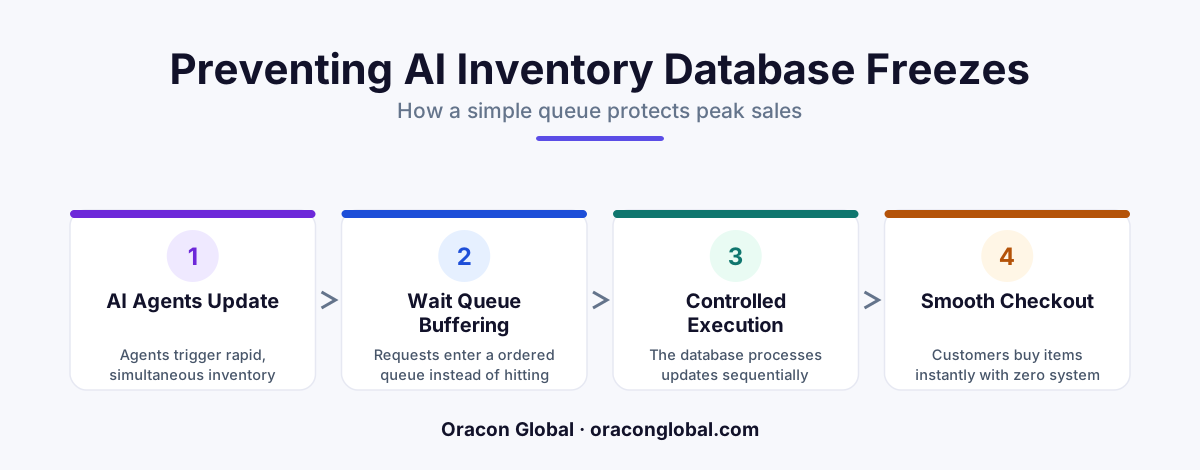
An AI database lock happens when automated software monopolizes a database record, preventing other systems from accessing it. By implementing a simple wait queue, you can line up these digital requests in an orderly fashion, keeping your e-commerce platform and inventory systems running smoothly during peak traffic.
Imagine running a popular online store during a major holiday sale. Orders are flooding in every second. Deep in your digital warehouse, your automated inventory system is working hard to update stock levels, adjust supplier orders, and sync shipping details. Suddenly, your checkout page freezes. Customers cannot buy anything, and your support dashboard fills up with error messages.
You might assume your servers simply ran out of memory or crashed under the heavy traffic. Often, the real culprit is a quiet backend traffic jam known as an AI database lock. This happens when your automated software and your human customers try to change the exact same piece of information at the exact same millisecond.
For non-technical founders and operations leaders, understanding why this happens and how to prevent it is key to building a reliable, automated business. Let us break down how database locking works in plain English and look at the simple mechanism that keeps your digital doors open during your busiest hours.
What is a Database Lock?
To understand what a database lock is, it helps to use a physical analogy. Imagine a physical paper ledger book where your company tracks how many blue t-shirts are left in stock. Only one person can write on a specific page of that paper book at any given moment.
If two warehouse workers try to grab the same pen and write on the exact same line at the same time, they will bump hands and make a mess. To prevent this, the first worker physically holds the book (or "locks" it) while they make their update. The second worker must wait until the first person finishes and hands the book over.
A database lock is the digital version of this exact process. A database is a structured digital filing cabinet. When a piece of software wants to update a record, such as changing a product quantity from 10 to 9, it temporarily locks that specific row in the database. This ensures that no other system can make conflicting changes at the same time, preventing data corruption.
How Automated Software Causes Digital Traffic Jams
Under normal circumstances, human-driven systems handle database locking seamlessly. A customer buys an item, the database locks the row for a fraction of a millisecond, updates the count, and releases the lock. Because human actions are relatively slow and spaced out, these locks rarely overlap.
The situation changes dramatically when you introduce automation. Automated AI agents do not work at human speed. They can read, analyze, and attempt to write data hundreds of times per second. During peak sales hours, you have two powerful forces colliding:
- Hundreds of real human customers clicking the checkout button at the same time.
- AI agents scanning sales data, calculating restocking needs, and attempting to update the same inventory records instantly.
When an AI agent tries to update an inventory line at the exact moment a customer tries to buy that item, the system can get confused. If the database lock is held too long by a busy AI process, the customer's checkout attempt will time out. To the customer, the site appears frozen or broken.
The Solution: A Simple Database Wait Queue
To prevent your automated inventory management systems from freezing up, you do not need a massive, expensive database overhaul. Instead, you need to introduce a basic organization system: a database wait queue.
Think of a database wait queue as the digital equivalent of a ticket dispenser at a busy deli. Instead of fifty hungry customers crowding the counter and shouting their orders at once, everyone takes a numbered ticket and stands in an orderly line. The deli worker serves ticket number one, then ticket number two, and so on.
A wait queue acts as a polite, organized buffer sitting right in front of your database. When your automated systems or your customers want to make a change, they do not talk directly to the database. Instead, their requests are turned into simple digital messages and placed in a fast, organized queue.
How the Queue Keeps Systems Moving
When you implement a wait queue in your e-commerce workflow automation, the database stops feeling overwhelmed. The system processes updates through a clear, three-step routine:
- The Hold: When a customer clicks buy, the purchase request enters the front of the queue.
- The Quick Update: The database pulls the request from the queue, locks the inventory row for a tiny fraction of a second, updates the stock count, and immediately unlocks it.
- The AI Read: Your AI agents pull their tasks from a separate, slower section of the queue. If the database is busy handling a burst of customer purchases, the queue gently holds back the AI's updates for a few seconds until the customer rush subsides.
Because the queue manages the flow of traffic, your database never experiences a collision. Your customer checkout remains lightning-fast, and your AI automation can still process data in the background without causing system errors.
A Real-World Example: The Flash Sale Freeze
Let us look at how this works in practice for an online retail brand. Imagine a brand that launches a limited-edition product run at noon on a Friday. Thousands of shoppers land on the website simultaneously.
Without a wait queue, a customer checks out, which locks the stock level for "Product A." At that exact microsecond, an AI assistant attempts to read the stock level of "Product A" to decide if it needs to trigger an automated reorder email to the manufacturer. Because the customer has the row locked, the AI waits. While the AI waits, ten more customers try to checkout. The database gets overwhelmed with pending requests, locks up entirely, and the site crashes.
With a wait queue installed, the outcome is entirely different. The checkout clicks from those thousands of customers instantly drop into the queue. The database processes them rapidly in order. The AI's request to read and update stock levels also drops into the queue, but it sits safely behind the active purchases. The customers get their confirmation pages instantly, and the AI quietly updates the manufacturing system three seconds later when the immediate rush clears.
Building Reliable Systems for Long-Term Growth
When you are building custom business tools or integrating smart automation into your operational workflows, reliability should always come first. A brilliant AI system is only useful if it keeps your daily business operations running smoothly.
At Oracon Global, we build custom web and mobile apps, workflow automations, and AI tools with this level of stability in mind. Our senior in-house team designs software that scale under pressure, ensuring your data remains secure, fast, and completely under your control. Best of all, you retain 100% ownership of your code and intellectual property.
Are you ready to build robust, high-performance automation for your business? Get in touch with Oracon Global today to discuss your next project.
Frequently asked questions
What is an AI database lock?
It is a state where an automated AI agent holds exclusive access to a database row, preventing other systems or customers from updating or reading that data.
Why does automated inventory freeze during peak sales hours?
When high traffic hits, multiple customer checkouts and rapid AI updates try to change the same stock numbers at the exact same millisecond, causing database collisions.
What is a database wait queue?
It is a digital waiting line that organizes incoming data updates in order, letting the database process them one by one without crashing or freezing.
Do I need to rebuild my entire database to fix database locking?
No, you do not need a complete rebuild; you can introduce a smart queueing layer between your AI tools and your existing database to manage the traffic flow.
Read next
Beyond Chatbots: How to Build AI Agents That Actually Do Work for Your Business
Most businesses use AI to answer questions. Here is how to build custom AI agents that actually take action, connect to your internal tools, and handle complex workflows.
Beyond the Wrapper: How to Build Custom AI Agents for Business That Actually Work
Many businesses invest in basic AI wrappers only to find they lack the security and context needed for real work. Here is how to build custom AI agents that integrate deeply with your workflows and databases.
Enterprise AI Maintenance Costs: Budgeting for Year Two and Beyond
Building an AI system is only half the battle. Discover the practical, ongoing operational costs of enterprise AI, including token management, model drift, and continuous security audits.
Oracon Global builds production-grade AI agents, automation and apps — and you own the code and IP. Tell us what you want to automate.
Book a call →See our work