

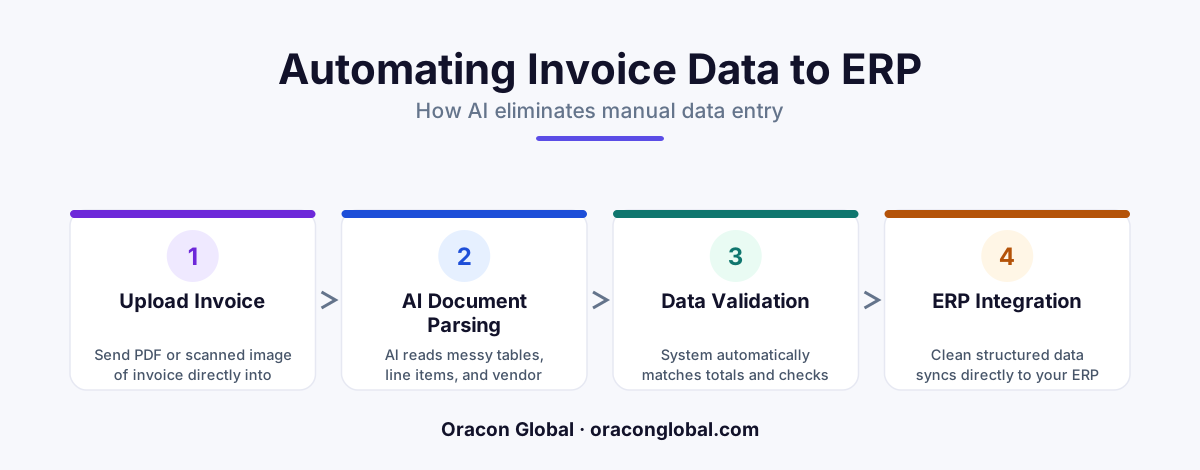
An AI document parser is software that uses artificial intelligence to read unstructured files like PDFs, extract key details like invoice tables, and type them into your database or ERP automatically. It replaces slow manual data entry with instant, highly accurate digital workflows.
If you run a growing business, you know the quiet headache of the accounts payable inbox. Every day, dozens of suppliers send invoices. Some come as clean digital PDFs. Others arrive as blurry smartphone photos or crumpled paper scans. Inside every single one of those files is a table containing quantities, descriptions, part numbers, and prices.
To get those numbers into your Enterprise Resource Planning (ERP) system—the central software directory where you track your business inventory, sales, and money—someone on your team has to manually type them in. It is slow, boring, and highly prone to typos. A single misplaced decimal point can throw off your entire inventory count or cause an overpayment.
Fortunately, modern technology has a solution. An AI document parser can read these files, extract the complex tables, and input the data directly into your ERP without a human ever having to touch the keyboard.
What is an AI Document Parser?
To understand what an AI document parser is, let us first define the terms. A "parser" is simply a tool that breaks down a block of information into smaller, organized pieces. An AI document parser is a smart software tool that uses artificial intelligence to read unstructured files—like PDFs, images, or emails—and pull out the specific data you need.
Think of it like hiring a incredibly fast digital assistant whose only job is to read documents and write down the important facts. It does not just look at a document as a flat picture. It actually understands what the words and numbers mean, even if they are scattered across a messy page.
The Difference Between Old Software and AI
In the past, businesses used a technology called Optical Character Recognition (OCR) to read documents. While OCR was helpful, it was also highly rigid. It relied on exact templates. You had to tell the software: "The invoice number will always be exactly three inches from the left and two inches from the top."
If a supplier changed their invoice design by even a millimeter, the old software would fail. Because every vendor formats their bills differently, your team had to build and maintain hundreds of different templates. An AI parser removes this headache. It does not care about physical layout. It reads the page contextually, finding the words "Invoice #" or "Bill To" just like a human eye does, regardless of where they sit on the page.
How the Parser Extracts Tables Without Human Help
The hardest part of manual data entry is dealing with tables. An invoice table has columns for item codes, descriptions, unit costs, tax rates, and totals. If an invoice has fifty different line items, typing them into an ERP one by one can take thirty minutes or more. Here is the step-by-step process of how an AI document parser handles this automatically:
- Intake: The system automatically grabs the invoice the moment it arrives in your email inbox or is uploaded to a shared folder.
- Visual Scanning: The AI examines the document layout, identifying where the paragraphs end and where the structured tables begin.
- Table Extraction: The parser reads the columns. It maps "Part No." to your ERP’s SKU field, "Qty" to your inventory count, and "Total" to your ledger balances.
- Validation Rules: The AI performs basic math to double-check the work. It multiplies the quantity by the unit price to make sure the math matches the invoice total.
- ERP Delivery: Once validated, the system pushes the clean, structured data directly into your ERP database through an automated connection.
A Real-World Example: The Warehouse Delivery
Let us look at a simple, everyday example of how this looks in practice. Imagine a commercial plumbing distributor that receives three shipments of copper pipes every Tuesday. Each shipment comes with a paper delivery slip and a digital invoice sent via email.
Historically, an office administrator had to sit down with the physical papers and type fifty rows of part numbers into the inventory system. If they typed "1/2-inch pipe" instead of "3/4-inch pipe," the warehouse team would ship the wrong products to plumbers the next morning.
With an AI document parser in place, the process changes completely:
The supplier sends the invoice email. Within three seconds, the AI parser opens the email attachment, reads the table containing twenty different sizes of copper pipes, verifies that the prices match the negotiated contract, and updates the inventory levels in the ERP. The administrator only gets a notification if there is a pricing mismatch.
Why This Matters for Your Business Operations
Implementing an automated invoice processing workflow does more than just save time. It fundamentally changes how your business operates. When you remove manual data entry, you gain three major advantages:
- Near-Instant Processing: Invoices that used to sit on a desk for days waiting to be typed in are now processed in seconds, keeping your financial records perfectly up-to-date.
- Zero Typo Errors: Computers do not get tired at 4:00 PM. The numbers extracted from the PDF match the numbers in your system with absolute accuracy.
- Happier Employees: Your operations team can stop doing repetitive data entry and focus on higher-value tasks, like resolving supplier disputes or negotiating better wholesale rates.
How to Bring This Technology into Your Business
You do not need an in-house team of data scientists to start using an AI document parser. Modern systems are designed to plug directly into your existing software tools, acting as a bridge between your messy incoming files and your structured database.
At Oracon Global, we design and build custom AI-native systems, workflow automations, and ERP integrations that help businesses eliminate manual bottlenecks. Our senior in-house team handles the complex engineering, ensuring that you own 100% of your code and intellectual property.
If you are ready to stop typing data manually and want to see how an AI parser can streamline your operations, contact Oracon Global today to discuss your workflow needs.
Frequently asked questions
What is an AI document parser?
An AI document parser is a smart software program that reads documents like PDFs or scans, understands the text and tables inside them just like a human would, and extracts the key information automatically.
How does it handle messy invoice tables?
Unlike old software that looks at exact pixel locations, an AI parser reads the context of the document, finding column headers like "Quantity" or "Price" no matter where they are placed on the page.
Do I need to build a template for every new supplier invoice?
No, an AI parser does not need rigid templates because it understands the meaning of words and layouts, allowing it to read new invoice formats on the very first try.
Does this replace my existing ERP system?
No, the AI parser acts as a helper that plugs into your existing ERP, reading the incoming documents and typing the data into your current system automatically.
Read next
Beyond Chatbots: How to Build AI Agents That Actually Do Work for Your Business
Most businesses use AI to answer questions. Here is how to build custom AI agents that actually take action, connect to your internal tools, and handle complex workflows.
Beyond the Wrapper: How to Build Custom AI Agents for Business That Actually Work
Many businesses invest in basic AI wrappers only to find they lack the security and context needed for real work. Here is how to build custom AI agents that integrate deeply with your workflows and databases.
Enterprise AI Maintenance Costs: Budgeting for Year Two and Beyond
Building an AI system is only half the battle. Discover the practical, ongoing operational costs of enterprise AI, including token management, model drift, and continuous security audits.
Oracon Global builds production-grade AI agents, automation and apps — and you own the code and IP. Tell us what you want to automate.
Book a call →See our work