

An AI knowledge base is a smart digital library that reads, understands, and instantly answers questions about your company files. Unlike basic search tools that only look for exact words, it understands the meaning behind your questions to deliver accurate answers in seconds.
Imagine your company files are stored in a physical room filled with thousands of unmarked cardboard boxes. Inside those boxes are older contracts, training manuals, product guides, and policy updates. If a team member needs to know the exact refund policy for a client in a specific region, they have to walk into that room, open dozens of boxes, and flip through hundreds of pages. This is exactly what working with digital shared drives feels like for most employees today.
A traditional search tool is like a simple index card file. It can help you find a box if the label matches your keyword exactly. But if you search for "return rules" and the document uses the phrase "cancellation procedures," the search tool will fail to find it. This is where an AI knowledge base changes how businesses operate.
In this guide, we will explain exactly what an AI knowledge base is, how it works in plain language, and why it is becoming an essential tool for growing companies.
What is an AI Knowledge Base?
An AI knowledge base is a smart digital library that reads, understands, and instantly answers questions about your company files. Instead of making you open a document and read through pages of text, the system acts like a highly knowledgeable assistant who has memorized every document your company has ever created.
To understand this technology, it helps to define a few basic terms in simple language:
- AI knowledge base: A secure digital system that reads your company documents and provides direct answers to your team's questions.
- Retrieval-augmented generation (RAG): The technology that allows an AI to look up facts in your private files before formulating a reply.
- Semantic search: A search method that looks for the meaning behind your words rather than just matching exact spelling.
Instead of returning a list of links or files for you to open, this tool gives you a direct, written answer. Even better, it points you to the exact page and paragraph of the document it used to find that answer.
An Everyday Analogy: The Expert Librarian
To see the difference between old systems and new AI tools, imagine visiting a massive public library.
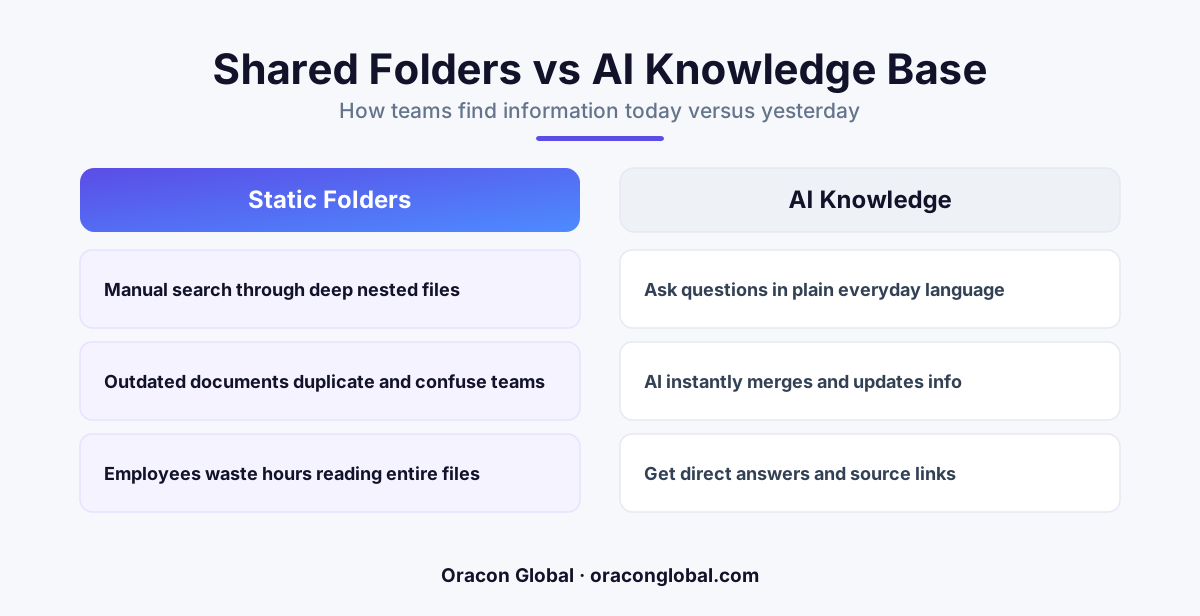
A traditional company knowledge base is like the library computer catalog. You type in a keyword like "historic ships," and it gives you a list of thirty books. You then have to walk to the shelves, find the books, and read through them to find the specific fact you need. If you misspell a word, the catalog might show you zero results.
An AI knowledge base is like having an expert librarian who has read every single page of those thirty books. You walk up and ask, "Did any wooden ships sail from this harbor in 1850?" The librarian does not hand you a book. Instead, they look at you and say, "Yes, the Star of the Sea departed on October 12th with a crew of twelve." Then, they hand you the open book to page 45 so you can verify it yourself.
How Does an AI Knowledge Base Work in Plain Language?
You do not need a computer science degree to understand how this system processes your files. The entire journey happens in three simple steps:
1. Reading and Organizing the Information
When you connect your folders, PDFs, or spreadsheets to the system, the AI reads them. It breaks long documents down into small, manageable paragraphs. It then translates the meaning of these paragraphs into a format that a computer can easily compare.
2. Understanding the Question
When a team member types a question, the AI does not just look for matching words. It looks for matching ideas. For example, if a user asks, "How do we handle sick days?" the system knows that "sick days" is closely related to "medical leave" and "time-off policies."
3. Delivering the Answer
The system retrieves the most relevant paragraphs from your files, reads them instantly, and writes a natural, easy-to-read summary. It also attaches links to the source documents so your team can double-check the facts in one click.
A Real-World Example: Customer Support
Let us look at a practical, real-world example of how this helps a business day-to-day.
Imagine a customer support representative at an appliance manufacturing company. A customer calls because their model heater is displaying an "Error Code 4." Under the old system, the representative has to search the shared drive, open a 200-page technical manual PDF, hit "Ctrl+F" to search for the code, and read through technical schematics while the customer waits on hold.
With an AI knowledge base, the representative simply types: "How do I fix Error Code 4 on the model heater?"
Within two seconds, the AI responds: "Error Code 4 means the water sensor is blocked. Tell the customer to unplug the unit, locate the small blue valve on the bottom left, and wipe it clean with a dry cloth." The AI also displays a direct link to page 18 of the official repair manual for reference.
The customer gets an answer immediately, the call time is cut in half, and the representative does not have to spend hours memorizing dense technical manuals.
Why Custom AI Development Matters for Your Data
While there are many pre-built, off-the-shelf software packages available today, many companies find that a generic solution does not fit their unique operational needs. Standard tools often struggle with highly specialized industry terms, custom file structures, or strict security requirements.
By opting for custom AI development, your business gets a system tailored to your exact workflow. A custom tool ensures that your data remains entirely private, fits perfectly within your existing team chat apps or software, and matches the specific vocabulary of your industry.
Get Started with Smart Information Management
Moving away from messy folders and endless searching does not require a complete overhaul of your business. A smart business search tool can be introduced gradually, starting with your most important guides, manuals, or policy files.
At Oracon Global, our senior in-house team builds custom AI tools, digital employees, and software systems designed to solve real operational problems for companies worldwide. We build custom applications where you own 100% of the code and intellectual property.
Would you like to see how an AI knowledge base can help your team find answers faster? Contact Oracon Global today to discuss how we can build a secure, intelligent solution for your business.
Frequently asked questions
What is the difference between a normal folder and an AI knowledge base?
A normal folder just stores files and requires you to open and read them. An AI knowledge base reads all the files for you, understands the content, and answers your questions directly.
Do we have to format all our documents before using one?
No. A custom AI knowledge base can read standard PDFs, Word documents, spreadsheets, and presentation slides without you needing to clean them up first.
Is our private company data safe with an AI knowledge base?
Yes. When built correctly, your files are stored in a private, secure database that only your team can access, keeping your intellectual property completely safe.
How long does it take to get answers from the system?
The system works in real time, usually providing a complete, accurate answer with references to the source documents in less than two seconds.
Read next
Beyond Chatbots: How to Build AI Agents That Actually Do Work for Your Business
Most businesses use AI to answer questions. Here is how to build custom AI agents that actually take action, connect to your internal tools, and handle complex workflows.
Beyond the Wrapper: How to Build Custom AI Agents for Business That Actually Work
Many businesses invest in basic AI wrappers only to find they lack the security and context needed for real work. Here is how to build custom AI agents that integrate deeply with your workflows and databases.
Enterprise AI Maintenance Costs: Budgeting for Year Two and Beyond
Building an AI system is only half the battle. Discover the practical, ongoing operational costs of enterprise AI, including token management, model drift, and continuous security audits.
Oracon Global builds production-grade AI agents, automation and apps — and you own the code and IP. Tell us what you want to automate.
Book a call →See our work