

An AI memory pipeline is a system that allows business software to store, organize, and recall past interactions and data just like a human brain. Without it, your AI tools treat every conversation like the very first day on the job, leading to repetitive questions and slow workflows.
Imagine hiring an assistant who is incredibly smart but suffers from total amnesia every single night. Every morning, you have to retrain them on your business goals, remind them of your client preferences, and explain how to format your invoices all over again.
This is exactly how most standard AI tools work today. They might be brilliant at writing emails or analyzing spreadsheets in the moment, but the second you close the chat window, they forget everything you just discussed. To fix this, modern business tools use what developers call an AI memory pipeline.
You do not need a computer science degree to understand how this works or why it is valuable. Below is a simple, plain-English guide to what an AI memory pipeline is, how it works, and how it can help your business run more smoothly.
What is an AI Memory Pipeline?
An AI memory pipeline is a dedicated system that allows custom software to save, organize, and recall important details from past conversations and tasks. Just like the human brain, it helps the software learn from experience so it can work faster and smarter over time.
Without this system, an AI tool treats every single interaction like the very first day on the job. With it, the tool can remember a customer's favorite product, a company's specific billing cycle, or a preferred tone of voice without being told twice.
A Simple Everyday Analogy
To understand the value of business software memory, think of your local coffee shop. If you visit a new barista every day, you have to explain exactly how you like your coffee every single morning. That is an AI without memory.
Now, picture walking into your favorite local spot where the barista knows your name, remembers your order, and even recalls that you prefer oat milk. That is a memory pipeline in action. It turns a repetitive transaction into a seamless, personal experience.
The Three Steps of Software Memory
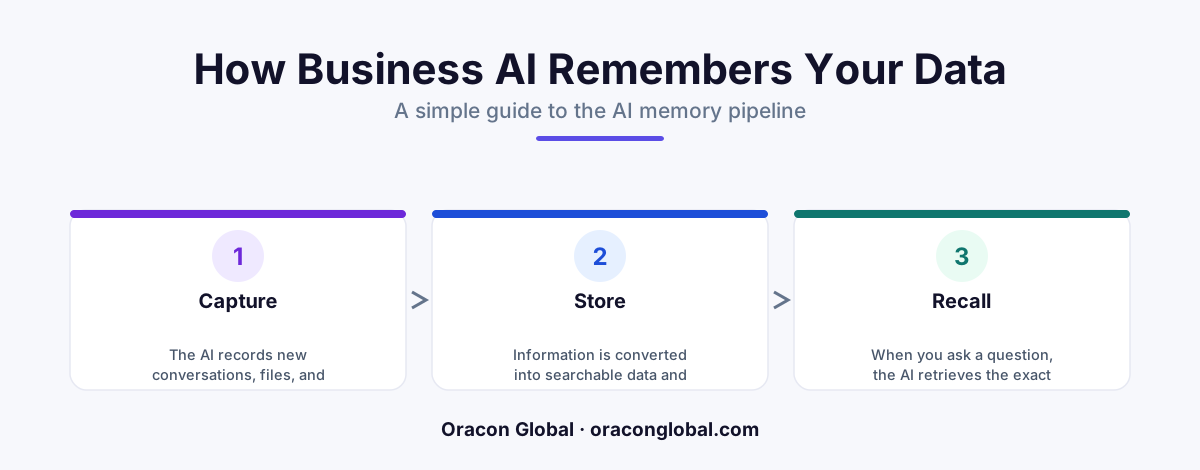
An AI does not just magically remember things. A team of developers has to build a structured pathway for information to travel through. This pathway consists of three basic steps:
- Listening and Sorting: As you work, the software listens to the conversation. It filters out the noise (like "hello" and "how are you") and captures only the crucial facts (like "the client wants the draft by Friday").
- Storing Safely: The software saves these facts in a secure digital storage space. This space is organized by meaning, not just by alphabetical order, making it incredibly fast to search.
- Recalling at the Right Moment: When you ask a new question, the software instantly scans its memory bank, pulls out the relevant past facts, and uses them to give you a highly accurate, personalized answer.
A Real-World Business Example
Let us look at how this works for a service-based business, such as a plumbing and heating company. Imagine a customer named Sarah calls because her boiler is making a strange noise.
If the company uses a basic chatbot with no memory, Sarah has to explain her address, her boiler model, and her service history to the bot. If the line drops and she has to restart the chat, she has to explain it all over again. This causes massive frustration.
If the company uses custom software with an integrated memory pipeline, the experience is entirely different:
- The First Interaction: Sarah mentions she has a "Model-X boiler installed in 2021." The memory pipeline quietly saves this technical detail.
- The Second Interaction: Three months later, Sarah chats in saying, "My heater is acting up again."
- The Memory Recall: The AI instantly remembers she has a Model-X boiler from 2021. Instead of asking her what model she has, it immediately says, "I see you have a Model-X boiler. Let me check if we have a technician nearby who specializes in that specific model."
This saves Sarah time, makes the business look highly professional, and reduces the workload on the company's human support staff.
Why Standard Databases Are Not Enough
You might wonder: "Why can't we just use a traditional computer database for this?"
A traditional database is like a rigid digital filing cabinet. It is great for storing exact numbers, like a phone number or a zip code. However, it cannot understand human nuance. If you store "the client was unhappy with the slow delivery speed" in a traditional database, a regular software program cannot easily connect that note to a future conversation about shipping options.
An AI memory system is different because it stores the meaning behind the words. It knows that "unhappy with delivery speed" is closely related to "express shipping options," allowing it to make smart connections automatically.
The Benefits of Giving Your Software a Memory
Investing in custom AI development to add memory to your business tools offers several immediate advantages:
1. No More Repetitive Questions
Your team and your clients do not have to repeat themselves. The software remembers past preferences, draft edits, and project goals, allowing everyone to get straight to work.
2. Fewer Mistakes
When software relies on human memory to copy-paste details from old emails, things get lost in translation. A memory pipeline keeps a clean, automated record of key decisions, reducing the risk of costly human errors.
3. True Digital Employees
With memory, your automated tools stop acting like simple calculators and start acting like actual team members. They can handle complex, multi-day projects because they remember what happened on day one when they reach day five.
Building a Secure Memory System
When you build a memory system for your business, security is the top priority. A professional software studio can set strict boundaries on what the AI is allowed to remember. For example, you can program the system to automatically ignore credit card numbers or personal passwords, ensuring your business stays compliant with privacy laws while still enjoying the benefits of smart automation.
At Oracon Global, our senior in-house team builds tailored AI tools, smart workflows, and custom databases that help companies work faster and smarter. We deliver clean, reliable software that you own 100%, with no hidden licensing fees or locked code.
Ready to see how smart software can change the way you run your business? Contact Oracon Global today to discuss how we can build a secure, custom solution for your team.
Frequently asked questions
What is a simple definition of an AI memory pipeline?
It is a behind-the-scenes system that lets an AI tool save important details from past conversations and use those details to make better decisions in the future.
How is this different from a regular computer database?
A regular database stores rigid files like a giant digital filing cabinet, while an AI memory pipeline understands the meaning and context of information so it can recall the right detail at the exact moment it is needed.
Can a business choose what its AI memory pipeline remembers?
Yes, developers can set strict rules so the AI only remembers helpful business facts while automatically ignoring or deleting sensitive personal data.
Do we need to build an entirely new software system to use this?
No, an experienced development team can build a custom memory pipeline and connect it directly to your existing business tools and databases.
Read next
Beyond Chatbots: How to Build AI Agents That Actually Do Work for Your Business
Most businesses use AI to answer questions. Here is how to build custom AI agents that actually take action, connect to your internal tools, and handle complex workflows.
Beyond the Wrapper: How to Build Custom AI Agents for Business That Actually Work
Many businesses invest in basic AI wrappers only to find they lack the security and context needed for real work. Here is how to build custom AI agents that integrate deeply with your workflows and databases.
Enterprise AI Maintenance Costs: Budgeting for Year Two and Beyond
Building an AI system is only half the battle. Discover the practical, ongoing operational costs of enterprise AI, including token management, model drift, and continuous security audits.
Oracon Global builds production-grade AI agents, automation and apps — and you own the code and IP. Tell us what you want to automate.
Book a call →See our work