

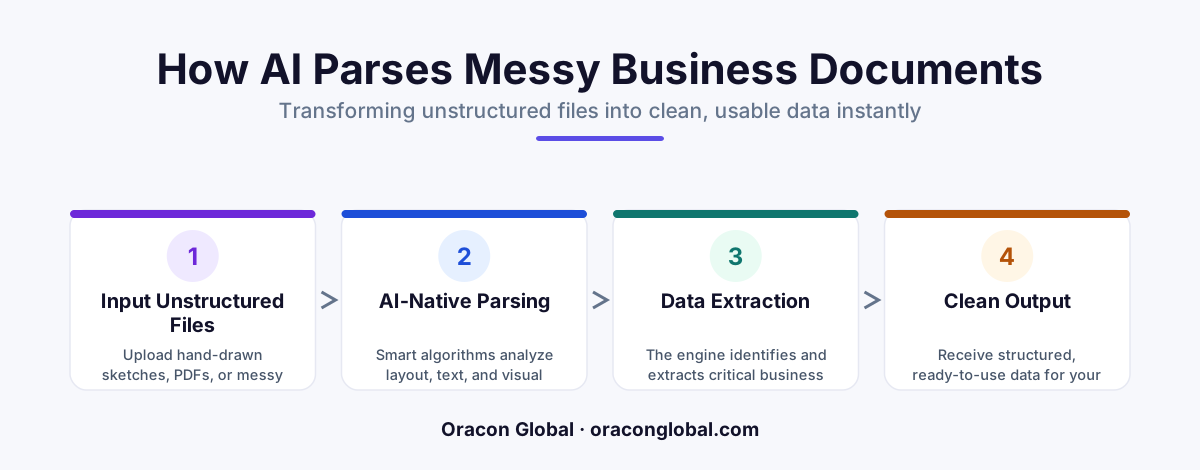
An AI-native file parser is a software tool that uses artificial intelligence to read messy, unstructured files like hand-drawn sketches or scanned PDFs and turn them into clean, structured data. Unlike older systems that require strict, rigid templates, these modern tools understand context and meaning, saving businesses hundreds of hours of manual data entry.
Every day, businesses waste thousands of hours typing information from paper documents, scanned PDFs, and messy emails into their database systems. It is slow, boring, and expensive work. Historically, software could not help much because computer programs are notoriously rigid. If a document did not match a pixel-perfect template, the software would fail, leaving a human to manually copy the data.
Enter the AI-native file parser. This is a modern, highly intelligent software tool designed to read messy documents just like a human does. It does not look for text in exact coordinates on a page. Instead, it reads the page, understands what it sees, and extracts clean, structured business data from even the most chaotic sources—including hand-drawn sketches, crumpled receipts, and unstructured scans.
In this guide, we will break down exactly what an AI-native file parser is, how it works in plain language, and how it can help your business eliminate manual data entry for good.
What Is an AI-Native File Parser?
To understand this technology, we need to define a few terms in simple language:
- Parser: A software tool that reads a file and breaks it down into organized parts that other computer programs can easily use.
- Structured Data: Highly organized information, like a clean spreadsheet with clearly labeled columns and rows (for example, "Client Name" and "Invoice Total").
- Unstructured Data: Messy, unorganized information that has no fixed format, such as an email, a photo of a whiteboard, a scanned PDF, or a hand-drawn diagram.
- AI-Native: Software that was built from the ground up using artificial intelligence, meaning it can think, adapt, and understand context rather than just following rigid, pre-programmed rules.
An AI-native file parser bridges the gap between the messy physical world and your clean digital databases. It takes unstructured data—the kind of messy files that make traditional software break—and instantly converts it into structured data that your business apps can use immediately.
The Relatable Analogy: The New Office Assistant
Imagine you hire a new office assistant and hand them a stack of 500 invoices from 50 different vendors. Every vendor uses a different layout. Some invoices are crisp digital PDFs. Others are crumpled paper receipts. A few are even handwritten notes jotted down by field technicians.
A traditional computer program acts like an extremely stubborn robot. It can only find the "Total Price" if it is located in the exact top-right corner of the page, in size 12 font. If a vendor moves the total to the bottom, the robot gets confused, throws an error, and stops working.
An AI-native file parser acts like a smart human assistant. It does not care where the "Total Price" is written. It reads the page, understands the context of the words, and finds the number next to "Total," "Amt Due," or "Balance." It can even look at a hand-drawn diagram of a kitchen remodel, identify the measurements, and compile them into a neat list.
How It Works: Step-by-Step
You do not need an engineering degree to understand how an AI-native file parser processes files. The pipeline is simple and straightforward:
- Ingestion: You upload a file. This could be a high-quality PDF, a blurry smartphone photo of a contract, or a scanned blueprint.
- Visual Analysis: The AI looks at the file as an image. It identifies where the text blocks are, detects lines, recognizes tables, and separates handwriting from printed text.
- Semantic Reading: The AI reads the words and understands their meaning. It knows that "TX" in an address block means Texas, while "TX" in a medical document might mean treatment.
- Structured Output: The AI packages the clean information into a structured format, like a spreadsheet or a clean data file, and sends it directly to your business systems.
A Real-World Use Case: From Hand-Drawn Schemas to Active Inventories
Let us look at a practical business example. Imagine a custom manufacturing company that builds industrial shelving. Salespeople often meet clients on-site, draw a quick diagram of the warehouse layout on a piece of grid paper, write down the measurements by hand, and take a photo of the sketch with their phone.
Traditionally, that photo is emailed to an office administrator. The administrator has to manually read the handwriting, type the measurements into an Excel sheet, and copy the product codes into the company's inventory software. This process takes 30 minutes per sketch and is prone to human typing errors.
With an AI-native file parser, the workflow changes completely:
- The salesperson uploads the photo of the hand-drawn sketch directly from their phone.
- The AI-native file parser analyzes the image, reads the handwritten numbers, and identifies the hand-drawn boxes representing the shelving units.
- In less than ten seconds, the parser generates a clean digital order containing the exact dimensions, quantities, and layout specifications.
- The data is sent directly to the production line and the inventory system without a single human having to type a thing.
Why Your Business Needs an AI-Native Parser
If your team is still copying and pasting data from files, you are losing time and money. Upgrading to an AI-native file parser offers several major advantages:
No More Template Maintenance
With older systems, if a vendor changed their invoice layout by even an inch, your IT team had to spend hours rebuilding the template. AI-native tools do not use templates. They read and comprehend, meaning they adapt to layout changes automatically.
Fewer Human Errors
People get tired, especially when typing numbers from scans for hours. AI does not get tired. It processes thousands of pages with consistent, high-level accuracy, flagging only the actual anomalies for human review.
Faster Turnaround Times
Instead of waiting days for an administrator to process incoming paperwork, your business can process invoices, order forms, and field sketches in real time. This means happier clients and faster cash flow.
How Oracon Global Can Help
At Oracon Global, our senior in-house team builds custom AI agents, document automation systems, and custom software integrations that help businesses run smoother and faster. We build solutions where you own 100% of the code and intellectual property.
If you want to see how AI can handle your messiest documents, you can try the live AI demos right now on our website. Our custom builds ensure your business data remains secure, organized, and instantly accessible.
Are you ready to stop manual data entry and automate your document workflows? Reach out to us at Oracon Global today to discuss how we can build a custom solution for your business.
Frequently asked questions
What is the main difference between an AI-native file parser and old parsing tools?
Old parsing tools require strict templates and break if a single line or text box moves. An AI-native file parser reads documents like a human, understanding context and meaning even if the layout changes completely.
Can an AI-native file parser read handwritten notes or sketches?
Yes. Modern AI-native parsers use advanced visual and language models to interpret messy handwriting, hand-drawn diagrams, and irregular sketches, converting them into clean digital text and tables.
Do we need to build different templates for every document type?
No. Because the system understands the actual meaning of the text and images, you do not need to build or maintain rigid templates for different document formats.
Where does the extracted data go?
Once the AI-native parser cleans the data, it formats it into structured digital files like JSON or Excel, which can be sent automatically into your ERP, CRM, or database.
Read next
Beyond Chatbots: How to Build AI Agents That Actually Do Work for Your Business
Most businesses use AI to answer questions. Here is how to build custom AI agents that actually take action, connect to your internal tools, and handle complex workflows.
Beyond the Wrapper: How to Build Custom AI Agents for Business That Actually Work
Many businesses invest in basic AI wrappers only to find they lack the security and context needed for real work. Here is how to build custom AI agents that integrate deeply with your workflows and databases.
Enterprise AI Maintenance Costs: Budgeting for Year Two and Beyond
Building an AI system is only half the battle. Discover the practical, ongoing operational costs of enterprise AI, including token management, model drift, and continuous security audits.
Oracon Global builds production-grade AI agents, automation and apps — and you own the code and IP. Tell us what you want to automate.
Book a call →See our work