

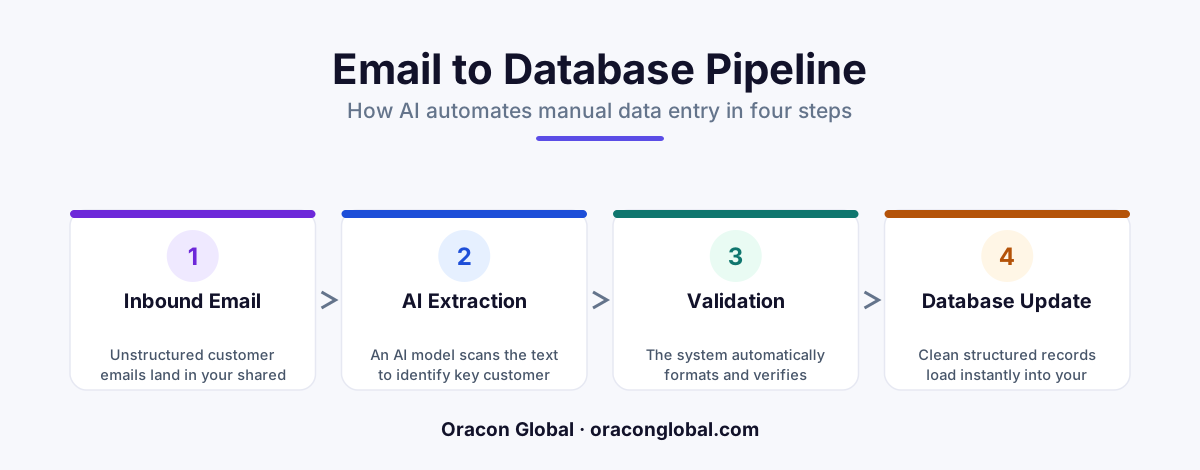
A structured extraction pipeline is an automated AI system that reads messy, unstructured text like emails and organizes it into clean, standardized database fields. Instead of human staff manually copying and pasting information, the AI instantly finds the key details and updates your business software automatically.
Every day, businesses receive hundreds of emails from customers, suppliers, and partners. Some are requests for quotes, others are support questions, and many are orders with attached invoices. While these emails contain the lifeblood of your operations, they arrive in a chaotic mess.
One customer might write: "Hey, I need 50 blue widgets sent to our Boston office by Friday. Charge our usual account." Another might send a long, rambling paragraph with the same request buried at the very end. To get this information into your order system, someone on your team has to read the email, find the key details, and manually type them into a database.
This manual process is slow, boring, and prone to typing mistakes. That is where a structured extraction pipeline comes in. It is a modern helper that uses artificial intelligence to read messy messages and instantly organize them into clean database records without human effort.
What Is a Structured Extraction Pipeline?
To understand this technology, it helps to break down the name into simple parts:
- Structured Data: This is information that is highly organized and easy for computers to read, like a spreadsheet with clear columns for "Name," "Quantity," and "Delivery Date."
- Extraction: This means finding and pulling out specific pieces of information from a larger, messy pile of text.
- Pipeline: This is a step-by-step digital assembly line. Data goes in one end, passes through a few automated stations, and comes out the other end perfectly processed.
So, a structured extraction pipeline is an automated software channel that takes messy, unorganized text (unstructured data) and converts it into a clean, organized format (structured data) that your business databases can understand instantly.
The Relatable Analogy: The Automated Mailroom
Imagine you run a physical mailroom where people send handwritten letters. Some letters are neat, but most are messy scribbles on scrap paper. Normally, a human worker has to read every letter, find the sender's name and address, and write them onto index cards filed in a cabinet.
A structured extraction pipeline is like giving that worker a magical scanner. The scanner looks at any messy letter, instantly highlights the name, address, and request, and prints out a perfect, typed index card. The worker just glances at the card to make sure it is correct before filing it away.
How the Pipeline Works: Step by Step
A reliable data extraction AI pipeline does not just guess what is in an email. It follows a strict, step-by-step process to ensure the information is accurate before it touches your database.
Step 1: The Intake
The moment a customer email arrives in your inbox, the pipeline quietly makes a copy of it. It does not matter if the email is short, long, or has attached files like PDFs. The pipeline collects all the raw text and prepares it for processing.
Step 2: Clean and Prep
Before the AI reads the email, the pipeline cleans up the text. It removes unnecessary clutter like email signatures, legal disclaimers, and reply chains. This ensures the AI only focuses on the actual message that matters.
Step 3: AI Extraction
This is where the magic happens. The pipeline passes the cleaned text to a secure Large Language Model (LLM)—the engine behind modern AI. Instead of asking the AI to write a creative reply, the pipeline gives it a strict instruction: "Find the customer name, the product they want, the quantity, and the shipping address in this text."
Step 4: Validation and Formatting
AI can sometimes be overly creative. To prevent mistakes, the pipeline runs the extracted details through a set of hardcoded business rules. For example, if the AI extracts "Friday" as the delivery date, the pipeline automatically converts that into a real calendar date, like "2026-10-23." If a quantity is missing, it flags the record for human review.
Step 5: Database Delivery
Once the data is verified and formatted, the pipeline automatically saves it into your company's database or ERP system. Your team now has a clean, organized record ready for action, without anyone having to type a single word.
A Real-World Use Case: Logistics and Ordering
Let us look at how this works for a real business using customer email automation to handle incoming product orders.
Imagine a wholesale distributor that receives hundred of purchase orders via email every morning. A typical email looks like this:
"Hi Team, we need to top up our stock. Please send 100 units of the Red Spacer (Part #RS-99) and 50 of the Blue Brackets (Part #BB-12) to our warehouse in Dallas. We need this by next Tuesday. Send the invoice to billing@clientco.com. Thanks, Sarah."
Without automation, an operations manager has to open this email, open the company's order software, search for Part #RS-99, type in "100," search for Part #BB-12, type in "50," type in the Dallas shipping address, and manually enter the billing email. This takes about five to ten minutes per email.
With an email to database pipeline, the system reads Sarah's email the second it lands. Within two seconds, it extracts the following clean data structure:
- Customer Name: Sarah
- Company: ClientCo
- Item 1: RS-99 (Quantity: 100)
- Item 2: BB-12 (Quantity: 50)
- Destination: Dallas Warehouse
- Required Date: 2026-10-27
- Billing Email: billing@clientco.com
This structured block of information is instantly sent to the company's inventory database. The operations manager only has to click "Approve" to print the shipping labels and send the invoice.
Why Businesses Are Moving Away From Manual Data Entry
Replacing manual typing with an automated pipeline provides several immediate benefits for growing companies:
1. Incredible Speed
Humans read and type at a natural pace. An AI pipeline can read, extract, validate, and save data from an email in less than three seconds. This means orders are processed faster, and customers get their items sooner.
2. Fewer Human Errors
Tired employees making manual entries often mistype part numbers, swap zip codes, or forget to enter quantities. A structured pipeline uses strict validation rules to ensure the data matches your existing database system perfectly before saving.
3. Happier Teams
No one goes to college or starts a career hoping to spend eight hours a day copying numbers from emails into a software dashboard. Automating this repetitive work frees your team to focus on high-value tasks, like talking to customers and solving actual business problems.
How to Get Started with Structured Extraction
Building a pipeline like this does not require you to become an AI expert. At Oracon Global, our senior in-house team builds custom AI agents, workflow automation, and custom web applications that handle the heavy lifting for you.
When we design a pipeline for your business, you own 100% of the code and intellectual property. We build systems that connect directly with your existing software, ensuring your data remains secure, private, and fully under your control.
Would you like to see how we turn messy business data into organized systems? You can try out our live, interactive AI demos right now on our website, or chat with our virtual assistant, Aria, to see our technology in action.
If you are ready to stop wasting time on manual data entry and want to learn how a custom pipeline can streamline your operations, contact the team at Oracon Global today.
Frequently asked questions
What is a structured extraction pipeline in simple terms?
It is an automated software system that reads messy, unorganized text—like a casual customer email—and pulls out the exact details you need to save into a clean database.
How does structured extraction differ from regular email search?
Regular search only finds keywords, but structured extraction understands the context of the words to group them into specific database columns like names, dates, or prices.
Can this system handle attachments like PDFs or images?
Yes, a complete pipeline can read both the text inside an email and the files attached to it, organizing all the data into one single database record.
Do we need to train our own AI model to use this?
No, modern pipelines use existing large language models combined with custom-built software rules to process your specific business data safely.
Read next
Beyond Chatbots: How to Build AI Agents That Actually Do Work for Your Business
Most businesses use AI to answer questions. Here is how to build custom AI agents that actually take action, connect to your internal tools, and handle complex workflows.
Beyond the Wrapper: How to Build Custom AI Agents for Business That Actually Work
Many businesses invest in basic AI wrappers only to find they lack the security and context needed for real work. Here is how to build custom AI agents that integrate deeply with your workflows and databases.
Enterprise AI Maintenance Costs: Budgeting for Year Two and Beyond
Building an AI system is only half the battle. Discover the practical, ongoing operational costs of enterprise AI, including token management, model drift, and continuous security audits.
Oracon Global builds production-grade AI agents, automation and apps — and you own the code and IP. Tell us what you want to automate.
Book a call →See our work