

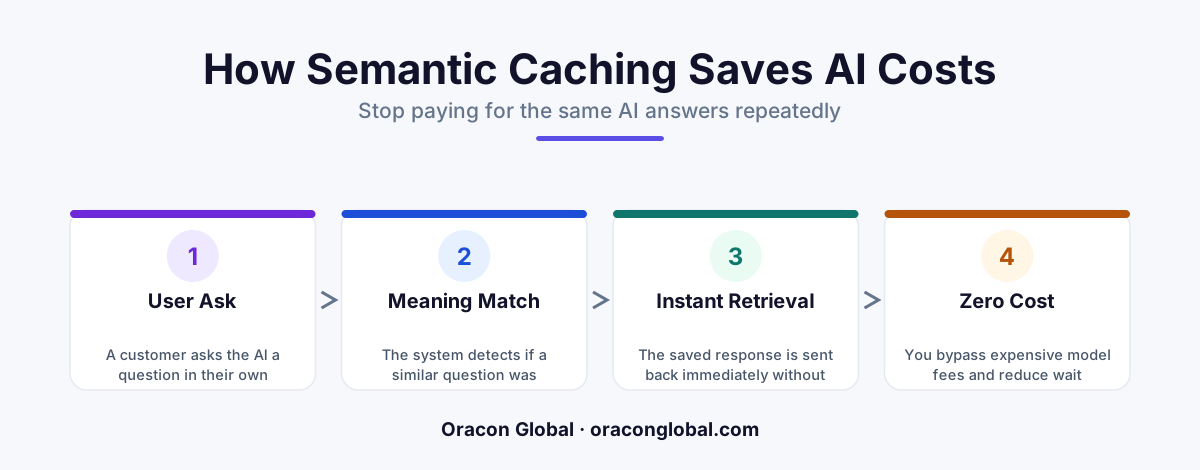
Semantic caching is a smart storage system that remembers previous AI answers and reuses them when a user asks a similar question. Instead of paying an AI provider to generate the same response in slightly different words, semantic caching delivers the stored answer instantly and for free.
Imagine you run a busy customer service desk. A customer walks up and asks, "What time do you close?" You look at the clock, check the schedule, and say, "We close at 8:00 PM."
Two minutes later, another customer walks up and asks, "When do you guys shut your doors?"
You already know the answer. The meaning of the question is exactly the same, even though the words are slightly different. You do not need to look at the schedule again. You simply say, "We close at 8:00 PM."
But traditional computer programs are not very good at understanding meaning. If you ask a standard computer program those two different questions, it treats them as completely unique tasks. In the world of Artificial Intelligence (AI), this limitation is incredibly expensive. Every time a customer asks a question in a slightly different way, your system pays an AI provider to think up a brand-new answer.
This is where semantic caching comes in. It is a smart digital memory that helps your business software recognize when different questions mean the same thing, saving you from paying for the same AI answers over and over again.
What Is Semantic Caching?
To understand semantic caching, we first need to break down the two words in its name:
- Semantic means relating to meaning in language. It is about the idea behind the words, not just the spelling of the words themselves.
- Caching (pronounced "cashing") is the process of storing data in a temporary, high-speed holding area so that future requests for that data can be served much faster.
Therefore, semantic caching is a system that saves previous AI answers and reuses them when someone asks a new question with the same meaning.
Without semantic caching, your software uses a basic "exact-match" cache. If User A asks, "How do I reset my password?" and User B asks, "How do I reset my password?", the system can reuse the saved answer because the letters match perfectly. But if User C asks, "Where do I change my passcode?", the exact-match system fails. It has to send that brand-new phrase to the main AI, costing you time and money.
A semantic cache understands that "reset my password" and "change my passcode" are essentially the same request. It pulls the saved answer from your local memory instantly.
How Does It Work Under the Hood?
You do not need an engineering degree to understand how a semantic cache functions. The process relies on three simple steps:
1. Turning Words into Math
When a user types a question into your app, the system converts those words into a long string of numbers called an embedding. This mathematical string represents the core meaning of the sentence. Sentences with similar meanings get similar mathematical scores.
2. Searching the Vector Database
The system stores these mathematical scores in a specialized digital filing cabinet called a vector database. When a new question comes in, the software does not look for matching words. Instead, it looks for mathematical scores that are very close to the new question's score.
3. Deciding to Reuse or Refresh
If the system finds a saved question that is a 95% match in meaning, it instantly displays the saved answer. This is called a "cache hit." If the meaning is completely new, the system sends the question to the main AI provider, saves the new answer for next time, and delivers it to the user. This is called a "cache miss."
A Real-World Example: The E-Commerce Support Desk
Let us look at how this plays out for an online retail business. Suppose you run an e-commerce store that gets thousands of visitor questions a day.
Without semantic caching, your AI assistant processes these three queries separately:
- "Do you ship to Canada?" (Cost: $0.02 to generate an AI answer)
- "Can you deliver to Toronto?" (Cost: $0.02 to generate an AI answer)
- "Is shipping available for Canadian addresses?" (Cost: $0.02 to generate an AI answer)
That is $0.06 spent on the exact same information. Multiply this by 10,000 customers a month, and you are wasting hundreds of dollars on repetitive answers.
With semantic caching, the first customer pays the $0.02 fee because the AI has to write the answer once. The second and third customers get the saved Canadian shipping answer instantly. The cost for those next two queries is virtually zero, and the response time drops from three seconds to under 50 milliseconds.
The Business Benefits of Semantic Caching
Implementing a semantic cache is one of the fastest ways to improve your software's unit economics. Here is why non-technical founders and operators love this technology:
Massive AI Cost Reduction
Every time your software calls a large language model (LLM) like OpenAI's GPT-4, you pay a small fee per word. By answering repetitive questions from a local cache, you dramatically lower your monthly LLM API bills. Many businesses see their AI operating costs drop by 30% to 80% immediately after setup.
Blazing Fast Performance
Waiting for an AI to think and type can take several seconds. A semantic cache retrieves saved answers in a fraction of a second. This makes your custom web and mobile apps feel incredibly snappy and responsive to your users.
Protection Against Bill Spikes
If your app suddenly goes viral, or if a bot spam-attacks your chat window with similar questions, your AI bill could skyrocket overnight. A semantic cache acts as a shield, absorbing the repetitive traffic and keeping your software bills predictable.
Is It Right for Every AI App?
While semantic caching is incredibly powerful, it is not a one-size-fits-all solution. It works best when your users ask questions that have relatively static, unchanging answers. This includes customer support, product FAQs, and internal policy searches.
It is less useful for highly personalized or rapidly changing data. For example, if a user asks, "What is my current bank account balance?" or "What is the weather right now?", you cannot reuse a saved answer from five minutes ago. In those cases, your app must bypass the cache and fetch live, real-time data.
Building Smart AI Infrastructure
As you scale your business, managing your AI infrastructure efficiently becomes just as important as the features you build. Semantic caching is a prime example of how smart software design can save you thousands of dollars in hidden operational costs while delivering a better experience to your customers.
At Oracon Global, we build custom web and mobile applications, AI digital employees, and custom workflows designed to scale safely and affordably. Our senior in-house team ensures you own 100% of your code and intellectual property, with smart optimizations like semantic caching built in from day one.
Are you looking to build custom AI tools without your monthly software bills getting out of hand? Contact Oracon Global today to discuss how we can build efficient, high-performing software tailored to your business.
Frequently asked questions
What is the main difference between traditional caching and semantic caching?
Traditional caching only works if the user types the exact same words, letter for letter. Semantic caching understands the meaning behind the words, so it can reuse a stored answer even if the new question is phrased differently.
How much money can semantic caching save my business?
While exact savings depend on your traffic, businesses with repetitive customer questions or standard workflows often see their AI API costs drop by 30% to 80% because they stop paying for duplicate queries.
Will semantic caching make my AI application faster?
Yes. Because the system pulls the answer from a local database instead of sending a request to an external AI provider over the internet, response times drop from several seconds to a fraction of a second.
Can semantic caching return outdated or incorrect information?
It can if it is not configured correctly, but you can set expiration rules. This tells the cache to clear out old answers and ask the live AI again after a set period, ensuring your data stays fresh.
Read next
Beyond Chatbots: How to Build AI Agents That Actually Do Work for Your Business
Most businesses use AI to answer questions. Here is how to build custom AI agents that actually take action, connect to your internal tools, and handle complex workflows.
Beyond the Wrapper: How to Build Custom AI Agents for Business That Actually Work
Many businesses invest in basic AI wrappers only to find they lack the security and context needed for real work. Here is how to build custom AI agents that integrate deeply with your workflows and databases.
Enterprise AI Maintenance Costs: Budgeting for Year Two and Beyond
Building an AI system is only half the battle. Discover the practical, ongoing operational costs of enterprise AI, including token management, model drift, and continuous security audits.
Oracon Global builds production-grade AI agents, automation and apps — and you own the code and IP. Tell us what you want to automate.
Book a call →See our work