

An AI dead-letter queue (DLQ) acts as an isolation chamber for failed agent tasks. Instead of allowing broken AI loops to repeatedly hammer your production database with toxic payloads, a DLQ safely routes these errors to a separate holding area for human review and debugging.
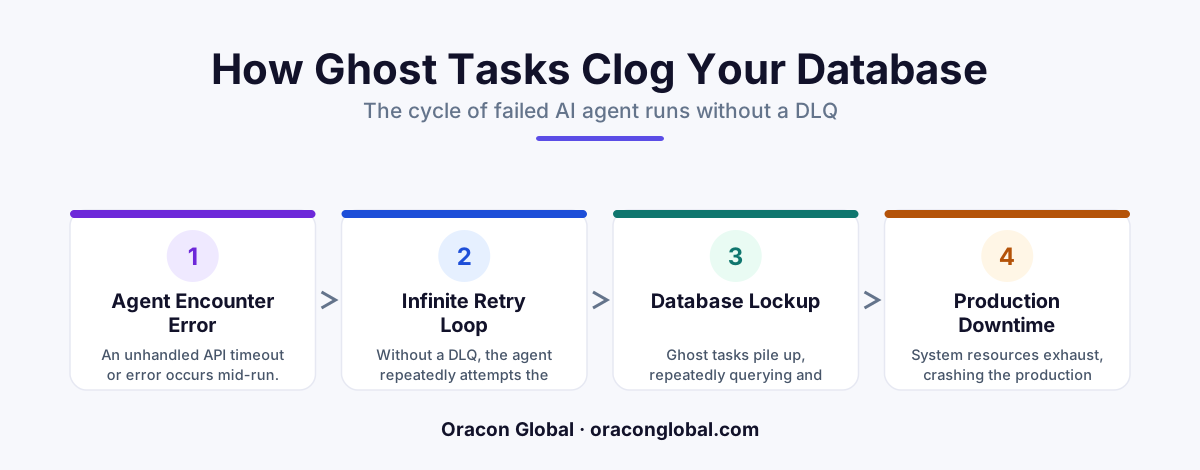
When you transition from a simple AI proof-of-concept to a production-ready AI agent, the nature of failure changes. In a demo environment, a failed run is just an error log on a developer’s screen. In production, an unhandled failure in an autonomous agent can trigger an aggressive retry loop, lock critical tables, and dump corrupt data into your primary systems. This is the origin of the "ghost task" — a phantom process that continuously tries to complete a broken job, quietly degrading your system performance.
To achieve true AI agent database safety, your engineering team must plan for the inevitability of structured data failures. The most reliable way to prevent these issues from impacting your users is by implementing a dedicated dead-letter queue for AI workflows. Here is why this architectural layer is non-negotiable for enterprise deployments.
Understanding the Ghost Task Phenomenon
Unlike traditional software that follows rigid, predictable paths, an autonomous AI employee operates with a level of decision-making freedom. It reads unstructured files, formats data on the fly, and interacts with third-party APIs. But this flexibility introduces unique failure points. If a vendor suddenly updates their API payload or an invoice contains a warped characters set, the agent may generate an output that your database schema rejects.
Without a dead-letter queue, the system typically responds in one of two destructive ways:
- The Infinite Loop Trap: The agent assumes the failure was a temporary network glitch and attempts to run the task again. It uses the same bad inputs, fails, and retries indefinitely, eating up your LLM API budget and hogging database connections.
- The Silent Data Poisoning: The agent forces a partial or malformed write to the database to clear its current queue, corrupting your historical records and throwing off analytics.
These repeating, failed operations are what we call ghost tasks. They hover in your system architecture, consuming processing power and threatening the stability of your entire operational database.
What is a Dead-Letter Queue (DLQ)?
Originally used in message-broking architectures, a dead-letter queue is a designated isolation holding area. When a system task fails to process after a specified number of attempts, the system strips it from the main traffic lane and deposits it into the DLQ.
For AI agents, a DLQ acts as a quarantine zone. It stores the exact state of the failed workflow, including:
- The original system prompt and user input.
- The raw JSON or unstructured output generated by the LLM.
- The precise error log returned by the database or third-party API.
- The step in the multi-turn workflow where the failure occurred.
By moving this metadata out of the main transaction queue, your primary business operations can continue running smoothly while the broken task awaits professional diagnostics.
Why Production AI Architecture Demands a DLQ
Building a robust production AI architecture requires separating the unpredictable nature of natural language processing from the rigid requirements of transactional databases. A DLQ provides three essential protections for your business systems.
1. Preventing Database Bloat and Locks
When an AI agent struggles to write a complex record (such as a multi-line shipping order or a detailed customer profile) to your SQL database, it holds open database transactions. If dozens of these transactions stall simultaneously, you run the risk of table locks. This slows down human workers trying to access the platform. A DLQ instantly offloads these stuck transactions, keeping database tables clean and responsive.
2. Preserving the Debugging Context
If an AI agent fails silently or simply crashes, developers are often left guessing what caused the hallucination or formatting error. Since the DLQ saves the entire execution snapshot, your development team doesn't have to spend hours trying to replicate the exact scenario. They can look directly at the quarantined payload, identify the structural anomaly, and deploy a target fix.
3. Graceful Human Intervention
Not all AI failures require a code change. Sometimes, a task fails simply because a customer uploaded a blurry PDF or input a non-existent part number. A DLQ allows you to build simple, zero-UI admin dashboards where operations managers can review quarantined tasks. A human operator can manually correct the minor typo in the data and click "reprocess," sending the task back into the main pipeline without developer intervention.
Best Practices for Implementing an AI Dead-Letter Queue
Setting up a DLQ is not just about creating a secondary database table; it requires intentional design choices. When we build custom applications at Oracon Global, we design our database layers to isolate agentic failures automatically.
First, establish a strict retry threshold. For AI tasks, we recommend a limit of two or three retries. If the agent cannot successfully parse and write the data within those attempts, it is highly likely a logical or structural issue rather than a temporary network drop, and the task should be immediately routed to the DLQ.
Second, ensure your DLQ is physically or logically segregated from your primary production tables. Storing dead letters in the same high-frequency table as your active operations defeats the purpose of managing database bloat. Use a separate database instance or a dedicated queue service to keep the primary pipeline clear.
Take Control of Your Enterprise AI Operations
Deploying AI agents can dramatically speed up your business workflows, but only if your underlying database architecture is designed to handle the unexpected. Safeguarding your systems with robust error-handling patterns like dead-letter queues ensures your digital employees remain an asset, not a database liability.
At Oracon Global, our senior in-house engineering team designs and builds custom AI agents, workflow automations, and enterprise-grade applications tailored to your operational needs. We write clean, resilient code, and our clients own 100% of their software IP.
Ready to build production-grade AI tools that protect your database integrity? Reach out to the Oracon Global team today to discuss your project.
Frequently asked questions
What is a dead-letter queue in the context of AI agents?
A dead-letter queue (DLQ) is a dedicated database table or message queue where failed, corrupted, or unparseable AI agent tasks are automatically redirected after a set number of failed processing attempts.
How do ghost tasks clog a production database?
When an AI agent encounters a data formatting error or API timeout, standard retry loops can cause the agent to repeatedly write corrupted data, hold transaction locks, or spam the database with identical queries, degrading overall system performance.
Why can't standard error handling replace a DLQ?
Standard try-catch blocks only handle anticipated code errors. AI agents often fail due to unstructured data variations, unexpected LLM outputs, or downstream API changes, which require isolating the entire execution state for human inspection.
Does implementing a DLQ slow down the AI agent's execution?
No, a DLQ actually improves performance. By immediately offloading broken and looping tasks from the primary database transaction pool, the system keeps the main processing pipelines fast and clear.===
Read next
Beyond Chatbots: How to Build AI Agents That Actually Do Work for Your Business
Most businesses use AI to answer questions. Here is how to build custom AI agents that actually take action, connect to your internal tools, and handle complex workflows.
Beyond the Wrapper: How to Build Custom AI Agents for Business That Actually Work
Many businesses invest in basic AI wrappers only to find they lack the security and context needed for real work. Here is how to build custom AI agents that integrate deeply with your workflows and databases.
Enterprise AI Maintenance Costs: Budgeting for Year Two and Beyond
Building an AI system is only half the battle. Discover the practical, ongoing operational costs of enterprise AI, including token management, model drift, and continuous security audits.
Oracon Global builds production-grade AI agents, automation and apps — and you own the code and IP. Tell us what you want to automate.
Book a call →See our work