

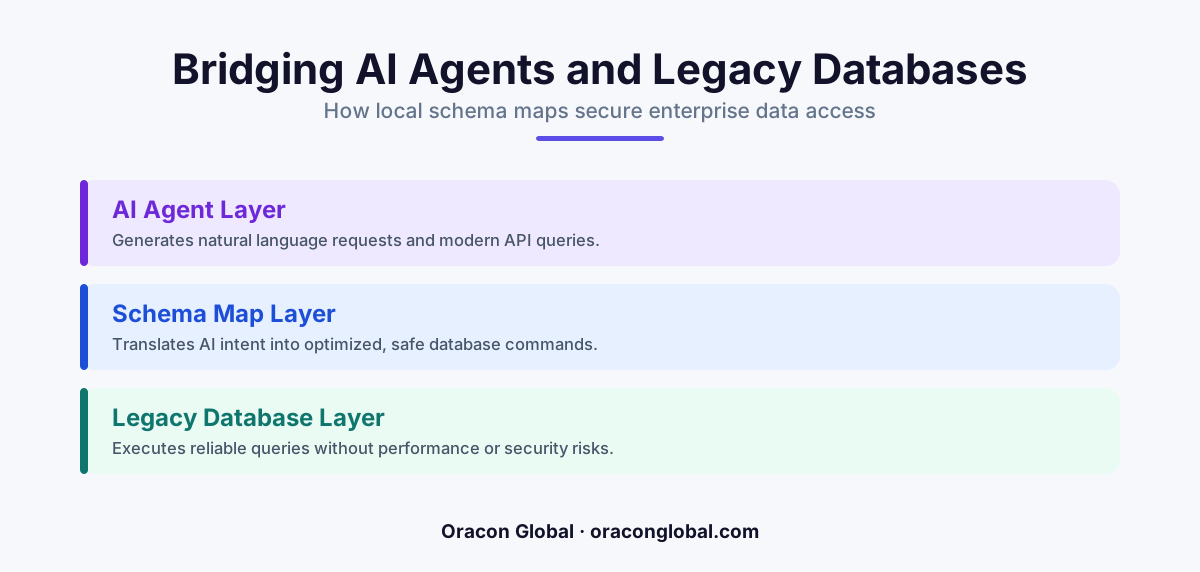
Plugging an AI agent directly into a legacy database invites system crashes because LLMs do not understand rigid, historical table relationships. By implementing a local schema map, businesses can provide AI agents with a simplified, safe metadata translation layer that protects core databases while ensuring accurate query results.
When businesses decide to deploy custom AI agents to automate inventory lookups, generate sales reports, or reconcile invoices, they quickly run into a major technical roadblock: the legacy database. Most enterprise data lives in older SQL databases or proprietary systems built years, if not decades, ago. These databases were designed for rigid software workflows, not for the fluid, unpredictable queries of large language models (LLMs).
Plugging an AI agent directly into these older systems is a recipe for trouble. An agent trying to write its own SQL queries against a database with hundreds of poorly named columns, cryptic tables, and complex foreign key relationships will inevitably hallucinate, timing out your servers or returning incorrect business data. To build reliable AI agent architecture, you need a protective translator. That translator is a local schema map.
The Danger of Direct Database Connections
To understand why a database abstraction layer is necessary, consider what happens when an AI agent is given direct access to a legacy database. If a team member asks an AI digital employee to "find all active clients who purchased widgets last month," the LLM must generate a database query on the fly.
Without a local schema map, the AI agent faces several immediate challenges:
- Cryptic Column Names: Legacy systems are notorious for table structures like
TBL_CLNT_MGR_V2or column names likeCUST_STAT_01. An LLM has to guess what these mean, often leading to incorrect joins and broken queries. - Overwhelming Database Size: Sending an entire database schema with hundreds of tables to an LLM context window is expensive, slow, and confusing for the model.
- Runaway Queries: An AI agent might generate a massive, unindexed join query that locks your production database, halting operations for human staff.
- Security Risks: Granting an autonomous agent direct read and write access to your primary database makes it incredibly difficult to enforce fine-grained data permissions.
What is a Local Schema Map?
A local schema map is a lightweight, secure translation layer that sits between your AI agent and your legacy database. Instead of letting the AI look at your raw database, you present the AI with a curated, simplified directory of your data. This directory is written in clean, semantic language that LLMs understand perfectly.
For example, instead of forcing the AI to navigate a messy, fragmented table structure, the local schema map tells the AI: "If you need customer contact details, query the Customer Profile view, which contains name, email, and phone number." This approach ensures enterprise database safety while allowing the agent to fetch real-time data quickly.
How the Translation Layer Works
When your AI agent needs to perform a task, it interacts solely with the local schema map using a standardized format. The map takes the agent's intent, validates it against predefined business rules, and executes a pre-approved, highly optimized database query. The raw database never interacts with the LLM directly, and the LLM never writes raw SQL against your production tables.
By keeping the AI agent inside a sandboxed schema map, you eliminate the risk of accidental data deletion, unauthorized access, and database crashes caused by runaway queries.
The Key Benefits of Schema-Mapped Architecture
Building a local schema map requires some upfront design, but it pays massive dividends in system stability, speed, and accuracy. For non-technical operators and founders, this architecture offers several strategic advantages for legacy database integration.
1. Protection Against Database Schema Changes
In a growing business, databases evolve. Columns are renamed, tables are merged, and database engines are upgraded. If your AI agent is hardcoded to your raw database, any minor database update will break the agent instantly. With a local schema map, if a database developer changes a table name, you only need to update the map. The AI agent continues to work seamlessly without needing to be retrained or reprogrammed.
2. Dramatic Cost and Latency Reductions
Sending massive database schemas to an LLM with every user request consumes thousands of tokens and adds seconds of latency to every interaction. A local schema map isolates only the relevant data models needed for the specific task at hand. This keeps your API payloads small, your LLM costs low, and your AI response times incredibly fast.
3. Strict, Non-Negotiable Data Permissions
A schema map acts as an ironclad security gate. You can explicitly define which tables and columns the AI agent is allowed to see. If your AI support agent has no business looking at employee salary data, that table simply does not exist in the local schema map. This prevents data leaks before they can even start.
How to Implement a Safe Database Map for Your AI Agents
Setting up this architecture does not require rewriting your entire IT infrastructure. It can be implemented incrementally using modern development practices.
- Identify High-Value Workflows: Start by mapping out only the specific tables and data fields your AI agent needs to perform its primary job. Do not try to map your entire database on day one.
- Create Semantic Views: Build read-only database views or API endpoints that aggregate legacy data into clean, modern formats.
- Define the Local Schema Map: Document these clean views in a structured format (such as JSON or YAML) that clearly describes the data types, descriptions, and relationships in plain English.
- Establish Guardrails: Put strict rate limits and query timeout rules on the translation layer to ensure that even if an AI agent attempts a heavy query, the database engine safely terminates it before it impacts human users.
Keep Your Data Safe and Your AI Accurate
To build business-grade AI tools, you cannot treat your databases like a playground for LLMs. True digital employees require predictable, safe, and governed access to your company's data. By implementing a local schema map, you bridge the gap between flexible, natural-language AI and the rigid reliability of your core enterprise software.
At Oracon Global, our senior in-house team specializes in building secure, production-ready AI agents, custom workflow automations, and AI-native ERP integrations that play nice with legacy systems. We ensure you own 100% of your code and intellectual property from day one.
Are you ready to safely connect your business data with modern AI? Get in touch with Oracon Global today to discuss your integration needs.
===Frequently asked questions
What is a local schema map for AI agents?
It is a dedicated metadata translation layer that sits between your AI agent and a legacy database, translating natural language requests into highly precise, safe SQL queries without exposing the underlying raw database structure.
Why can't I just connect my AI agent directly to my SQL database?
Direct connections expose your legacy database to unpredictable, high-volume, or poorly optimized queries generated by LLMs, which can cause system slowdowns, data exposure, or database crashes.
Does implementing a schema map require modifying our existing database?
No, a local schema map is an external abstraction layer, meaning you can protect and integrate your legacy systems without performing risky migrations, changing table structures, or altering existing codebases.
How does this approach improve AI agent accuracy?
By providing the AI agent with a clean, curated map of what data exists and how it relates, the agent does not have to guess column names or table relationships, which drastically reduces hallucinations and failed queries.
Read next
Beyond Chatbots: How to Build AI Agents That Actually Do Work for Your Business
Most businesses use AI to answer questions. Here is how to build custom AI agents that actually take action, connect to your internal tools, and handle complex workflows.
Beyond the Wrapper: How to Build Custom AI Agents for Business That Actually Work
Many businesses invest in basic AI wrappers only to find they lack the security and context needed for real work. Here is how to build custom AI agents that integrate deeply with your workflows and databases.
Enterprise AI Maintenance Costs: Budgeting for Year Two and Beyond
Building an AI system is only half the battle. Discover the practical, ongoing operational costs of enterprise AI, including token management, model drift, and continuous security audits.
Oracon Global builds production-grade AI agents, automation and apps — and you own the code and IP. Tell us what you want to automate.
Book a call →See our work