

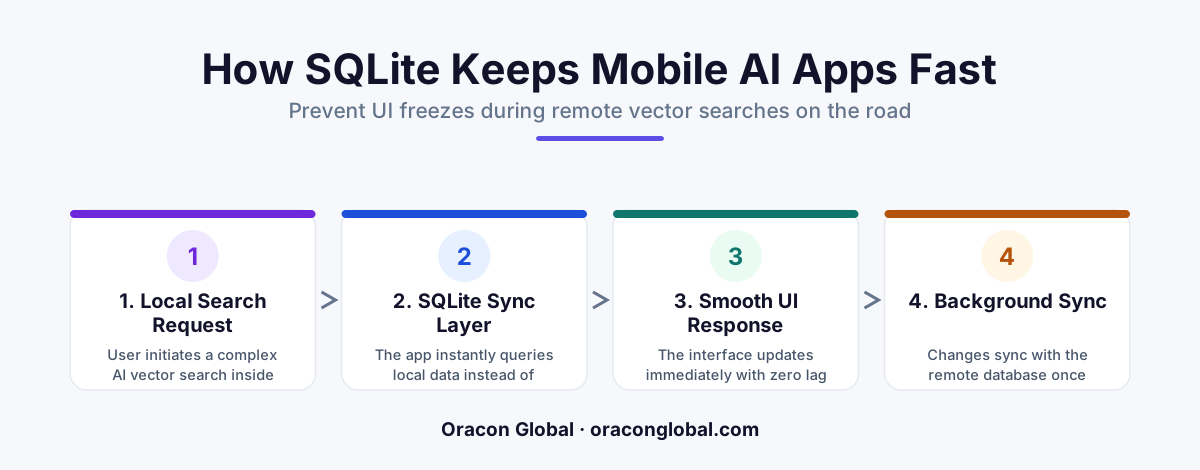
When field workers execute semantic searches on weak mobile networks, waiting for remote AI vector databases causes the app UI to freeze or crash. By building a local SQLite sync layer with vector extensions directly on the device, the mobile app runs searches instantly offline and syncs updates in the background.
Imagine a field technician standing in a concrete basement, trying to pull up a machinery repair manual. Or a logistics coordinator on a remote highway, searching for delivery instructions using natural language. They type their query into your custom mobile app, expecting an intelligent search experience. Instead, the screen freezes, the loading spinner spins indefinitely, and the app eventually crashes.
This is the reality of relying solely on cloud-based mobile AI vector search when users are on the move. While vector databases in the cloud are incredibly powerful for handling semantic search, they depend on an unbroken, high-speed internet connection. When your users are on the road, that connection is anything but guaranteed.
To build a truly reliable, enterprise-grade field tool, your application needs a architectural shift: a local SQLite sync layer. This design pattern keeps your user interface responsive, protects your brand reputation, and ensures your field team remains productive anywhere.
The Hidden Cost of Cloud-Only Vector Queries on the Road
Traditional search looks for exact keyword matches. Modern AI search uses vector embeddings to understand the actual meaning behind a query. For instance, searching for "leaking pipe under pressure" should surface documents about "seal degradation" even if those exact words are not in the text.
In a standard cloud setup, this process requires multiple network hops:
- The mobile app sends the user's raw text query to an embedding model API.
- The API returns a high-dimensional vector array.
- The app sends this vector array to a cloud-based vector database.
- The cloud database performs a similarity search and returns the document IDs.
- The app fetches the actual document metadata to display on the screen.
On a stable office Wi-Fi connection, this round-trip takes under a second. On a spotty cellular network along a rural highway, this multi-step handshake stalls. Because mobile OS threads must coordinate these network requests, any packet loss can block the main user interface thread, resulting in severe responsive mobile UI issues and frozen screens.
Why SQLite is the Perfect Fit for Offline Mobile AI
To prevent these freezes, we must move the search execution closer to the user. This is where offline mobile AI comes into play, powered by a lightweight, embedded database. SQLite has been the industry standard for local mobile storage for decades, but its utility has expanded dramatically with the rise of edge computing.
By leveraging specialized vector search extensions for SQLite, we can store quantized vector embeddings directly on the mobile device. Instead of querying a distant cloud database, the mobile app performs the semantic mathematical calculations locally on the hardware in the user's hand.
This approach offers three immediate advantages for field agent mobile apps:
- Sub-millisecond Latency: Local database queries bypass the network entirely, returning search results in milliseconds.
- Guaranteed Offline Access: If a technician is in a hospital basement or a rural wind farm with zero cell service, the search bar still works flawlessly.
- Reduced API Costs: By processing routine searches locally, you dramatically cut down on repetitive calls to external LLM embedding APIs.
How a Local SQLite Sync Layer Works
You do not need to store your entire enterprise database on a single smartphone. Instead, you build a smart synchronization engine that keeps a localized, highly relevant subset of data on the device.
The architecture consists of three core components working in harmony:
1. The Cloud Vector Source
Your central cloud database remains the source of truth. Whenever new technical manuals, inventory items, or client records are uploaded, your backend automatically generates their vector embeddings using your primary LLM pipeline.
2. The Incremental Sync Engine
The sync engine monitors connection status on the mobile device. When a stable connection is detected (such as office Wi-Fi at the start of a shift), it downloads the latest data changes, along with their pre-calculated, low-dimensional vector embeddings, and writes them directly to the local SQLite database.
3. The Local Search Runtime
When the user types a query on the road, a lightweight on-device model converts the text into a vector, and SQLite instantly runs a nearest-neighbor search against the local tables. The UI updates instantly, completely isolated from whatever is happening with the cellular signal.
Designing for Low Memory and Battery Efficiency
A common concern for operators is whether running vector math on a mobile device will drain the battery or consume too much storage. This is a valid concern, but it is easily managed through proper engineering practices.
First, we use vector quantization to compress the size of the embeddings stored in SQLite. This reduces the storage footprint by up to 80% without a noticeable drop in search accuracy. Second, local searches are executed on a background thread using a dedicated database connection pool, ensuring the main rendering thread remains completely free to handle user interactions like scrolling and typing.
By offloading the heavy math to a optimized, native SQLite extension, device resource consumption is kept to a absolute minimum, maintaining a smooth experience even on older smartphone models.
Build Software That Works Where Your Business Does
Your field agents, technicians, and operators do not work in pristine office environments with perfect connectivity. They work in the real world, where cellular towers drop connections and networks fluctuate constantly. If your mobile software relies on a constant, perfect link to the cloud to perform basic AI search functions, your users will abandon it.
At Oracon Global, we specialize in building robust, production-ready mobile and web applications with offline-first architectures. Our senior in-house engineering team designs clean database schemas, custom synchronization pipelines, and native mobile experiences that stay fast, responsive, and reliable no matter where your team goes on the road.
If you want to build custom mobile software with a highly resilient local sync layer that keeps your operations moving forward, let's discuss your project. Contact Oracon Global today to speak with our engineering team.
Frequently asked questions
Why does local vector search prevent mobile UI freezes?
It removes the network hop entirely. By querying a local SQLite database on the device rather than waiting for a remote cloud database over a weak 3G or 4G connection, the main UI thread remains completely responsive.
Can SQLite actually handle complex AI vector search embeddings?
Yes. With modern extensions like sqlite-vss or customized local vector quantization, SQLite can store and query low-dimensional embeddings directly on a standard smartphone without degrading device performance.
How does data stay synchronized between the mobile device and the cloud?
A background sync manager schedules incremental updates, downloading new vector embeddings and relational metadata to the local SQLite database when a stable connection is detected, without interrupting the user.
Is this architecture suitable for non-technical field workers?
Absolutely. Field operators on the road simply experience a fast, reliable search bar that works instantly in basements, rural areas, or transit dead zones, without realizing the heavy lifting is happening locally.
Read next
Beyond Chatbots: How to Build AI Agents That Actually Do Work for Your Business
Most businesses use AI to answer questions. Here is how to build custom AI agents that actually take action, connect to your internal tools, and handle complex workflows.
Beyond the Wrapper: How to Build Custom AI Agents for Business That Actually Work
Many businesses invest in basic AI wrappers only to find they lack the security and context needed for real work. Here is how to build custom AI agents that integrate deeply with your workflows and databases.
Enterprise AI Maintenance Costs: Budgeting for Year Two and Beyond
Building an AI system is only half the battle. Discover the practical, ongoing operational costs of enterprise AI, including token management, model drift, and continuous security audits.
Oracon Global builds production-grade AI agents, automation and apps — and you own the code and IP. Tell us what you want to automate.
Book a call →See our work