

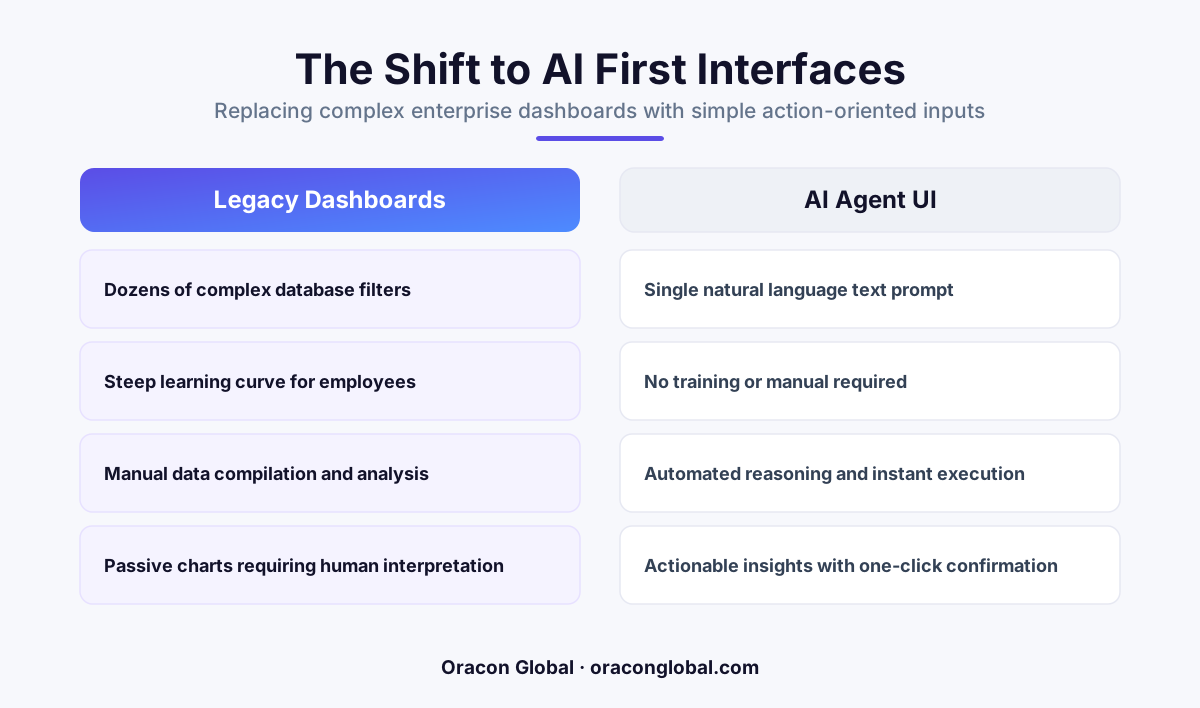
Cluttered enterprise dashboards with dozens of filters are a symptom of legacy database limitations. By replacing complex control panels with a simple text input and a confirmation button, AI agents allow operations teams to query data and execute tasks using plain language.
Walk into almost any operations department, logistics hub, or finance office, and you will see the same thing: dual monitors dominated by massive, complex dashboards. These screens are filled with dozens of dropdown menus, date pickers, checkboxes, and nested search parameters. To find a single discrepant invoice or check the status of a delayed shipment, an employee has to click, scroll, and filter their way through a digital maze.
We built software this way for decades because we had to. Traditional databases are rigid. They do not understand intent; they only understand strict queries. The dashboard filter bar was our best attempt to translate a human question into something a database could process. But now that we have robust, production-grade AI agents, continuing to build software this way is no longer necessary or efficient.
It is time to ask a fundamental question about our dashboard user experience: Why are we still forcing teams to configure a hundred manual filters when an AI agent just needs a single text input and a confirmation button?
The Hidden Cost of the Infinite Filter Bar
Every filter on a dashboard represents a business rule that a human employee must memorize. When an operator needs to generate a weekly report or flag an inventory anomaly, they have to remember exactly which boxes to check, which date ranges to exclude, and which status codes to select.
This approach introduces three distinct points of friction into your daily operations:
- Extensive Training Cycles: Onboarding new team members takes weeks because they must learn how to navigate the idiosyncrasies of your specific custom software rather than focusing on the actual business decisions.
- High Error Rates: If an operator misses a single checkbox or selects "contains" instead of "equals" in a dropdown, the entire report is ruined, potentially leading to missed deliveries, incorrect billing, or bad strategic decisions.
- Cognitive Fatigue: Staring at dense tables of data and constantly adjusting parameters to find a needle in a haystack drains your team’s mental energy, leaving them less focus for complex problem-solving.
We built these interfaces because we lacked a translator. We needed humans to act as the bridge between business intent and database execution. Modern AI agent interfaces have permanently changed that dynamic.
How the Single-Input Interface Works
Instead of presenting a user with a blank canvas of filters, a modern AI-native interface presents a simple text box. The user types their request in plain English, just as they would speak to a colleague.
"Show me all international shipments from last Tuesday that are delayed by more than four hours, and draft an update email to the account managers."
Behind the scenes, the AI agent performs the heavy lifting that used to require manual clicking:
- Intent Parsing: The agent analyzes the sentence to identify the core entities (international shipments), the date range (last Tuesday), the conditions (delayed by more than four hours), and the desired outcome (drafting an email).
- Database Translation: The agent translates those parameters into the precise SQL queries or API calls required to fetch the data from your legacy systems or ERP.
- Action Preparation: Rather than dumping a massive table on the screen, the agent packages the specific results alongside the prepared drafts.
This is where the transition from traditional enterprise search UI to agentic automation becomes clear. The user is not left to sift through raw data; they are presented with a finished package of work.
The Crucial Role of the Confirmation Button
Replacing a complex dashboard with a text input does not mean giving up control or letting an AI run wild in your database. The second half of the modern interface equation is the confirmation button.
An effective AI assistant does not execute high-stakes database writes or send external emails without oversight. Instead, it presents its findings and proposed actions on a clean, simplified screen. The human operator reviews the summary, checks the draft, and clicks a single button: Confirm and Send.
This design paradigm keeps the human firmly in the loop while removing the tedious manual labor of locating, sorting, and formatting the data. The human operator shifts from being a manual data-entry clerk to an editor and decision-maker.
Transitioning from Dashboards to Action Queues
For businesses looking to modernize their software, the goal should not be to build a prettier dashboard. The goal should be to reduce the steps required to achieve a business outcome. This shift in workflow automation moves your team from a reactive posture to an active one.
At Oracon Global, we focus on building custom AI applications and digital employees that integrate directly with your existing databases and APIs. We design systems that hide the underlying technical complexity behind clean, intuitive interfaces, allowing your team to work faster and with fewer errors.
Whether you are upgrading an older internal system or designing a new SaaS product, reducing the complexity of your interface is the fastest way to drive adoption and return on investment. You do not need more filters; you need smarter software.
If you want to explore how to simplify your business applications and replace cluttered legacy interfaces with action-oriented AI agents, get in touch with our team at Oracon Global today.
Frequently asked questions
Why are traditional dashboards with dozens of filters so common in business software?
Traditional dashboards were designed because legacy databases require highly specific SQL queries. Filters act as a visual translator for those databases, forcing human operators to map their business questions into rigid system parameters.
How does an AI agent replace a complex dashboard interface?
An AI agent acts as an intelligent intermediary. It translates a natural language request into the precise database queries and API calls needed to retrieve the data, presenting a simple confirmation screen before taking action.
Does removing filters mean we lose control over our business data?
No. In fact, control improves because the interface shifts from passive viewing to active confirmation. Instead of guessing which filter combinations are correct, the operator reviews a plain-English summary of the action the agent is about to perform.
What are the main benefits of moving to a single-input AI interface?
The primary benefits are drastically reduced training times, fewer human input errors, faster decision-making, and a massive reduction in the cognitive load on your operations team.
Read next
Beyond Chatbots: How to Build AI Agents That Actually Do Work for Your Business
Most businesses use AI to answer questions. Here is how to build custom AI agents that actually take action, connect to your internal tools, and handle complex workflows.
Beyond the Wrapper: How to Build Custom AI Agents for Business That Actually Work
Many businesses invest in basic AI wrappers only to find they lack the security and context needed for real work. Here is how to build custom AI agents that integrate deeply with your workflows and databases.
Enterprise AI Maintenance Costs: Budgeting for Year Two and Beyond
Building an AI system is only half the battle. Discover the practical, ongoing operational costs of enterprise AI, including token management, model drift, and continuous security audits.
Oracon Global builds production-grade AI agents, automation and apps — and you own the code and IP. Tell us what you want to automate.
Book a call →See our work