

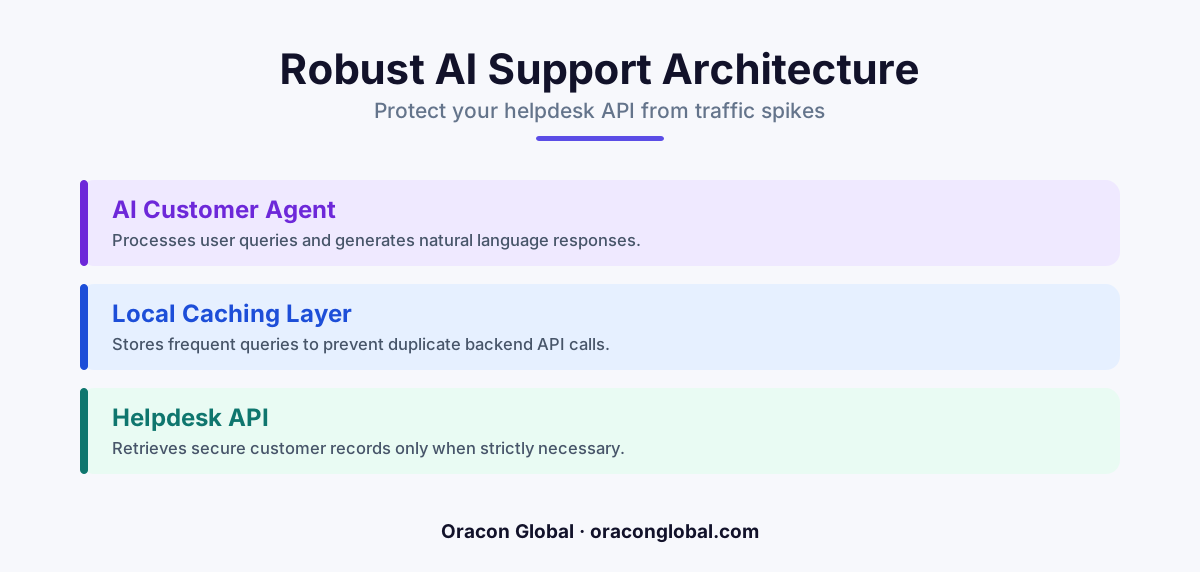
Connecting customer support AI directly to legacy helpdesk APIs often leads to system timeouts and API rate limit locks during traffic spikes. A local ticket cache layer acts as a resilient buffer, storing incoming inquiries and processing them asynchronously to ensure zero dropped messages and lower API costs.
When you build a customer support AI, the first instinct is often to connect it directly to your existing ticketing system or helpdesk API. In a quiet testing environment with two or three concurrent users, this direct connection works perfectly. The AI reads the incoming message, queries the API, processes the context, and writes back a helpful response in seconds.
But when real-world traffic hits, this simple architecture quickly falls apart. A sudden surge in customer inquiries can cause your helpdesk API to hit its rate limits. When the API starts returning errors or slowing down under load, your AI agents begin to time out. Because there is no buffer, those timed-out operations result in dropped customer messages, lost context, and frustrated users.
To build a resilient customer support automation system, you need a buffer. Here is why your customer support AI needs a local ticket cache layer and how it protects your operational workflow.
The Hidden Risk of Direct API Integration
Most modern helpdesk platforms and CRMs are not designed to handle the high-volume, concurrent read-and-write patterns of an autonomous customer support AI. When an AI agent processes a single customer inquiry, it rarely makes just one API call. It might query the customer profile, pull past conversation histories, search your internal knowledge base, and then write a draft reply.
During peak hours, this chatter can trigger strict rate limits on your legacy systems. If your helpdesk platform caps your team at 100 API requests per minute, a small flurry of simultaneous customer chats can lock your system. Once locked, your AI agent cannot read or write data, causing the entire session to freeze and forcing the customer to restart their conversation from scratch.
What Is a Local Ticket Cache Layer?
A local ticket cache layer is a dedicated, intermediate database that sits between your incoming customer communication channels and your core business systems. Instead of allowing your AI agent to call your helpdesk API directly for every action, all events are first written to this local cache.
Think of it as a shock absorber for your customer support AI. It decouples the speed of the incoming messages from the speed and limitations of your external APIs. By keeping a local, real-time copy of active ticket states, your system can manage operations smoothly even if your primary helpdesk software experiences temporary downtime.
Key Functions of a Caching Buffer
- Instant Message Acknowledgment: Inbound messages are recorded locally in milliseconds, ensuring no customer inquiry is ever lost or ignored.
- Rate Limiting and Throttling: The cache can queue outgoing API calls, releasing them to your external helpdesk at a controlled rate that never triggers system blocks.
- State Preservation: If an AI agentic workflow timeouts mid-execution, the local cache preserves the current step, allowing the system to resume immediately upon recovery.
How Local Caching Prevents Workflow Timeouts
LLM-based operations are inherently slow compared to traditional database lookups. Generating a tailored, context-aware customer response can take anywhere from three to ten seconds. If your system relies on synchronous connections, holding a web socket open for ten seconds while waiting for an LLM response is a recipe for system instability.
With a local ticket cache layer, you can transition your customer support AI to an asynchronous processing model. When a user sends a message, the system instantly writes the payload to the local cache and returns a fast receipt to the front-end application. A background worker then picks up the cached ticket, feeds it to the AI agent, gathers the required internal data locally, and sends the response when ready.
This design patterns means that even if a specific LLM query takes longer than usual, the user's connection remains stable, and other incoming tickets continue to queue up safely without dropping.
Lowering Operational Costs and API Overhead
Running customer support automation at scale can become expensive if every single action requires pulling massive volumes of historical data over the network. Repetitive queries—such as fetching return policies, delivery times, or standard business hours—do not need to hit your main databases repeatedly.
By caching common query results and customer profiles locally, your AI agent can retrieve context in a fraction of the time and at zero API cost. This localized data access drastically reduces the payload size of your external API calls, lowering your infrastructure overhead and speeding up the overall response times of your digital assistants.
Building a Resilient Support Architecture
When we build custom AI agents and enterprise workflows at Oracon Global, we prioritize architectural resilience. We focus on building software that handles real-world edge cases, high-traffic events, and API disruptions gracefully.
A local ticket cache is not a luxury; it is a fundamental requirement for any production-ready customer support AI. By decoupling your AI logic from your external database dependencies, you ensure a reliable experience for your customers and protect your core systems from unnecessary strain.
If you are planning to automate your customer service operations or want to build robust AI-native workflows that scale seamlessly, our senior in-house team at Oracon Global can help. Let's talk about building a secure, custom-engineered platform tailored to your operational needs.
Frequently asked questions
What is a local ticket cache layer for customer support AI?
It is a dedicated, secure database buffer that temporarily stores incoming customer messages and ticket states before passing them to your AI agents or external helpdesk APIs.
Why can't the AI agent just query my helpdesk API directly?
Direct queries expose your system to API rate limits and network latency. If your helpdesk API slows down, your AI agent will time out, leading to dropped customer messages.
Does a local cache layer add latency to customer responses?
No, it actually improves perceived speed by instantly acknowledging the receipt of a message while allowing the AI to process the response asynchronously in the background.
What database technologies are best for building a ticket cache?
Light, fast, and reliable databases like Redis for active queue management and PostgreSQL or SQLite for persistent local state storage work best for this architecture.
Read next
Beyond Chatbots: How to Build AI Agents That Actually Do Work for Your Business
Most businesses use AI to answer questions. Here is how to build custom AI agents that actually take action, connect to your internal tools, and handle complex workflows.
Beyond the Wrapper: How to Build Custom AI Agents for Business That Actually Work
Many businesses invest in basic AI wrappers only to find they lack the security and context needed for real work. Here is how to build custom AI agents that integrate deeply with your workflows and databases.
Enterprise AI Maintenance Costs: Budgeting for Year Two and Beyond
Building an AI system is only half the battle. Discover the practical, ongoing operational costs of enterprise AI, including token management, model drift, and continuous security audits.
Oracon Global builds production-grade AI agents, automation and apps — and you own the code and IP. Tell us what you want to automate.
Book a call →See our work