

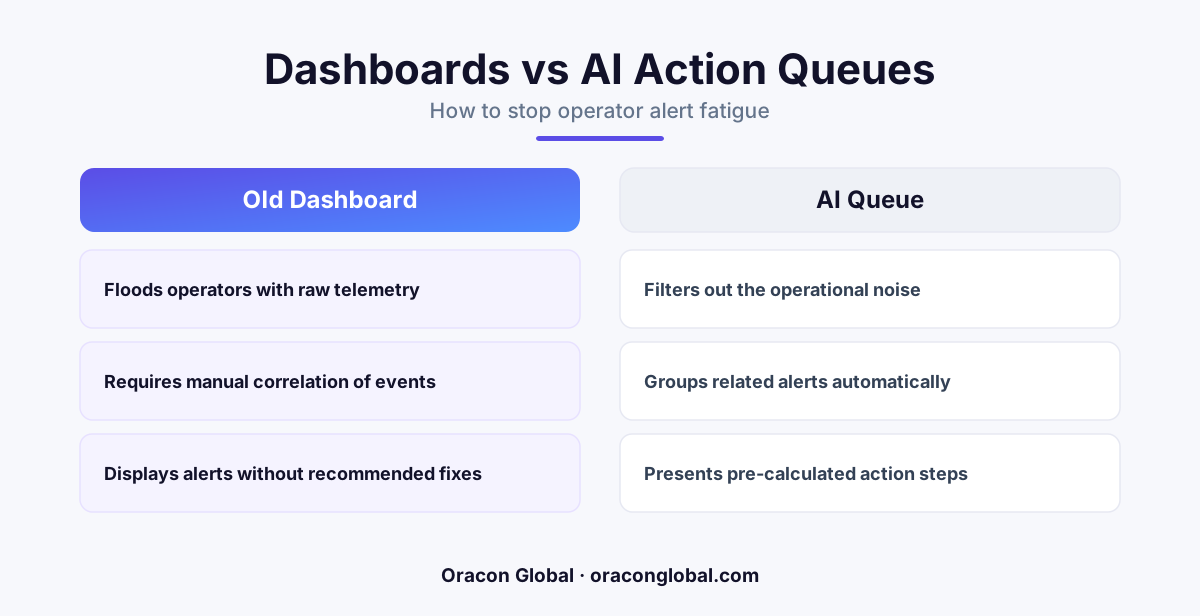
Modern operations suffer from data overload, where dashboards show hundreds of alerts but offer no context or path to resolution. Transitioning to an AI action queue changes the paradigm by grouping telemetry into single, actionable events with pre-packaged resolution steps ready for human approval.
Walk onto any modern operations floor, and you will see the same sight: walls covered in glowing screens, complex graphs, and flashing red status widgets. These systems were built on a simple premise: more visibility leads to better decisions. If your team can see everything, they can fix everything.
But that is not what happens. Instead, operators sit in front of these interfaces drowning in noise. They suffer from severe alert fatigue, a state of mental exhaustion where the sheer volume of warnings makes it nearly impossible to separate a critical business threat from routine system background noise. A traditional operations dashboard is designed to show data, not solve problems. It forces human operators to act as the integration layer, manually stitching together logs, database entries, and support tickets to figure out what is actually broken.
To scale your business operations without burning out your staff, you need to shift from passive observation to active triage. Your static screen of charts needs to become an intelligent AI action queue.
The Problem with the Glass-on-Wall Dashboard
Most enterprise software packages come with a visual portal. Whether it is an ERP system, a supply chain tracker, or a customer service portal, these tools excel at dumping raw data onto a screen. They flash red when a metric crosses a threshold, generating an alert.
This approach introduces three structural problems for your operations management team:
- Siloed Information: A shipping delay alert on one screen is rarely linked to a supplier inventory dip on another screen, even though they share the same root cause.
- Zero Context: An alert tells the operator what is happening (e.g., "Database Latency High") but never why it is happening or how to resolve it.
- Cognitive Friction: To handle a single alert, an operator must open multiple browser tabs, search legacy databases, verify customer records, and manually execute a series of routine clicks.
When everything is flagged as urgent, nothing is. Operators naturally develop coping mechanisms, which usually involve ignoring notifications, snoozing alerts, or performing hasty, unverified workarounds just to clear the screen.
What is an AI Action Queue?
An AI action queue is a paradigm shift in how business teams interact with software. Instead of displaying a wall of graphs and raw logs, the interface presents a clean, prioritized list of specific business tasks.
Behind the scenes, custom AI agents monitor your databases, APIs, and communication channels. When an anomaly occurs, the AI does not simply sound an alarm. It immediately begins the triage process. It gathers the historical context, queries relevant internal tools, checks corporate policy databases, and packages the entire event into a single, cohesive item in the queue.
For the human operator, the experience changes entirely. Instead of staring at a flashing red light and wondering what to do, they open a clean interface that says: "Vendor X missed their delivery window. We have located a backup supplier with identical inventory at the same contract rate. Click here to approve the re-route."
How the Transition Saves Operator Cognitive Load
Replacing passive monitoring with intelligent workflow automation fundamentally alters the day-to-day work of your operations team. The benefits span across several operational dimensions:
1. Noise Consolidation and Deduplication
If a network connection drops for five minutes, a legacy dashboard might generate 150 separate error alerts. An AI-driven queue recognizes that these alerts are symptoms of a single event. It suppresses the individual notifications, groups them under a single master ticket, and updates the status automatically when the connection restores.
2. Pre-calculated Resolution Paths
The primary driver of alert fatigue is not the alerts themselves; it is the research required to resolve them. An AI action queue does the heavy lifting before a human ever looks at the ticket. It executes the standard operating procedures (SOPs) in the background, drafting emails, preparing API payloads, and staging database updates.
3. Human-in-the-Loop Safeguards
Transitioning to AI does not mean handing over total control of your business decisions. The queue functions with a strict human-in-the-loop architecture. The AI acts as an elite chief of staff—doing the research, finding the solution, and presenting the paperwork—while the human operator retains the final veto and approval authority.
Designing the Queue: Action over Visualization
Building an actionable operational workspace requires a clean break from old UI habits. A high-performance queue should follow strict design principles focused on execution:
"The goal of a modern operational interface is to get the user out of the software as quickly as possible. Every click, scroll, and tab-switch is a design failure."
When we design custom software and AI integrations at Oracon Global, we focus on three core UI requirements to ensure systems are truly action-oriented:
- The Single Screen Rule: All context required to make a decision on an issue must be visible within a single, scroll-free viewport. The operator must never have to copy and paste a serial number or transaction ID into another tool to verify data.
- Binary Outcomes: Every item in the queue should lead to a clear action. Usually, this is a choice between "Approve Resolution," "Reject and Re-route," or "Escalate to Manual Review."
- Audit Trails by Default: When an operator clicks approve, the system must log exactly what the AI recommended, who approved it, and what systems were updated, keeping your operational records perfectly clean and compliant.
Moving from Passive to Active Operations
If your operations team spends their mornings clicking through dashboards, searching for errors, and manually copy-pasting data between legacy systems, they are wasting precious cognitive capacity. They are acting as highly paid, easily fatigued routers of data.
By upgrading your monitoring architecture to an AI action queue, you free your staff to focus on complex exceptions, strategy, and actual customer relationships. You transform your operational hub from a chaotic room of flashing alarms into a quiet, highly efficient engine of execution.
At Oracon Global, our senior in-house team specializes in building custom AI agents, workflow automation systems, and custom web and mobile apps that integrate deeply with your existing enterprise databases and ERPs. We build systems where you own 100% of the code and intellectual property.
Ready to turn your noisy dashboard into an intelligent, high-throughput action queue? Get in touch with Oracon Global today to discuss how we can streamline your business workflows.
Frequently asked questions
What is the main difference between an operations dashboard and an AI action queue?
A traditional dashboard displays raw metrics, logs, and isolated alerts that humans must manually investigate. An AI action queue groups related alerts, diagnoses the root cause, and presents a single, human-approvable resolution step.
How does an AI action queue reduce alert fatigue?
By consolidating hundreds of noisy, repetitive alerts into a handful of contextual tasks, operations teams only interact with anomalies that require actual human judgment or verification.
Does an AI action queue require replacing our existing enterprise software?
No. It functions as an intelligent orchestration and triage layer that sits on top of your existing databases, ERPs, and monitoring tools, translating raw data into structured tasks.
How much control do operators keep in this setup?
Operators retain full control. The system is built with human-in-the-loop approval gates, meaning the AI handles the data collection and draft resolution, but a human must click approve to execute the fix.
Read next
Beyond Chatbots: How to Build AI Agents That Actually Do Work for Your Business
Most businesses use AI to answer questions. Here is how to build custom AI agents that actually take action, connect to your internal tools, and handle complex workflows.
Beyond the Wrapper: How to Build Custom AI Agents for Business That Actually Work
Many businesses invest in basic AI wrappers only to find they lack the security and context needed for real work. Here is how to build custom AI agents that integrate deeply with your workflows and databases.
Enterprise AI Maintenance Costs: Budgeting for Year Two and Beyond
Building an AI system is only half the battle. Discover the practical, ongoing operational costs of enterprise AI, including token management, model drift, and continuous security audits.
Oracon Global builds production-grade AI agents, automation and apps — and you own the code and IP. Tell us what you want to automate.
Book a call →See our work